Download Android Apps and Games
AppBrain
  • Apps
  • Apps being viewed right now Trending apps today Most popular apps All-time most downloaded apps Top rated apps
  • Intelligence ▾
    Intelligence overview → Track any Android app or your whole market
    Track & analyze
    Keyword Tracker & OptimizerTrack & improve Play rankings App Performance ReportOne-off PDF for any app StatisticsFree Android & Play market stats
    Promote your app
    Featured Apps App Links
  • Intelligence
  • Pricing
  • Dashboard
  • Sign up
  • Log in
Last updated on: 2026-07-22
App Store Apps > Music > Grid Music Midi Player
Grid Music Midi Player icon

Grid Music Midi Player

1.3.25
Mohit Khanna
0.00
0 reviews
$1.99

Grid Music Midi Player Screenshot 1 of 5
Grid Music Midi Player Screenshot 2 of 5
Grid Music Midi Player Screenshot 3 of 5
Grid Music Midi Player Screenshot 4 of 5
Grid Music Midi Player Screenshot 5 of 5
Download from the App Store

About Grid Music Midi Player

Grid Music Midi Player is an overall app developed by Mohit Khanna.

Download Statistics

User Ratings

The app has no ratings yet.

App Information

Grid Music Midi Player costs $1.99 to download. The APK download size is 51.10 MB. The latest version available is 1.3.25. The last update was on June 23, 2026.

Technical Requirements

The app has a content rating of Everyone. The app has been available on Google Play July 2024.

Description
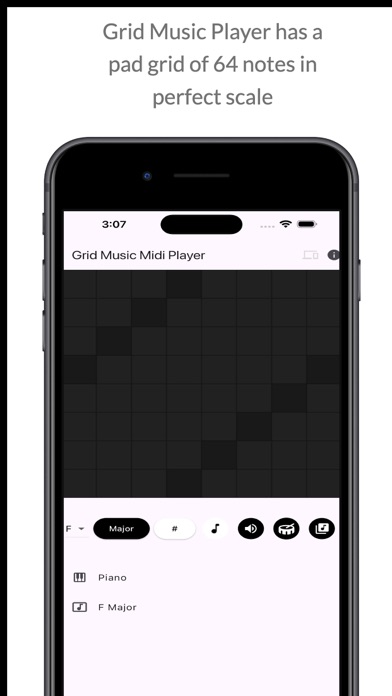
Grid Music Midi Player is an instrument playing app for mobile devices. This app allows users to pick an instrument from a list, and play the instrument on 64 pads grid layout. The app also allows users to select Scale, Key Notes, Sharps (#) and an option to display the Note pressed on the device screen.

Grid Midi Controller is a midi controller that triggers or toggles midi controls that you map with your DAW. This controller has been tested with Ableton Live, and is useful for controller midi mapped triggers on your DAW. You can save a controller, set default controllers, and even import and export previously saved controllers. In the edit mode, you can increase rows and columns of the midi control pads, change column colours, and set pad to toggle/trigger. The save feature is available only when you are in edit mode.

Scale Finder is an app to find scales with the toggled keys.

Features:
Grid Music Midi Player
* Play Piano as the default instrument
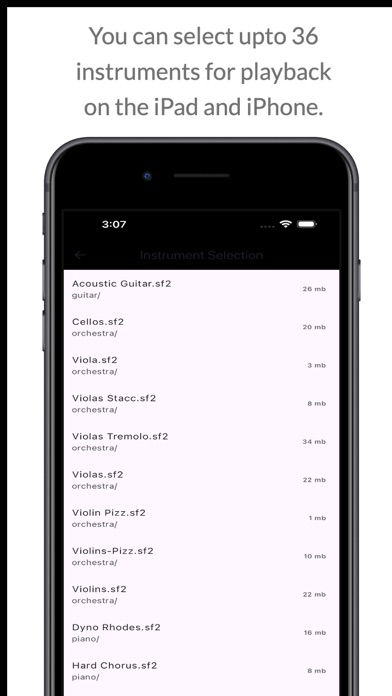
* Play from a list of 36+ instruments (internet required)
* Select Scale to play
* Select between Major / Minor Key Patterns
* Toggle Sharp for the Scale
* Toggle display for Note being played
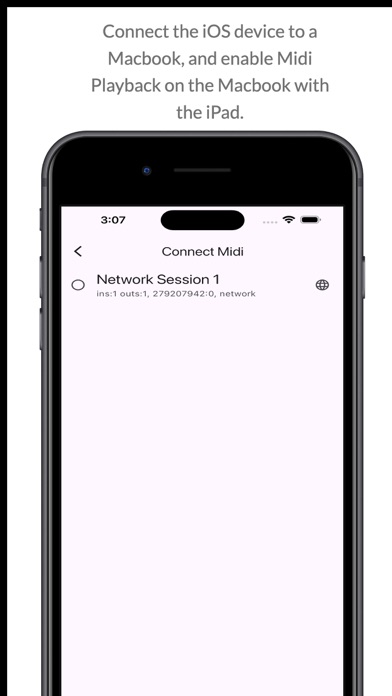
* Connect to laptop with DAW and play any DAW instrument
* LongPress the Speaker icon to stop sound playback
* Toggle midi or SoundFont playback with Speaker icon

Midi Controler:
* Create multiple controllers
* Toggle/Trigger midi controls
* Export/Import/Edit saved Controllers
* LongPress to set controller to Default in the Saved Controller List
* LongPress Default to set the default controller to factory default
* Change columns colours by clicking on column button in Edit Mode
* Add/Remove Rows and Columns in Edit mode
* Set a pad to Toggle/Trigger by pressing on the pad and the on the toggle/trigger in edit mode

Scale Finder:
* Press more than 1 key to list all the scales with that key
* Toggle keys on or off

New Features (Added 2025)
* Midi Controller App
* Save, delete sliding options on Instrument Loading Screen
* Set to Default option by Long Pressing in Instrument List or Controller List
* LongPress Speaker icon to stop audio playback
* Toggle speaker icon for midi and soundfont playback

New Features (added 2024)
* Connect the player to your DAW (tested with Ableton)
* Play Midi Notes on your DAW
* Turn on/off Player volume for DAW playback
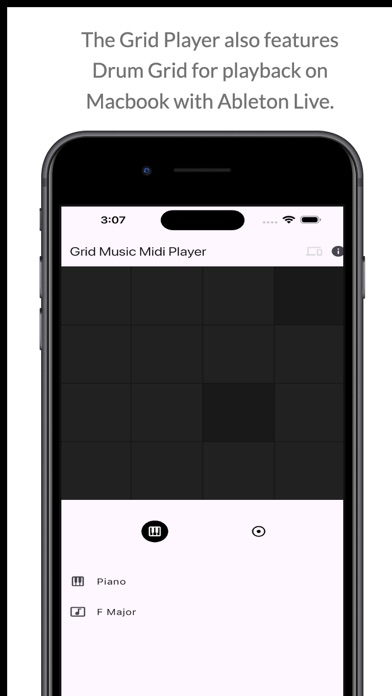
* Separate Grid (4x4 ) for Drum Playback.
* Changeable 2x and 4x Drum Playback.
* How to use: Click on the Devices icon on the App bar and connect your DAW. Then start playing while you're connected to your DAW.
* Ableton Setup Tutorial: https://help.ableton.com/hc/en-us/articles/209071169-Setting-up-a-virtual-MIDI-network
Update:
* By default, the ads will not be clickable. You'll have to click on the "INFO" icon on the top right to enable ads. Long Press the Icon to enable the Advertisements.
* The Key note pads can be enabled/disabled by the Key Icon on the info panel that displays the Key of the note being played.
Show more Show less

More data about Grid Music Midi Player

Price $1.99
Rating No ratings
Ranking Not ranked
Version 1.3.25
App download size 51.1 MB
Suitable for Everyone

More from Mohit Khanna

Grid Music Player icon Grid Music Player
Mohit Khanna
4.2
$9.99
5 ratings
Text without Addressbook icon Text without Addressbook
Mohit Khanna
4.0
Free
3 ratings
Directory Viewer icon Directory Viewer
Mohit Khanna
5.0
Free
2 ratings
Playlist Extractor icon Playlist Extractor
Mohit Khanna
1.0
Free
1 ratings
Cloud Text Clipboard icon Cloud Text Clipboard
Mohit Khanna
0.0
Free
Canadian RNIP Reference icon Canadian RNIP Reference
Mohit Khanna
0.0
Free
Travel Nest - Tourist Apps icon Travel Nest - Tourist Apps
Mohit Khanna
0.0
Free
Canadian Designated Colleges icon Canadian Designated Colleges
Mohit Khanna
0.0
Free

Changelog of Grid Music Midi Player

No changelog data

Developer information for Mohit Khanna

Mohit Khanna

Address:

Share Grid Music Midi Player

Comments on Grid Music Midi Player for iOS

We don't have enough comments to show example comments. Please check back later.

App Store Rankings for Grid Music Midi Player

This app is not ranked

Technologies used by Grid Music Midi Player

Apps other people are watching Popular Overall Today's trending apps Apps on sale Top new apps
More hot apps 🔥

Back to top
AppBrain Intelligence premium content

Subscribe now to get full and unlimited access to AppBrain Intelligence. You'll have access to:

  • App Intelligence dashboard (performance timeline, competitor comparison, country rankings, insight cards)
  • Detailed ranking data per app
  • Full timeline per developer
  • Device market shares data per country
  • Unlimited keyword tracking
1 Month

$75/mo
(billed every month)

SAVE 0%
Subscribe
3 Months

$65/mo
($195 billed every 3 months)

SAVE 13%
Subscribe
1 Year

$57.50/mo
($690 billed every year)

SAVE 23%
Subscribe
Each subscription will automatically renew 3 days before the expiration date for the same time period. Subscriptions can be cancelled at any time before the renewal.

AppBrain is a directory focused on discovering great apps and games. We give statistics, rankings and search options that Google Play and the App Store don't have. All trademarks are owned by their respective owners. AppBrain doesn't offer APKs or binaries, and always lets users install the official version from Google Play or the App Store.

More apps

  • Top Android apps being viewed
  • RayVeo - AI Photo & Video stats
  • Real War: Not Fake for Android
  • View Tobicam

Android Statistics

  • Android statistics
  • Google Play Developer stats
  • Trending Android Apps
  • Top popular Apps
  • Buy the best Android phone

About AppBrain

  • Contact
  • Privacy
  • Documentation
  • DMCA takedowns
  • Articles
  • Blog
  • Tips to improve your Android promotional campaign
© 2010-2026 - AppBrain