

Helium AUv3 MIDI Sequencer
Helium AUv3 MIDI Sequencer is made and published by 4Pockets.com. AppBrain is an independent app data site and isn't affiliated with 4Pockets.com. The app name, icon, screenshots and description belong to 4Pockets.com and are shown as published on the App Store.
AppBrain's verdict
Established- Rating on App Store
- 4.33
- 55 ratings
- Last updated
- November 30, 2025
It doesn't have enough ratings yet to judge what users think.
Rankings
App Store top chartsApp Store Rankings for Helium AUv3 MIDI Sequencer
Competitors
Similar apps and more from 4Pockets.comAlternatives to Helium AUv3 MIDI Sequencer








More from 4Pockets.com





Releases
Updates seen on the App Store- Version
- 1.58
- Launched
- April 2021
No changelog data
User feedback
Ratings and reviews on the App StoreComments on Helium AUv3 MIDI Sequencer for iOS
We don't have enough comments to show example comments. Please check back later.
Technology
Found in the app by AppBrain- Price
- $7.99
- App size
- 84.2 MB
- Content rating
- Everyone
Technologies used by Helium AUv3 MIDI Sequencer
About the app and developer
About Helium AUv3 MIDI Sequencer
Helium AUv3 MIDI Sequencer is a music app developed by 4Pockets.com.
What is the rating of Helium AUv3 MIDI Sequencer?
Helium AUv3 MIDI Sequencer is rated 4.33 out of 5 stars, based on 55 ratings.
Is Helium AUv3 MIDI Sequencer free?
Helium AUv3 MIDI Sequencer costs $7.99. The app size is 84.24 MB. The latest version available is 1.58. The last update was on November 30, 2025.
What are the requirements for Helium AUv3 MIDI Sequencer?
The app has a content rating of Everyone. The app has been available on the App Store since April 2021.
Developer information for 4Pockets.com
Address:
Store listing
By 4Pockets.com, from the App Store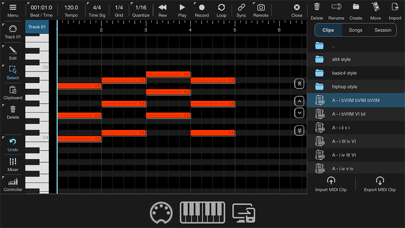
Description by 4Pockets.com Written by the developer, not by AppBrain. Click to read.
One of the great features is the ability to import and maintain libraries of MIDI clips using Helium's 'Media Bay'. These clips are freely available all over the internet and may contain individual chord sets, chord progressions or drum tracks. You can quickly build a song by dragging and dropping your MIDI clips from the media bay onto your timeline. You can also save your own clips directly to the media bay to create your own personal MIDI clips libraries. Long press on a clip to preview its contents using the currently selected MIDI device.
Helium now ships with a library of over 7000 MIDI clips, consisting of every chord and chord progression you could ever need.
Helium allows many different ways to import additional MIDI clip libraries. Simply drag and drop your ZIP collections directly to your PC/MAC web browser and they are automatically unpacked into the clips library folder. You can also drag and drop files between the Media Bay and the iOS Files app.
Helium supports a sync mode called 'Remote Looping'. This was something we recently introduced into our MultiTrack Recorder plugin and is very useful for breaking down the timeline into sections. You can define up to 12 loops which can be used to specify the locations of say the intro, verse, chorus, and outro within your song, then trigger these loops seemlessly in sync with the host tempo. Once captured, these loops can then be triggered by incoming MIDI notes.
A new addition to Helium is the ability to piece together loops into songs, so you just concentrate on creating a single verse, chorus, bridge etc. and piece everything together without the headache of having to re-arrange your timeline.
Features
○ 16 Tracks per instance.
○ Includes a library of over 7000 MIDI clips.
○ Assignable MIDI channel and Bus per track.
○ Full editing of CC controllers using the controller lane.
○ Independent vertical and horizontal zooming.
○ Import & Export MIDI tracks.
○ Media Bay, organize your MIDI flips libraries.
○ Clip Preview from Media Bay
○ Drag and Drop from the Media Bay directly to the timeline.
○ Drag and Drop to Files App.
○ Remote Control with Looping advanced functionality.
○ Step Recording.
○ Build in Mixer to adjust relative track levels with Mute/Solo.
○ Sync to Host.
○ Up to 16 outputs (configurable).
○ MIDI Clip Preview
○ Ghost Note Feature
○ Multi level undo and redo.
○ Song Mode
○ Multi-Take Record
Please checkout the help manual for details on where to find my tutorial videos on Helium and where to download some fully featured and free MIDI clip libraries.
This is not recommended to use on small iPhone screen sizes such as the SE models. You can adjust the screen scaling to suite your iPhone model by long pressing the MENU button and changing the scale.