HexHive Launcher is made and published by
忠 张.
AppBrain is an independent app data site and isn't affiliated with 忠 张.
The app name, icon, screenshots and description belong to 忠 张 and are shown as
published on the App Store.
About HexHive Launcher
HexHive Launcher is a productivity app developed by 忠 张.
User Ratings
The app has no ratings yet.
App Information
HexHive Launcher is freely available from the App Store. The app size is 16.23 MB. The latest version available is 1.0. The last update was on September 20, 2026.
Technical Requirements
The app has a content rating of Everyone. The app has been available on the App Store since September 2026.
Description by 忠 张(from the App Store)
Honeycomb Launcher is an innovative iOS quick-launch tool that redefines "one-tap launch" with its unique honeycomb gesture.
No more searching through screens full of icons, no more swiping between pages. Press the honeycomb center, slide to your target, and release to launch — one fluid motion, faster than you can imagine.
【KEY FEATURES】
■ Honeycomb Gesture Launch Press the center slot to reveal six surrounding slots, slide to the target slot and release to execute. 3 honeycomb groups with 21 launch slots in total — your most-used actions are always one touch away.
■ Four Launch Panels Default / Home / Work / Commute — 12 launch slots per panel. Freely organize by scenario, everything in its place.
■ Smart Time & Location Switching Panels can be linked to time rules and geofences. The work panel appears automatically when you arrive at the office, and the home panel takes over when you're back. The right panel, at the right time, in the right place.
■ Rich Launch Types Supports system apps, third-party apps, Shortcuts, and custom URL Schemes — make calls, scan QR codes, open websites, run Shortcuts, all with one tap.
■ Deep Shortcuts Integration Automatically detects Shortcut icons and names for effortless setup, and runs your carefully crafted automation workflows directly.
■ Custom Icons Freely combine SF Symbols with text, adjust icon color and background color as you like, to create launch slots that are uniquely yours.
■ Six Curated Presets Built-in templates for six user types (productivity pros, home living, navigation, and more). Ready to use out of the box, or fully customizable on top of that.
■ Centralized Honeycomb Management Manage all honeycombs on a single screen. Long-press and drag to freely move and reorder across groups — efficient and intuitive organization.
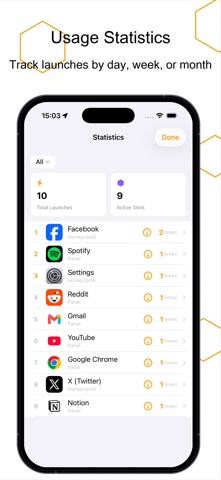
■ Usage Statistics View launch counts by day / week / month. Understand your usage patterns and see which features you use most at a glance.
■ Usage Limits & Reminders Set daily caps for any launch slot, with smart reminders when the limit is reached. Helps you control how often you use certain apps, so you can spend time on what matters more.
【WHY HONEYCOMB LAUNCHER】
• Original honeycomb gesture — launch speed far exceeds traditional icon tapping • Smart panels auto-switch by time and location — scenario-based management, well organized • Pure native development, no third-party libraries — fast launch, small size, more stable • 100+ built-in app presets, ready to use out of the box
Make every launch, one step ahead.
Terms of Use: https://www.apple.com/legal/internet-services/itunes/dev/stdeula/
Each subscription will automatically renew 3 days before the expiration date for
the same time period. Subscriptions can be cancelled at any time before the renewal.