

HiPaint- Sketch & Paint
HiPaint- Sketch & Paint is made and published by 艾戈科技(武汉)有限公司. AppBrain is an independent app data site and isn't affiliated with 艾戈科技(武汉)有限公司. The app name, icon, screenshots and description belong to 艾戈科技(武汉)有限公司 and are shown as published on the App Store.
AppBrain's verdict
Loved by users- Rating on App Store
- 4.59
- 3,075 ratings
- Last updated
- September 15, 2026
- Size
- 196.2 MB
Users love it: 4.6 stars from 3,075 ratings.
User feedback
Ratings and reviews on the App StoreComments on HiPaint- Sketch & Paint for iOS
We don't have enough comments to show example comments. Please check back later.
Store listing
By 艾戈科技(武汉)有限公司, from the App Store



Description by 艾戈科技(武汉)有限公司 Written by the developer, not by AppBrain. Click to read.
「Highlights」
· Minimal and intuitive interface to allows you to focus on the digital drawing itself.
· A powerful tool set for drawing and image editing complete your own artworkout.
· Quick operations and gesture controls make your creation process more convenient.
· Import and export custom brushes and brush sets
· Supports multiple color modes including RGB, HSV, and CMYK.
· Custom Themes & DIY canvas: Drag-and-drop tool icons for a customizable canvas interface.
「Brushes Features」
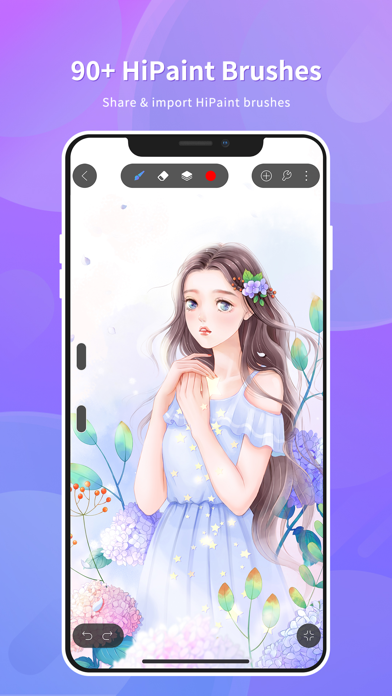
· Over 100 kinds of brushes including pencils, markers, airbrushes, smudges, fill brushes, oil brushes, charcoal brushes, crayons, etc.
· Brush Studio - with over 90 customizable settings, design your own custom brushesx
· Import and export custom brushes
· Brush supports full pressure and tilt support controls.
「Layer Features」
·Rasterize, Duplicate and Merge layers
·28 layer blend modes for industry-grade compositing
· Supports creating layer groups and renaming layers to facilitate creation and management.
「 Professional painting tools/image editing tools」
· Vector tool
· Liquify tool
· Clipping mask features
· Selection tool: Precisely select the editing area
· Shape Tools: Insert Shapes and Shape Transformation Functions
· Gradient tool with Linear and Radial options
· Symmetry tool: Create symmetrical effects such as mirrors or kaleidoscopes.
· Gaussian and Motion Blur filters for depth and movement.
· Add text and import fonts to the artwork
· More tools you need!
「Accessibility features」
· Advanced stroke stabilization
· Painting process playback function
· Add reference images and copy for practice
· Perspective, Isometric, 2D, and Symmetry visual guides
· Line art coloring assistance function
· Powerful image adjustments including Color Balance, Curves, HSB, and Gradient Map
「Animation Assist」
· Easy frame-by-frame animation with customizable onion skinning
· Create storyboards, GIFs, animatics, and simple animations
· Export your animations in the full resolution of your canvas
「 Save, export, and share」
· Share/export drawings as JPG, PNG, PSD, HSD
.Play back your paintings and reproduce your creative process in MP4 format, support export and sharing.
Use HiPaint just paint it! draw! Hope you'll like this digital painting and sketching app. Now let's try HiPaint to start your digital painting journey~
Safety and technology
Found in the app by AppBrain- Price
- Free
- App size
- 196.2 MB
- Content rating
- High
Technologies used by HiPaint- Sketch & Paint
Releases
Updates seen on the App Store- Version
- 6.1.11
- Launched
- January 2023
No changelog data
Alternatives
Similar apps and more from 艾戈科技(武汉)有限公司Alternatives to HiPaint- Sketch & Paint


More from 艾戈科技(武汉)有限公司

Rankings
App Store top chartsApp Store Rankings for HiPaint- Sketch & Paint
About the app and developer
About HiPaint- Sketch & Paint
HiPaint- Sketch & Paint is a graphics & design app developed by 艾戈科技(武汉)有限公司.
What is the rating of HiPaint- Sketch & Paint?
HiPaint- Sketch & Paint is rated 4.59 out of 5 stars, based on 3.1 thousand ratings.
Is HiPaint- Sketch & Paint free?
HiPaint- Sketch & Paint is free. The app size is 196.18 MB. The latest version available is 6.1.11. The last update was on September 15, 2026.
What are the requirements for HiPaint- Sketch & Paint?
The app has a content rating of High Maturity. The app has been available on the App Store since January 2023.
Developer information for 艾戈科技(武汉)有限公司
Address:
Frequently asked questions about HiPaint- Sketch & Paint
Is HiPaint- Sketch & Paint free?
Yes. HiPaint- Sketch & Paint is free on the App Store.
Is HiPaint- Sketch & Paint still available?
Yes. HiPaint- Sketch & Paint is on the App Store, and the last update we saw was on September 15, 2026.
How large is HiPaint- Sketch & Paint?
HiPaint- Sketch & Paint is 196.18 MB.
Is HiPaint- Sketch & Paint suitable for children?
App Store gives HiPaint- Sketch & Paint a high maturity rating. It is meant for adults.
How do people rate HiPaint- Sketch & Paint?
HiPaint- Sketch & Paint scores 4.59 out of 5 stars, from 3,075 ratings on the App Store.
Who made HiPaint- Sketch & Paint?
HiPaint- Sketch & Paint was developed by 艾戈科技(武汉)有限公司. It is listed in the graphics & design category on the App Store.
What are the best alternatives to HiPaint- Sketch & Paint?
People looking at HiPaint- Sketch & Paint also look at these graphics & design apps: Artstudio Pro: Draw, Paint, Sketch Pro: Draw & Create Art, Clip Studio Paint for iPhone, Mental Canvas Draw, Callipeg: 2D Animation App.