

HoldOn: Screen Time Nudge
HoldOn: Screen Time Nudge is made and published by Pardhasaradhi Tirumalasetti. AppBrain is an independent app data site and isn't affiliated with Pardhasaradhi Tirumalasetti. The app name, icon, screenshots and description belong to Pardhasaradhi Tirumalasetti and are shown as published on the App Store.
AppBrain's verdict
- Rating on App Store
- 5.00
- 1 ratings
- Last updated
- October 1, 2026
It doesn't have enough ratings yet to judge what users think.
Rankings
App Store top chartsApp Store Rankings for HoldOn: Screen Time Nudge
Competitors
Similar apps and more from Pardhasaradhi TirumalasettiAlternatives to HoldOn: Screen Time Nudge


Releases
Updates seen on the App Store- Version
- 1.0.1
- Launched
- August 2026
No changelog data
User feedback
Ratings and reviews on the App StoreComments on HoldOn: Screen Time Nudge for iOS
We don't have enough comments to show example comments. Please check back later.
Technology
Found in the app by AppBrain- Price
- Free
- App size
- 12.3 MB
- Content rating
- Everyone
Technologies used by HoldOn: Screen Time Nudge
About the app and developer
About HoldOn: Screen Time Nudge
HoldOn: Screen Time Nudge is a productivity app developed by Pardhasaradhi Tirumalasetti.
What is the rating of HoldOn: Screen Time Nudge?
HoldOn: Screen Time Nudge is rated 5.00 out of 5 stars, based on one rating ratings.
Is HoldOn: Screen Time Nudge free?
HoldOn: Screen Time Nudge is free. The app size is 12.33 MB. The latest version available is 1.0.1. The last update was on October 1, 2026.
What are the requirements for HoldOn: Screen Time Nudge?
The app has a content rating of Everyone. The app has been available on the App Store since August 2026.
Developer information for Pardhasaradhi Tirumalasetti
Address:
Frequently asked questions about HoldOn: Screen Time Nudge
Is HoldOn: Screen Time Nudge free?
Yes. HoldOn: Screen Time Nudge is free on the App Store.
Is HoldOn: Screen Time Nudge still available?
Yes. HoldOn: Screen Time Nudge is on the App Store, and the last update we saw was on October 1, 2026.
How large is HoldOn: Screen Time Nudge?
HoldOn: Screen Time Nudge is 12.33 MB.
Is HoldOn: Screen Time Nudge suitable for children?
App Store rates the content of HoldOn: Screen Time Nudge as suitable for everyone.
How do people rate HoldOn: Screen Time Nudge?
HoldOn: Screen Time Nudge has one rating of 5.00 stars on the App Store.
Who made HoldOn: Screen Time Nudge?
HoldOn: Screen Time Nudge was developed by Pardhasaradhi Tirumalasetti. It is listed in the productivity category on the App Store.
What are the best alternatives to HoldOn: Screen Time Nudge?
People looking at HoldOn: Screen Time Nudge also look at these productivity apps: Kept: Private Link Library, Flex 40, IEPDesk: IEP & 504 Tracker, Welligama: Breathe to Scroll, Monk Zone: Stop Brainrot.
Store listing
By Pardhasaradhi Tirumalasetti, from the App Store


Description by Pardhasaradhi Tirumalasetti Written by the developer, not by AppBrain. Click to read.
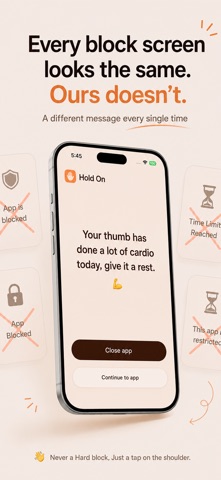
So Hold On doesn't ask for willpower. Every time you open Instagram,
YouTube, TikTok, or Snapchat, Hold On steps in with a nudge - a different nudge based on the moment
Most screen time apps show you the same block screen so often you stop
reading it after day three.
Hold On has 500+ nudges that rotate so it never gets old, and never gets ignored.
HOW IT WORKS
Open a distracting app → Hold On shows up first, always.
Read the nudge (funny, sharp, sometimes a little mean, never preachy).
Decide: close the app, or continue in.
Keep scrolling? Hold On comes back — every 5 minutes or so, not just once.
So you are never left to Doomscroll
FIND YOUR SCROLL TYPE
After a week of app usage we find out your scroll type — The Night Owl, The Weekend
Goblin, The Alarm Clock, and more.
Share it with friends
YOUR WEEKLY REPORT
See exactly how much time went to which apps, how many times you opened
them, and how many times you actually resisted. No shame, just the numbers.
GOING SOMEWHERE?
Pause nudges for a day, a weekend, or however long you need. So you dont need to uninstall the app all together, just Pause the nudges
FREE VS PRO
- Free: track and get nudged on 1 app.
- Pro: unlimited apps, full nudge variety, full weekly reports.
Hold On doesn't lock your phone or set a timer counting down to a fight
with yourself. It just makes sure you never open distracting apps on autopilot
again.
Terms of Use (EULA): https://www.apple.com/legal/internet-services/itunes/dev/stdeula/
Terms of Use: https://hold-on-web.vercel.app/terms
Privacy Policy: https://hold-on-web.vercel.app/privacy