

HoleCopy: Drill Template & Jig
HoleCopy: Drill Template & Jig is made and published by Netflowers Inc. AppBrain is an independent app data site and isn't affiliated with Netflowers Inc. The app name, icon, screenshots and description belong to Netflowers Inc. and are shown as published on the App Store.
AppBrain's verdict
- Last updated
- October 12, 2026
Rankings
App Store top chartsApp Store Rankings for HoleCopy: Drill Template & Jig
Competitors
Similar apps and more from Netflowers Inc.Alternatives to HoleCopy: Drill Template & Jig


More from Netflowers Inc.


Releases
Updates seen on the App Store- Version
- 1.2
- Launched
- August 2026
No changelog data
User feedback
Ratings and reviews on the App StoreComments on HoleCopy: Drill Template & Jig for iOS
We don't have enough comments to show example comments. Please check back later.
Technology
Found in the app by AppBrain- Price
- $1.99
- App size
- 2.24 MB
- Content rating
- Everyone
Technologies used by HoleCopy: Drill Template & Jig
About the app and developer
About HoleCopy: Drill Template & Jig
HoleCopy: Drill Template & Jig is an utilities app developed by Netflowers Inc.
What is the rating of HoleCopy: Drill Template & Jig?
HoleCopy: Drill Template & Jig has no ratings yet.
Is HoleCopy: Drill Template & Jig free?
HoleCopy: Drill Template & Jig costs $1.99. The app size is 2.24 MB. The latest version available is 1.2. The last update was on October 12, 2026.
What are the requirements for HoleCopy: Drill Template & Jig?
The app has a content rating of Everyone. The app has been available on the App Store since August 2026.
Developer information for Netflowers Inc.
Address:
Store listing
By Netflowers Inc., from the App Store






Description by Netflowers Inc. Written by the developer, not by AppBrain. Click to read.
HOW IT WORKS
1. Print the A4 or US Letter reference sheet at 100%
2. Lay the old part on the sheet and take one photo
3. HoleCopy squares up the perspective and detects round through-holes
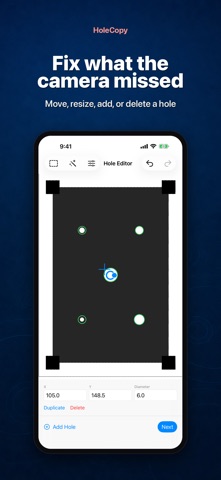
4. Check the result on screen: move a center, resize a hole, add one the camera missed, delete one it invented
5. Export a true 1:1 PDF or SVG, tape it to the new material and drill
WHAT YOU CAN DO BEFORE EXPORTING
Photographing the part, perspective correction, hole detection, editing and the output preview all work with any part you try. You can see whether HoleCopy reads your part correctly before you export anything.
WHAT UNLOCKING EXPORT ADDS
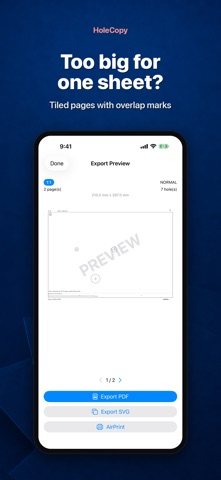
Saving, sharing and AirPrinting the actual-size PDF or SVG, as often as you like. That includes patterns larger than one sheet, split across pages with overlap marks and alignment crosses, ready to tape together.
BUILT FOR THE WORKSHOP
- Mirror the template for the back side of a part
- SVG export for vector programs
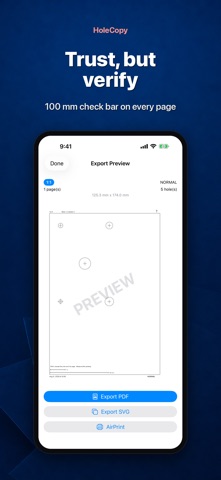
- A 100 mm and 1 inch check bar on every page, so you can confirm your printer did not scale it
- Everything is processed on your device; photos never leave it
WHO IT IS FOR
Furniture repair, woodworking and metalwork DIY: brackets, hinges, handles, table legs, speaker cabinets, control panels, car or motorcycle mounts, gasket and flange hole patterns.
BEFORE YOU DRILL
HoleCopy works with flat parts and round through-holes of 3 mm and larger, when the part and the reference sheet fit in one photo. It is a positioning aid, not a guarantee of precision: check that the printed bar measures exactly 100 mm and drill a small pilot hole first when it matters. Not intended for safety-critical parts.