

HomeBatteries for HomeKit
HomeBatteries for HomeKit is made and published by Adam Foot. AppBrain is an independent app data site and isn't affiliated with Adam Foot. The app name, icon, screenshots and description belong to Adam Foot and are shown as published on the App Store.
AppBrain's verdict
Loved by users- Rating on App Store
- 4.65
- 270 ratings
- Last updated
- October 12, 2026
Users love it: 4.6 stars from 270 ratings.
Rankings
App Store top chartsApp Store Rankings for HomeBatteries for HomeKit
Competitors
Similar apps and more from Adam FootAlternatives to HomeBatteries for HomeKit




More from Adam Foot


Releases
Updates seen on the App Store- Version
- 4.1.1
- Launched
- July 2023
No changelog data
User feedback
Ratings and reviews on the App StoreComments on HomeBatteries for HomeKit for iOS
We don't have enough comments to show example comments. Please check back later.
Technology
Found in the app by AppBrain- Price
- Free
- App size
- 52.5 MB
- Content rating
- Everyone
Technologies used by HomeBatteries for HomeKit
About the app and developer
About HomeBatteries for HomeKit
HomeBatteries for HomeKit is a lifestyle app developed by Adam Foot.
User Ratings
HomeBatteries for HomeKit is rated 4.65 out of 5 stars. The rating is based on 270 ratings.
App Information
HomeBatteries for HomeKit is freely available from the App Store. The app size is 52.53 MB. The latest version available is 4.1.1. The last update was on October 12, 2026.
Technical Requirements
The app has a content rating of Everyone. The app has been available on the App Store since July 2023.
Developer information for Adam Foot
Address:
Store listing
By Adam Foot, from the App Store




Description by Adam Foot Written by the developer, not by AppBrain. Click to read.
* As featured on HomeKit Insider, Shane Whatley & 9to5Mac *
If you have ever found yourself in the situation where a battery powered HomeKit accessory has stopped working, then HomeBatteries can prevent it from happening again. HomeBatteries enables you to view all of your Apple Home device battery levels in one place and get notified before they run out of power.
HomeBatteries contains these great features:
BATTERY STATUS
View each accessoryʼs battery level as a percentage alongside a glyph which gets highlighted if it is running low. Selecting an accessory will let you see even more details about the device including charge status, trends and more.
NOTIFICATIONS
Get notified before an accessory runs out of battery with support for notifications. Notifications are fully customizable from the Settings screen.
BATTERY TRENDS
View a history of your accessory battery levels and see when it was last charged/replaced so you can determine how long a battery lasts.
WIDGETS
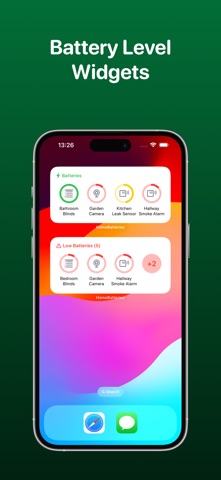
Add the Low Batteries & Batteries widgets to see the status of your accessories on your Home or Lock Screen.
SHORTCUTS
With deep support for Siri Shortcuts, you’ll be able to access and control many features of the app. Use your device, or even HomePod, to get battery levels, last charge date and see which accessories are running low.
APPLE WATCH
View all of your batteries at a glance with the companion Apple Watch app.
BATTERY TYPES
Set the battery type for each accessory from a preset list of options or choose your own so you know what you need when it comes to charging/replacing them. Battery types are suggested using a local database and the power of Apple Intelligence.
THIRD PARTY SERVICES
HomeBatteries supports integrating with Philips Hue, SwitchBot and SOMA, using their APIs, to pair devices with Apple Home accessories. This means devices added to Apple Home, often via Matter, can now display their battery level in HomeBatteries.
ICLOUD SYNC
Trend data and settings for all of your accessories sync over iCloud so you can access them from your other Apple devices.
UNIVERSAL PURCHASE
Get this app across multiple Apple platforms with a single purchase. Your HomeBatteries+ subscription works across devices too.
If you like this app, I’d really appreciate it if you could take the time to leave a positive review! Having issues? Please get in touch:
Email: support@adamfoot.dev
Website: https://adamfoot.dev
Please note that devices should have already been setup in the Apple Home app to use this app. Not all battery powered devices expose their battery level to HomeKit and will therefore not appear in HomeBatteries or the Home app. Notifications & widgets may not be up-to-date 100% of the time due to limitations with accessing HomeKit in the background but there is a Shortcuts Automation that can be enabled to improve this. Some features may require a HomeBatteries+ subscription which can be purchased in the app. You can cancel at anytime.
Terms: https://adamfoot.dev/terms-of-use