

WristBoard - Watch Keyboard
WristBoard - Watch Keyboard is made and published by Adam Foot. AppBrain is an independent app data site and isn't affiliated with Adam Foot. The app name, icon, screenshots and description belong to Adam Foot and are shown as published on the App Store.
AppBrain's verdict
Established- Rating on App Store
- 3.24
- 357 ratings
- Last updated
- October 12, 2026
Users are divided: 3.2 stars from 357 ratings.
Rankings
App Store top chartsApp Store Rankings for WristBoard - Watch Keyboard
Competitors
Similar apps and more from Adam FootAlternatives to WristBoard - Watch Keyboard






More from Adam Foot


Releases
Updates seen on the App Store- Version
- 7.3.2
- Launched
- February 2019
No changelog data
User feedback
Ratings and reviews on the App StoreComments on WristBoard - Watch Keyboard for iOS
We don't have enough comments to show example comments. Please check back later.
Technology
Found in the app by AppBrain- Price
- Free
- App size
- 28.7 MB
- Content rating
- Everyone
Technologies used by WristBoard - Watch Keyboard
About the app and developer
About WristBoard - Watch Keyboard
WristBoard - Watch Keyboard is a productivity app developed by Adam Foot.
User Ratings
WristBoard - Watch Keyboard is rated 3.24 out of 5 stars. The rating is based on 360 ratings.
App Information
WristBoard - Watch Keyboard is freely available from the App Store. The app size is 28.70 MB. The latest version available is 7.3.2. The last update was on October 12, 2026.
Technical Requirements
The app has a content rating of Everyone. The app has been available on the App Store since February 2019.
Developer information for Adam Foot
Address:
Store listing
By Adam Foot, from the App Store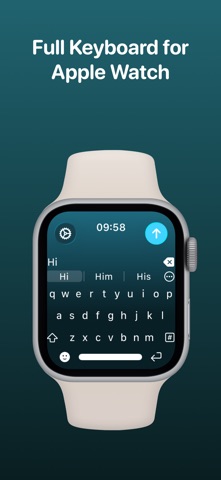


Description by Adam Foot Written by the developer, not by AppBrain. Click to read.
* As featured on the App Store, 9to5Mac, Cult of Mac, iMore, AppAdvice, TechRadar & iPhon.fr *
Typing messages on Apple Watch can be chore - Scribble doesn't always work and Dictation isn't great in public spaces. With WristBoard, you get a fully-fledged keyboard straight on your wrist, no awkward typos necessary!
By adding a full QWERTY, AZERTY or QWERTZ keyboard to your Apple Watch, you can reply to iMessages quickly and privately. Autocorrect and smart text predictions quickly ensures what you type is accurate and makes senses.
WristBoard contains these great features:
FULL KEYBOARD
Add a full QWERTY, AZERTY or QWERTZ keyboard to your Apple Watch.
Keys are easy to press and there’s support for key previews as you swipe along the keyboard.
SWIPE KEYBOARD
WristBoard was the first app to introduce swipe typing on Apple Watch and provides a more efficient way to type out messages on your wrist.
SENDING
WristBoard uses the built-in Apple Messages app on your Apple Watch to send messages to your contacts. Type out your message, tap the send button and you’ll be taken to the Messages app with your message ready to go! There's support for the Apple Mail app too so you can emails all from your wrist!
SUGGESTIONS
As you’re typing, you can complete words using the suggestions bar above the keys.
Tap on a suggestion to replace the current typed word with the full suggestion. Great for improving speed on the small screen!
Access all suggestions by tapping the ellipsis icon next to the first suggestions.
AUTOCORRECT
Whilst typing, if you make a mistake, WristBoard will automatically replace the incorrect word with one it thinks is correct.
OTHER CHARACTERS
WristBoard has full support for adding symbols, numbers and other special characters.
EMOJI
WristBoard supports adding an unlimited amount of emoji to a single message! Simply tap the emoji icon to get started and pick from Apple’s library, or one of your most recently used ones.
THEMES
Customise the look and feel of your keyboard with support for themes.
MESSAGE PREVIEW
Before sending your message, just tap the text field to view a full preview of your message.
HAPTICS
Choose to receive Haptic Feedback on actions like key presses and button actions.
COMPLICATION
For quick and easy access, you can add the WristBoard Complication to your Watch Face. Just tap and the keyboard will launch.
CURSOR
Whilst typing on the keyboard, you can see exactly where you are with the pulsing blue cursor. Use the Digital Crown to move the cursor's position.
SETTINGS
Customize WristBoard your way.
Access the Settings menu by using the options button on the keyboard and you’ll be able to change the layout and toggle auto correct, suggestions & more.
If you like this app, I’d really appreciate it if you could take the time to leave a positive review! Having issues? Please get in touch:
Email: support@adamfoot.dev
Website: https://adamfoot.dev
Please note, a supported Apple Watch is required for full app functionality. WristBoard supports sending messages via SMS & iMessage through the Messages app or email through the Mail app. Some features may require a WristBoard+ subscription which can be purchased in the app. You can cancel at anytime.
Terms: https://adamfoot.dev/terms-of-use