




AppBrain's verdict
- Last updated
- June 26, 2023
- Size
- 2.80 MB
User feedback
Ratings and reviews on the App StoreComments on Homecenter for iOS
We don't have enough comments to show example comments. Please check back later.
Store listing
By Stijnen, Emmanuel, from the App StoreDescription by Stijnen, Emmanuel Written by the developer, not by AppBrain. Click to read.
IMPORTANT: To use this app you need to have Home center server interface (__HIS module) (v3.0.0+) installed in your home network and it must be connected to a supported operational Home automation system!! (Velbus, Luxom or Qbus) You also need Wifi access to your home network.
Home center for iPhone/iPad is a client app for Home center.
Home center allows you to monitor and operate your home automation system. Control the lights in your house, activate the heater or cooler, read temperatures, open the gate or operate any other electronic device connected to Velbus (or Luxom or Qbus).
Home center for iPhone/iPad connects to the Home center server interface in your local network. The connection is verified with a username and password.
Home center for iPhone displays all available functions or 'channels' for your home automation system. The channels are organized in zones on tab pages. On an iPad these will automatically be presented in a layout identical to the layout created on the Windows and Web client for Home center.
Each channel can be operated by clicking it. The result of your action will immediately be visible in your house (eg. light goes on) and in the iPhone app (icon will be lit). Also if you turn on a light with a switch, the icon in the iPhone/iPad will be lit.
Available types of channels:
Toggles: anything that can be switched ON or OFF: light switch, controlled outlet, ...
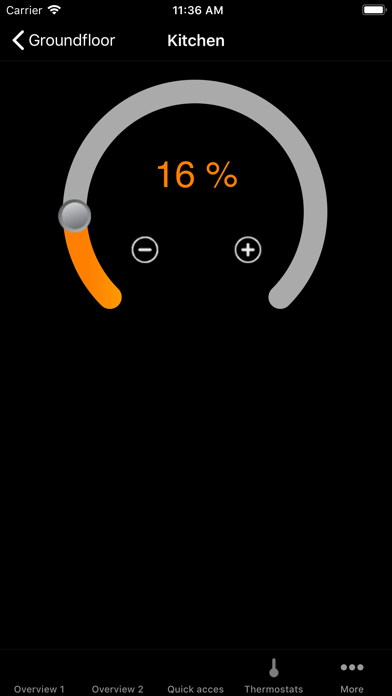
Dimmers: dimmable lights, engine, ...
Thermostats: read current temperature, control the desired temperature.
Shades or shutters: can go UP and DOWN (and STOP somewhere in between)
Macro's: combined functions that you have provided in your Velbus configuration (or Luxom or Qbus), they are activated with one click.
Inputs: restricted to Velbus and Luxom
Sonos and Frontier Silicon embedded devices can be operated through your home automation controls with Home center.
Global Caché iTach can be used for IR transmission within Home center.
2N video intercom and 2N access units are integrated.
Doorbird support (Native and Velbus version)
Vivotek camera support
Intesis HVAC support
Visualising Modbus information for configured hardware, like energy meters, inverters, ...
Safety and technology
Found in the app by AppBrain- Price
- Free
- App size
- 2.80 MB
- Content rating
- Everyone
Technologies used by Homecenter
Releases
Updates seen on the App Store- Version
- 4.3.4
- Launched
- November 2010
No changelog data
Alternatives
Similar apps and more from Stijnen, EmmanuelAlternatives to Homecenter





Also available on Google Play

Rankings
App Store top chartsApp Store Rankings for Homecenter
About the app and developer
About Homecenter
Homecenter is a lifestyle app developed by Stijnen, Emmanuel.
User Ratings
The app has no ratings yet.
App Information
Homecenter is freely available from the App Store. The app size is 2.80 MB. The latest version available is 4.3.4. The last update was on June 26, 2023.
Technical Requirements
The app has a content rating of Everyone. The app has been available on the App Store since November 2010.
Homecenter is made and published by Stijnen, Emmanuel. AppBrain is an independent app data site and isn't affiliated with Stijnen, Emmanuel. The app name, icon, screenshots and description belong to Stijnen, Emmanuel and are shown as published on the App Store.
Developer information for Stijnen, Emmanuel
Address: