

HomeMonitor - Smart Home Panel
HomeMonitor - Smart Home Panel is made and published by Kentaro Saito. AppBrain is an independent app data site and isn't affiliated with Kentaro Saito. The app name, icon, screenshots and description belong to Kentaro Saito and are shown as published on the App Store.
AppBrain's verdict
- Last updated
- September 17, 2026
Rankings
App Store top chartsApp Store Rankings for HomeMonitor - Smart Home Panel
Competitors
Similar apps and more from Kentaro SaitoAlternatives to HomeMonitor - Smart Home Panel


More from Kentaro Saito

Releases
Updates seen on the App Store- Version
- 1.2
- Launched
- August 2026
No changelog data
User feedback
Ratings and reviews on the App StoreComments on HomeMonitor - Smart Home Panel for iOS
We don't have enough comments to show example comments. Please check back later.
Technology
Found in the app by AppBrain- Price
- Free
- App size
- 9.40 MB
- Content rating
- Everyone
Technologies used by HomeMonitor - Smart Home Panel
About the app and developer
About HomeMonitor - Smart Home Panel
HomeMonitor - Smart Home Panel is an utilities app developed by Kentaro Saito.
User Ratings
The app has no ratings yet.
App Information
HomeMonitor - Smart Home Panel is freely available from the App Store. The app size is 9.40 MB. The latest version available is 1.2. The last update was on September 17, 2026.
Technical Requirements
The app has a content rating of Everyone. The app has been available on the App Store since August 2026.
Developer information for Kentaro Saito
Address:
Store listing
By Kentaro Saito, from the App Store



Description by Kentaro Saito Written by the developer, not by AppBrain. Click to read.
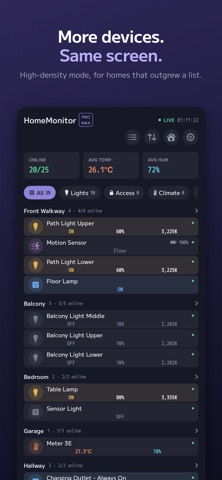
When your home mixes hardware from several manufacturers, keeping track means opening one vendor app after another. HomeMonitor groups everything by room and zone and shows the values that matter right now — brightness, temperature, humidity, lock state — all at once.
DENSITY FIRST
- Supports 27 accessory types
- Grouped by room and zone
- Reorder rooms, and the devices inside them
- Values flash briefly when they change, so you notice
- Offline status is decided by whether the accessory actually answers
CONTROL, ONE DEVICE AT A TIME
- Sliders for brightness, color temperature, hue, target temperature, fan speed and more
- Every characteristic an accessory exposes, with its current value, valid range and read/write access
SEE HOW THINGS CONNECT
- Matter or bridged, and which bridge it sits behind
- Home hub status
- For Matter accessories: network type, IP addresses, Thread role and neighboring nodes
PRIVATE BY DEFAULT
- No account, no sign-in
- No data collection of any kind. Everything stays on your device
——————
PLANS
The free tier shows every accessory and switches them on and off.
Pro (one-time purchase)
Faster updates, slider controls, reordering inside a room, and multiple homes
Pro Max (auto-renewable subscription)
Everything in Pro, plus a selectable refresh interval, a high-density display mode, advanced data with connection details, and a Settings screen
About the Pro Max subscription
- Available monthly or yearly
- Payment is charged to your Apple Account at confirmation of purchase
- Renews automatically unless canceled at least 24 hours before the end of the current period
- Manage your subscription and turn off auto-renew in your account settings after purchase
- Terms of Use: https://www.apple.com/legal/internet-services/itunes/dev/stdeula/
- Privacy Policy: https://www.gyuniku.jp/legal.php