

Homeshift: Moving Planner
Homeshift: Moving Planner is made and published by Peter Bognar. AppBrain is an independent app data site and isn't affiliated with Peter Bognar. The app name, icon, screenshots and description belong to Peter Bognar and are shown as published on the App Store.
AppBrain's verdict
- Last updated
- October 22, 2026
Rankings
App Store top chartsApp Store Rankings for Homeshift: Moving Planner
Competitors
Similar apps and more from Peter BognarAlternatives to Homeshift: Moving Planner


More from Peter Bognar


Releases
Updates seen on the App Store- Version
- 1.4.1
- Launched
- August 2026
No changelog data
User feedback
Ratings and reviews on the App StoreComments on Homeshift: Moving Planner for iOS
We don't have enough comments to show example comments. Please check back later.
Technology
Found in the app by AppBrain- Price
- Free
- App size
- 61.8 MB
- Content rating
- Everyone
Technologies used by Homeshift: Moving Planner
About the app and developer
About Homeshift: Moving Planner
Homeshift: Moving Planner is a productivity app developed by Peter Bognar.
What is the rating of Homeshift: Moving Planner?
Homeshift: Moving Planner has no ratings yet.
Is Homeshift: Moving Planner free?
Homeshift: Moving Planner is free. The app size is 61.84 MB. The latest version available is 1.4.1. The last update was on October 22, 2026.
What are the requirements for Homeshift: Moving Planner?
The app has a content rating of Everyone. The app has been available on the App Store since August 2026.
Developer information for Peter Bognar
Address:
Store listing
By Peter Bognar, from the App Store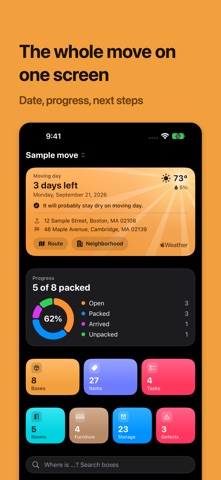




Description by Peter Bognar Written by the developer, not by AppBrain. Click to read.
You pack a box, photograph what went into it and stick a QR label on top. Three weeks later the boxes are standing in the new place and you are looking for the kettle. You scan the label and see straight away what is in which box.
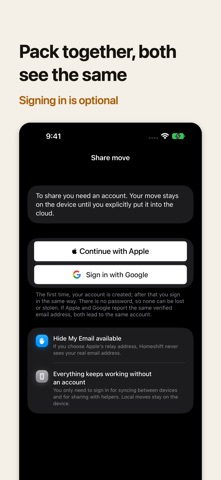
Homeshift keeps everything on your device: boxes, items and photos. The app works without an account and without an internet connection. If you are moving with somebody else, you can sign in and share the move. That part is optional.
BOXES AND ROOMS
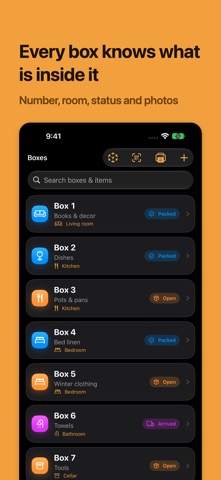
• Number, title, room and note for each box
• Status from Open through Packed and Arrived to Unpacked
• Mark a box as fragile, attach photos
• Search across every box and its contents
RECORDING THE CONTENTS WITHOUT MUCH TYPING
• Quick entry understands quantities: "4 plates" becomes 4x plate
• Photograph the contents of a box and add the recognized items with one tap
• Scan labels and printed text live with the camera
• Packing suggestions that fit the room
• Image recognition runs on the device. No photo leaves your iPhone.
QR LABELS TO STICK ON
• Print-ready labels with a QR code, box number, title and room
• One scan opens the box directly in the app
• All labels at once as a PDF, and you decide what goes on them
TASKS WITH A TIMELINE
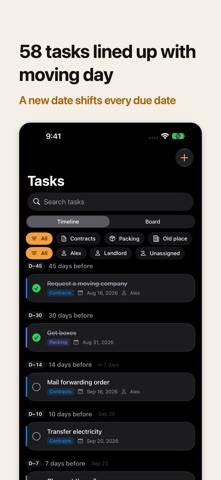
• 58 suggestions for a move, sorted into paperwork, packing, old place, new place, moving day and afterwards
• The due dates follow moving day. If the date moves, the tasks move with it
• A date you set yourself stays unchanged
• Task board with Backlog, Active and Done, with drag and drop on iPad
NOT ONLY BOXES
• Furniture list with what happens to each piece: take it along, sell it or dispose of it
• Damage report for the handover, with severity, photos and PDF export
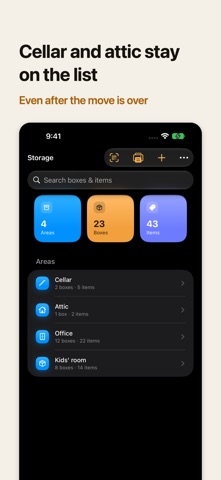
• Storage for the cellar, the attic and lockups, kept apart from the move and with its own labels
• AR mode that shows you the contents above every box in the room
• Several moves side by side, switched with one tap
MOVING TOGETHER, IF YOU WANT TO
• Sign in with Apple or Google, put the move into the cloud and invite helpers by link or QR code
• Changes appear on every device right away
• Roles: work along, or read only
• Photos are transferred only if you switch that on
• You can stop sharing at any time and delete your account in the app at any time
ON IPAD
• A sidebar instead of a tab bar, list and detail side by side
• The same data as on the iPhone
EXPORT AND BACKUP
• PDF manifest, CSV table or JSON archive
• If you want it, syncing between your own devices through your own iCloud account, photos included and without an account with us
• Widget with a countdown to moving day and your packing progress
Homeshift follows the language of your device.
HOMESHIFT CLOUD SUBSCRIPTION
The app is free and works without an account. Only moving together through the cloud is a subscription:
• Homeshift Cloud, monthly, 1-month term
• Homeshift Cloud, yearly, 12-month term
The price in your currency is shown in the app and under "In-App Purchases" on this page.
Payment is charged to your Apple Account. The subscription renews automatically unless it is cancelled at least 24 hours before the end of the current period; the renewal is charged within the last 24 hours of that period. You can manage and cancel the subscription in your Apple Account settings.
Terms of Use (EULA): https://www.apple.com/legal/internet-services/itunes/dev/stdeula/
Privacy Policy: https://homeshift.ch/en/privacy/