

Hourly Chime: Talking Clock
Hourly Chime: Talking Clock is made and published by Jakub Flisinski. AppBrain is an independent app data site and isn't affiliated with Jakub Flisinski. The app name, icon, screenshots and description belong to Jakub Flisinski and are shown as published on the App Store.
AppBrain's verdict
- Rating on App Store
- 2.00
- 1 ratings
- Last updated
- October 26, 2026
It doesn't have enough ratings yet to judge what users think.
Rankings
App Store top chartsApp Store Rankings for Hourly Chime: Talking Clock
Competitors
Similar apps and more from Jakub FlisinskiMore from Jakub Flisinski


Releases
Updates seen on the App Store- Version
- 17.3
- Launched
- August 2024
No changelog data
User feedback
Ratings and reviews on the App StoreComments on Hourly Chime: Talking Clock for iOS
We don't have enough comments to show example comments. Please check back later.
Technology
Found in the app by AppBrain- Price
- Free
- App size
- 32.0 MB
- Content rating
- Everyone
Technologies used by Hourly Chime: Talking Clock
About the app and developer
About Hourly Chime: Talking Clock
Hourly Chime: Talking Clock is a productivity app developed by Jakub Flisinski.
What is the rating of Hourly Chime: Talking Clock?
Hourly Chime: Talking Clock is rated 2.00 out of 5 stars, based on one rating ratings.
Is Hourly Chime: Talking Clock free?
Hourly Chime: Talking Clock is free. The app size is 31.98 MB. The latest version available is 17.3. The last update was on October 26, 2026.
What are the requirements for Hourly Chime: Talking Clock?
The app has a content rating of Everyone. The app has been available on the App Store since August 2024.
Developer information for Jakub Flisinski
Address:
Frequently asked questions about Hourly Chime: Talking Clock
Is Hourly Chime: Talking Clock free?
Yes. Hourly Chime: Talking Clock is free on the App Store.
Is Hourly Chime: Talking Clock still available?
Yes. Hourly Chime: Talking Clock is on the App Store, and the last update we saw was on October 26, 2026.
How large is Hourly Chime: Talking Clock?
Hourly Chime: Talking Clock is 31.98 MB.
Is Hourly Chime: Talking Clock suitable for children?
App Store rates the content of Hourly Chime: Talking Clock as suitable for everyone.
How do people rate Hourly Chime: Talking Clock?
Hourly Chime: Talking Clock has one rating of 2.00 stars on the App Store.
Who made Hourly Chime: Talking Clock?
Hourly Chime: Talking Clock was developed by Jakub Flisinski. It is listed in the productivity category on the App Store.
Store listing
By Jakub Flisinski, from the App Store

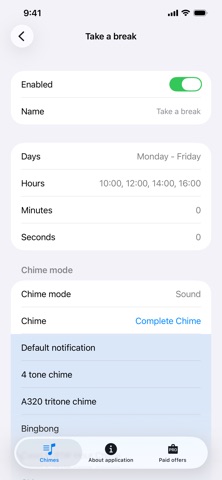

Description by Jakub Flisinski Written by the developer, not by AppBrain. Click to read.
• Choose the days and hours you want a chime; create an easy rhythm for focus sessions, short breaks and everyday routines.
• Get audible signals and background notifications. Set up a simple hourly alert instead of another full alarm.
• Use the time cue to remember to stretch, drink water, switch tasks or wind down. Notifications depend on your device settings.
A CLOCK CUE FOR THE WAY YOU LIVE
A clock on your phone can tell you the time, but checking it often leads to another distraction. An hourly signal is different: it gives you a small checkpoint while you keep reading, writing, creating, cooking, or taking care of everyday tasks. You decide when that interruption is useful. Use chimes during work hours, select particular weekdays, and leave quieter parts of the week alone.
BUILD A ROUTINE WITHOUT MORE ALARMS
A chime can mark the end of a study hour, remind you to move after sitting at a desk, or prompt a quick check of your next task. It's also a helpful cue when you tend to lose track of time during long periods of concentration. You don't have to treat every signal as a deadline. Sometimes hearing that another hour has passed is all you need to reset your attention and choose what to do next.
KEEP YOUR CHIMES ORGANIZED
Create settings for different parts of your day instead of relying on one generic alarm. Duplicate a chime setup with a swipe, then adjust it for another situation. Sort your chimes by time or by name, and find deleted items in the Trash view. With PRO, choose the precise minute and second for a cue, have the clock say the time or a phrase you wrote, use your own sound, or add a chime at sunrise or sunset.
ALERTS ON YOUR TERMS
Chimes use iOS notifications and sound behavior. What you actually hear depends on notification permission, volume, Focus or Silent settings, and the available system voices. This app is intended for everyday time awareness, not as a guaranteed alarm for urgent or medical events.
Free features cover basic time chimes. PRO unlocks spoken time and your own text-to-speech messages, custom alert sounds, minute-and-second timing and sunrise/sunset chimes. PRO removes ads and is available through a subscription or a one-time purchase. Removing ads alone is a separate purchase and does not unlock PRO.
Make your day easier to follow, one chime at a time.
Terms of Use: https://www.apple.com/legal/internet-services/itunes/dev/stdeula/