


AppBrain's verdict
- Last updated
- November 8, 2026
- Size
- 29.5 MB
User feedback
Ratings and reviews on the App StoreComments on Alarm Clock & Shift Reminders for iOS
We don't have enough comments to show example comments. Please check back later.
Store listing
By Jakub Flisinski, from the App StoreDescription by Jakub Flisinski Written by the developer, not by AppBrain. Click to read.
Alarms use the iOS alarm system: they ring at the set time on the Lock Screen when the app is closed, in Silent mode and with Focus on.
ALARMS FOR EVERY SCHEDULE
- Quick: a one-time alarm, or one that repeats weekly on the days you pick.
- Everyday: a morning alarm at the same time every day, for a steady morning routine.
- Work days: set the days of your work schedule once. When your shifts move from Mon-Thu to Tue-Fri, change them in Settings and every Work days alarm follows.
- Any day: pick dates on a calendar for appointments and one-off reminders.
- Cyclic: repeat every few days, or every few weeks on chosen weekdays. A shift work alarm for nurses, doctors, drivers and security staff, a workout every third day or a medicine reminder. Monthly and yearly repeats and a day like "second Tuesday of the month" need PRO.
- Annual: a reminder for a birthday or an anniversary every year (PRO).
- Timer: a countdown alarm for a nap, cooking, meditation or a gym workout, with a Live Activity on the Lock Screen and in the Dynamic Island.
WAKE-UP TASKS
Give an alarm a task to solve before Dismiss unlocks in the app:
- Math problem: solve an easy, medium or hard math problem.
- 1-2-3: tap the numbers in the right order.
The alarm has an Open button that takes you to the task. Like every iOS alarm, it can also be stopped from the alarm screen, so a task helps you wake up but does not lock the alarm.
SNOOZE AND SOUND
- Snooze length and number of snoozes for each alarm, with defaults for new alarms. More and longer snoozes need PRO.
- Choose a ringtone from the app's alarm sounds and a label for each alarm. The volume follows your iPhone's sound settings.
PLAN AND REVIEW YOUR ALARMS
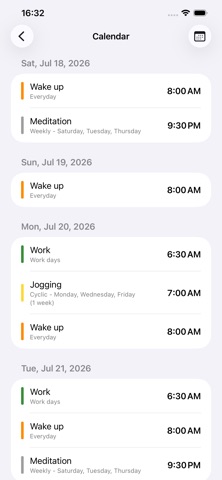
- Alarm calendar: a month view and a schedule of upcoming alarms. The free version shows the details of the coming days; Premium shows every day ahead.
- Skip the next alarm, or tap the days to skip, without deleting the alarm. Skipping some alarm types needs PRO.
- Turn off all alarms, for example on holiday. Turning them off until a chosen date and time needs PRO.
- Sunrise and sunset alarms: ring at dawn, sunrise, sunset or dusk for your location, with a time offset (PRO).
- Alarm history of the last 24 hours: rang, snoozed, dismissed and missed alarms.
- Trash: restore an alarm you deleted by mistake.
- Sort alarms by time or name, filter by type, and search alarms by name (PRO).
WIDGETS AND BACKUP
- Home Screen widgets for the next alarm and for the alarm list, and a Lock Screen widget for the next alarm.
- Back up all alarms to a file and restore them. A daily automatic backup of the alarm list is saved in the app's folder in Files.
- System, light or dark theme.
FREE AND PAID
Quick, Everyday, Work days, Any day, Cyclic and Timer alarms, wake-up tasks, the alarm calendar, widgets and backup are free, with ads. No ads is a one-time purchase that removes the ads. PRO unlocks the options marked PRO above and removes the ads. Premium includes everything in PRO and the full alarm calendar. PRO and Premium are available as a one-time purchase or as an auto-renewable subscription.
No account is needed. Allow alarms when the app asks, so iOS can ring them on time.
Terms of Use: https://www.apple.com/legal/internet-services/itunes/dev/stdeula/
Safety and technology
Found in the app by AppBrain- Price
- Free
- App size
- 29.5 MB
- Content rating
- Everyone
Technologies used by Alarm Clock & Shift Reminders
Releases
Updates seen on the App Store- Version
- 26.3
- Launched
- July 2026
No changelog data
Alternatives
Similar apps and more from Jakub FlisinskiAlternatives to Alarm Clock & Shift Reminders


More from Jakub Flisinski


Rankings
App Store top chartsApp Store Rankings for Alarm Clock & Shift Reminders
About the app and developer
About Alarm Clock & Shift Reminders
Alarm Clock & Shift Reminders is an utilities app developed by Jakub Flisinski.
User Ratings
The app has no ratings yet.
App Information
Alarm Clock & Shift Reminders is freely available from the App Store. The app size is 29.48 MB. The latest version available is 26.3. The last update was on November 8, 2026.
Technical Requirements
The app has a content rating of Everyone. The app has been available on the App Store since July 2026.
Alarm Clock & Shift Reminders is made and published by Jakub Flisinski. AppBrain is an independent app data site and isn't affiliated with Jakub Flisinski. The app name, icon, screenshots and description belong to Jakub Flisinski and are shown as published on the App Store.
Developer information for Jakub Flisinski
Address: