

HoverLingo - Screen Translator
HoverLingo - Screen Translator is made and published by 威 赵. AppBrain is an independent app data site and isn't affiliated with 威 赵. The app name, icon, screenshots and description belong to 威 赵 and are shown as published on the App Store.
AppBrain's verdict
- Rating on App Store
- 3.00
- 2 ratings
- Last updated
- September 15, 2026
It doesn't have enough ratings yet to judge what users think.
Rankings
App Store top chartsApp Store Rankings for HoverLingo - Screen Translator
Competitors
Similar apps and more from 威 赵Alternatives to HoverLingo - Screen Translator


More from 威 赵


Releases
Updates seen on the App Store- Version
- 1.6.0
- Launched
- November 2025
No changelog data
User feedback
Ratings and reviews on the App StoreComments on HoverLingo - Screen Translator for iOS
We don't have enough comments to show example comments. Please check back later.
Technology
Found in the app by AppBrain- Price
- Free
- App size
- 2.40 MB
- Content rating
- Everyone
Technologies used by HoverLingo - Screen Translator
About the app and developer
About HoverLingo - Screen Translator
HoverLingo - Screen Translator is a productivity app developed by 威 赵.
User Ratings
HoverLingo - Screen Translator is rated 3.00 out of 5 stars. The rating is based on 2 ratings.
App Information
HoverLingo - Screen Translator is freely available from the App Store. The app size is 2.40 MB. The latest version available is 1.6.0. The last update was on September 15, 2026.
Technical Requirements
The app has a content rating of Everyone. The app has been available on the App Store since November 2025.
Developer information for 威 赵
Address:
Store listing
By 威 赵, from the App Store


Description by 威 赵 Written by the developer, not by AppBrain. Click to read.
【FLOATING TRANSLATION】
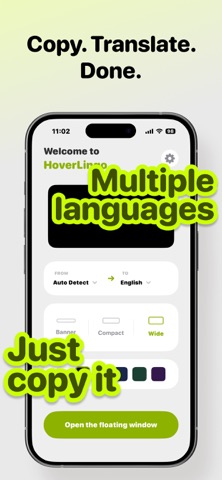
Copy any text, see the AI-powered translation instantly in a floating window. Read foreign articles, browse international websites, chat with friends worldwide — all without switching apps.
【KEY FEATURES】
- Picture-in-Picture translation window
- AI-powered instant translation
- 20+ languages supported
- Multiple AI models to choose from
- Customizable window size & color
- Works across all apps
- Privacy-first: data stays on your device
【PERFECT FOR】
- Reading foreign news & articles
- Browsing international websites
- Cross-border chat & social media
- Learning new languages
- International business communication
【HOW IT WORKS】
1. Open HoverLingo and start the floating window
2. Copy any text in other apps
3. See translation appear instantly
No more switching between apps. No more copy-paste hassle. Just copy and read.
Download HoverLingo now and break language barriers effortlessly.
Privacy Policy: https://lcfubrjegm.feishu.cn/wiki/TQxVwoa6lilwwPk9xh0ccMVqnvh?from=from_copylink
Terms of Use (EULA): https://www.apple.com/legal/internet-services/itunes/dev/stdeula/