

HP Smart Printer app FREE
HP Smart Printer app FREE is made and published by FREE MOBILE APPS STUDIO ONE MEMBER COMPANY LIMITED. AppBrain is an independent app data site and isn't affiliated with FREE MOBILE APPS STUDIO ONE MEMBER COMPANY LIMITED. The app name, icon, screenshots and description belong to FREE MOBILE APPS STUDIO ONE MEMBER COMPANY LIMITED and are shown as published on the App Store.
AppBrain's verdict
Well rated- Rating on App Store
- 4.15
- 100 ratings
- Last updated
- August 27, 2026
Users rate it well: 4.2 stars from 100 ratings.
Rankings
App Store top chartsApp Store Rankings for HP Smart Printer app FREE
Competitors
Similar apps and more from FREE MOBILE APPS STUDIO ONE MEMBER COMPANY LIMITEDAlternatives to HP Smart Printer app FREE


Releases
Updates seen on the App Store- Version
- 1.1.4
- Launched
- August 2026
No changelog data
User feedback
Ratings and reviews on the App StoreComments on HP Smart Printer app FREE for iOS
We don't have enough comments to show example comments. Please check back later.
Technology
Found in the app by AppBrain- Price
- Free
- App size
- 18.8 MB
- Content rating
- Everyone
Technologies used by HP Smart Printer app FREE
About the app and developer
About HP Smart Printer app FREE
HP Smart Printer app FREE is an utilities app developed by FREE MOBILE APPS STUDIO ONE MEMBER COMPANY LIMITED.
User Ratings
HP Smart Printer app FREE is rated 4.15 out of 5 stars. The rating is based on 100 ratings.
App Information
HP Smart Printer app FREE is freely available from the App Store. The app size is 18.81 MB. The latest version available is 1.1.4. The last update was on August 27, 2026.
Technical Requirements
The app has a content rating of Everyone. The app has been available on the App Store since August 2026.
Developer information for FREE MOBILE APPS STUDIO ONE MEMBER COMPANY LIMITED
Store listing
By FREE MOBILE APPS STUDIO ONE MEMBER COMPANY LIMITED, from the App Store




Description by FREE MOBILE APPS STUDIO ONE MEMBER COMPANY LIMITED Written by the developer, not by AppBrain. Click to read.
Connect to a compatible AirPrint-enabled printer on the same Wi-Fi network and print documents, photos, web pages, contacts, and custom text in just a few taps—no additional printer drivers required.
KEY FEATURES
• Print files and documents
Import files from your device or iCloud Drive, preview them, and send them to an AirPrint-enabled printer.
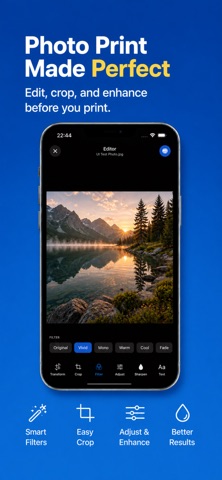
• Print and edit photos
Choose photos from your library or camera. Crop, rotate, draw, remove backgrounds, recognize text, compress images, and convert between supported image formats.
• Scan documents
Use your device’s camera to scan paper documents, automatically detect page edges, and save multi-page scans as PDFs.
• Complete PDF toolkit
Crop or rotate pages, add annotations, reorder pages, split large PDFs, or merge multiple files into one document.
• Print web pages
Enter a web address to create a printable PDF of the page, then save, share, or print it.
• Create documents
Write and format a quick text document or turn a selected contact into a printable page.
• Keep files organized
Store imported and created documents locally on your device for convenient access.
• Private, on-device processing
Your documents, photos, scans, and edits remain on your device. Printer does not require an account and does not include advertising or tracking.
Printer works with printers that support Apple AirPrint. Your iPhone or iPad and printer must usually be connected to the same Wi-Fi network.