

Hue Dashboard is made and published by Pim Nijman. AppBrain is an independent app data site and isn't affiliated with Pim Nijman. The app name, icon, screenshots and description belong to Pim Nijman and are shown as published on the App Store.
AppBrain's verdict
- Last updated
- September 22, 2026
- Size
- 5.40 MB
User feedback
Ratings and reviews on the App StoreComments on Hue Dashboard for iOS
We don't have enough comments to show example comments. Please check back later.
Store listing
By Pim Nijman, from the App Store



Description by Pim Nijman Written by the developer, not by AppBrain. Click to read.
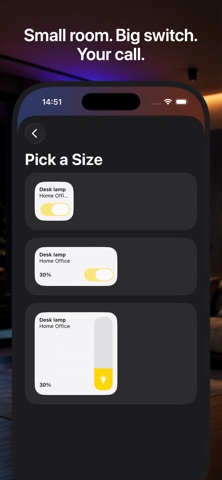
Add your lights, scenes and rooms as tiles and place them exactly where you want on the grid. Once you build your layout, it stays that way. No shuffling buttons, no hunting for the light you want because a new bulb got added somewhere else in the list.
Built for the way people actually use a smart home dashboard: mounted on a wall or the fridge, always on, glanceable from across the room. A layout you can find without thinking twice, and nothing moving around when your setup changes.
It's not only for the wall. On iPhone, the same fixed grid fits naturally in one hand, so you get the same fast, predictable control whether you're reaching for it in your pocket or walking past a mounted iPad.
Try it before you connect anything. From the welcome screen you can open a demo mode and explore a working layout to see exactly how it works before pairing it with your bridge.
What you get:
• Fixed grid layout that never rearranges itself
• Tiles for lights, scenes and rooms
• A demo mode, reachable from the welcome screen, to try before you connect your bridge
• Works with your existing Philips Hue bridge and lights
Hue Dashboard is the fastest, most predictable way to control your lights.
Safety and technology
Found in the app by AppBrain- Price
- Free
- App size
- 5.40 MB
- Content rating
- Everyone
Technologies used by Hue Dashboard
Releases
Updates seen on the App Store- Version
- 1.1
- Launched
- September 2026
No changelog data
Alternatives
Similar apps and more from Pim NijmanAlternatives to Hue Dashboard


More from Pim Nijman


Rankings
App Store top chartsApp Store Rankings for Hue Dashboard
About the app and developer
About Hue Dashboard
Hue Dashboard is a lifestyle app developed by Pim Nijman.
User Ratings
The app has no ratings yet.
App Information
Hue Dashboard is freely available from the App Store. The app size is 5.40 MB. The latest version available is 1.1. The last update was on September 22, 2026.
Technical Requirements
The app has a content rating of Everyone. The app has been available on the App Store since September 2026.
Developer information for Pim Nijman
Address:
Frequently asked questions about Hue Dashboard
Is Hue Dashboard free?
Yes. Hue Dashboard is free on the App Store.
Is Hue Dashboard still available?
Yes. Hue Dashboard is on the App Store, and the last update we saw was on September 22, 2026.
How large is Hue Dashboard?
Hue Dashboard is 5.40 MB.
Is Hue Dashboard suitable for children?
App Store rates the content of Hue Dashboard as suitable for everyone.
Who made Hue Dashboard?
Hue Dashboard was developed by Pim Nijman. It is listed in the lifestyle category on the App Store.
What are the best alternatives to Hue Dashboard?
People looking at Hue Dashboard also look at these lifestyle apps: Atlas Photo Journal, Cabin Collection, Simply Fast - Get in Shape, HomeScreen for HomeKit, Hearth for HomeKit.