

HumanScan is made and published by Excelltech Inc. AppBrain is an independent app data site and isn't affiliated with Excelltech Inc. The app name, icon, screenshots and description belong to Excelltech Inc. and are shown as published on the App Store.
AppBrain's verdict
- Rating on App Store
- 5.00
- 1 ratings
- Last updated
- May 8, 2026
It doesn't have enough ratings yet to judge what users think.
Rankings
App Store top chartsApp Store Rankings for HumanScan
Competitors
Similar apps and more from Excelltech Inc.More from Excelltech Inc.





Releases
Updates seen on the App Store- Version
- 1.01
- Launched
- May 2026
No changelog data
User feedback
Ratings and reviews on the App StoreComments on HumanScan for iOS
We don't have enough comments to show example comments. Please check back later.
Technology
Found in the app by AppBrain- Price
- Free
- App size
- 3.80 MB
- Content rating
- Everyone
Technologies used by HumanScan
About the app and developer
About HumanScan
HumanScan is an utilities app developed by Excelltech Inc.
User Ratings
HumanScan is rated 5.00 out of 5 stars. The rating is based on one rating ratings.
App Information
HumanScan is freely available from the App Store. The app size is 3.80 MB. The latest version available is 1.01. The last update was on May 8, 2026.
Technical Requirements
The app has a content rating of Everyone. The app has been available on the App Store since May 2026.
Developer information for Excelltech Inc.
Address:
Store listing
By Excelltech Inc., from the App Store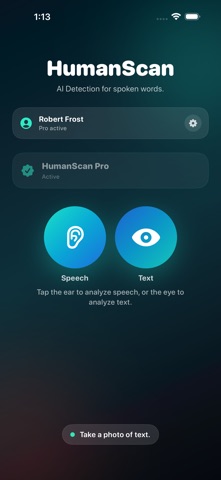

Description by Excelltech Inc. Written by the developer, not by AppBrain. Click to read.
Record a short speech sample, scan a photo of text, or review captured wording to see whether it resembles AI-generated writing. Whether you are listening to a presentation, reviewing a speech, checking a printed script, looking at notes, evaluating social content, or simply curious about how human something sounds or reads, HumanScan gives you a fast, simple way to take a closer look.
HumanScan does not analyze a person’s voice, identity, or intent. Instead, it focuses on the words themselves — the phrasing, structure, and patterns in the transcript or captured text.
How it works
Record spoken content
Capture a short speech sample and convert it into a transcript.
Scan text from a photo
Take a photo of written or printed text and use HumanScan to analyze the captured wording.
Analyze the text
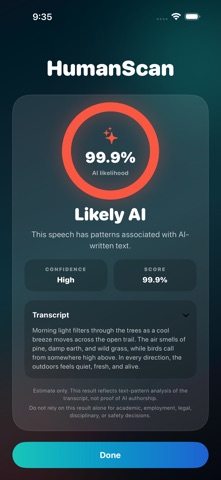
HumanScan checks the wording for patterns commonly associated with AI-generated writing.
Review the result
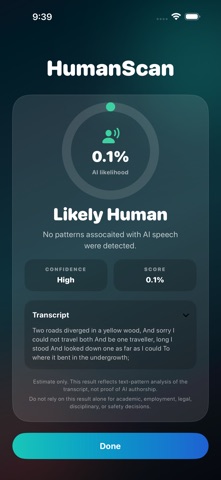
See a clear result, confidence level, and text preview so you can better understand what was analyzed.
Key features
• Record speech directly in the app
• Convert spoken words into text
• Take a photo of written or printed text
• Analyze transcripts and captured text for AI-like writing patterns
• View confidence-based results
• Review the text used for analysis
• Simple, fast, focused interface
• Designed for speeches, presentations, videos, podcasts, conversations, scripts, notes, and short written samples
HumanScan can be useful when you want to check whether content may have started as AI-written text. It is ideal for reviewing speeches, social videos, podcasts, presentations, prepared statements, lectures, sales scripts, printed notes, screenshots, handouts, or any short sample where the wording feels unusually polished, generic, or scripted.
Important note
HumanScan provides an estimate based on text analysis. It cannot prove whether someone used AI, and results should not be treated as definitive evidence. Use HumanScan as a helpful signal, not a final judgment.
HumanScan Pro
Upgrade to HumanScan Pro to unlock 100 scans per month and analyze more speech samples, transcripts, and captured text whenever you need them.
Get a fast second look at whether content sounds human, scripted, or AI-like with HumanScan.
End User License Agreement: https://www.apple.com/legal/internet-services/itunes/dev/stdeula/