

HWP Viewer - Hangul hwp·hwpx
HWP Viewer - Hangul hwp·hwpx is made and published by YEONWOO KIM. AppBrain is an independent app data site and isn't affiliated with YEONWOO KIM. The app name, icon, screenshots and description belong to YEONWOO KIM and are shown as published on the App Store.
AppBrain's verdict
- Last updated
- October 20, 2026
- Size
- 6.09 MB
User feedback
Ratings and reviews on the App StoreComments on HWP Viewer - Hangul hwp·hwpx for iOS
We don't have enough comments to show example comments. Please check back later.
Store listing
By YEONWOO KIM, from the App Store


Description by YEONWOO KIM Written by the developer, not by AppBrain. Click to read.
Viewing Hangul documents is free. Try form saves (Hangul files, signed PDFs or page images, edited documents, documents with stamps or pen marks) and conversions (paper, photos or PDFs to Hangul; Word export) three times each for free; a one-time lifetime unlock (not a subscription) keeps both going. Saving a filled form as PDF without a signature is free.
OPEN HANGUL FILES
HWP and HWPX attachments are shown as laid out on the page: tables, pictures, text boxes, numbering, headers and footers, footnotes, equations, shapes and charts.
FILL IN FORMS ON YOUR PHONE
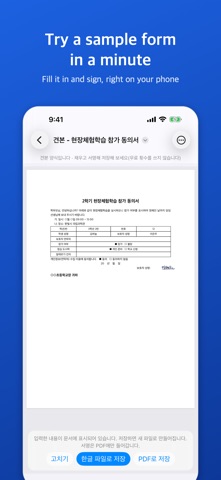
Open a Hangul form (reply slips, applications) and choose 더 보기 › 양식 채우기: the app lists the blanks in tables and text (such as "성명: ____ (서명)" or a date line), □ check boxes and choices such as "참가( ) 불참( )". After 완료, what you entered shows in the document, and you can save a new HWPX file marked (작성) or a PDF — the original stays. (Saving as a Hangul file works for HWPX documents; HWP documents are saved as PDF.)
SIGN ON YOUR PHONE
Where a form has a (서명) or (인) mark or a signature cell, draw your signature with a finger and it goes in that place in the PDF. It stays on this device and in your own iCloud (your iPad on the same Apple ID has it too); delete it any time.
NOTHING LOST
What you type and the text you change are kept on the device as you go; if the app closes, open the document again and choose 이어서 하기.
TRY THE SAMPLE FORM
Open the sample form (견본) in the app's folder to fill in, sign and save it; it does not use a free save.
EDIT TEXT
Fix a name, a date or a typo: choose 더 보기 › 글자 고치기, tap a paragraph or a table cell, and the change shows at once. It is saved as a new HWPX file marked (수정); the original stays as it was; 찾아 바꾸기 replaces the same words throughout at once. (HWP documents save the edited result as PDF.)
STAMPS AND PEN MARKS
Place a stamp photo with its background removed, mark with a pen, and save as PDF or a new HWPX file (더 보기 › 도장·펜 표시). Stamps reach your iPad the same way.
EXPORT TO WORD
Turn a Hangul document, as shown with entered values, edits and signature, into a .docx file for Pages, Word or Google Docs (더 보기 › 워드(DOCX)로 내보내기).
PAPER, PHOTOS AND PDFS TO HANGUL
Tap "PDF·사진을 한글 파일로" on the first screen, scan a page or pick a photo or PDF: the app reads the text and tables, makes an HWPX file you can edit in Hangul, and shows it at once. Files are saved in Files > HWP 뷰어 > 변환한 문서.
WORD, EXCEL, POWERPOINT AND PDF TOO
Word (docx, doc), Excel (xlsx, xls), PowerPoint (pptx, ppt), PDF, RTF and CSV attachments open here too (view only).
FIT TO SCREEN, PAGES, FIND, READ ALOUD, PDF
Reflow text, page list, night view, links, search with counts, copy text and tables, read aloud, character counts, Quick Look, and share as PDF or page images.
PRIVATE BY DESIGN
All processing, including text recognition, happens on your device. Documents are not uploaded; only your signature, stamps and trial counts go to your own iCloud. No ads, no subscriptions.
Good to know
- Conversion requires iOS 26 (viewing: iOS 18).
- Recognition can make mistakes; check converted documents. Only text and tables are carried over, and a table that runs over several pages becomes one table per page.
- Form filling lists only the blanks the app finds; some may be missed. The signature and pen marks go into PDFs and page images only (not into saved Hangul files); stamps also go into Hangul files saved from HWPX documents.
- Word export re-flows lines and pages; equations, charts and drawings become pictures.
- Some layout effects are simplified in the viewer; password-protected documents cannot be opened. The interface is in Korean.
This product was developed with reference to Hancom's published HWP file format document. Hangul is a trademark of Hancom Inc.; this app is not affiliated with Hancom. Word, Excel and PowerPoint are trademarks of Microsoft; this app is not affiliated with Microsoft.
Safety and technology
Found in the app by AppBrain- Price
- Free
- App size
- 6.09 MB
- Content rating
- Everyone
Technologies used by HWP Viewer - Hangul hwp·hwpx
Releases
Updates seen on the App Store- Version
- 1.2.0
- Launched
- October 2026
No changelog data
Alternatives
Similar apps and more from YEONWOO KIMAlternatives to HWP Viewer - Hangul hwp·hwpx


More from YEONWOO KIM


Rankings
App Store top chartsApp Store Rankings for HWP Viewer - Hangul hwp·hwpx
About the app and developer
About HWP Viewer - Hangul hwp·hwpx
HWP Viewer - Hangul hwp·hwpx is an utilities app developed by YEONWOO KIM.
What is the rating of HWP Viewer - Hangul hwp·hwpx?
HWP Viewer - Hangul hwp·hwpx has no ratings yet.
Is HWP Viewer - Hangul hwp·hwpx free?
HWP Viewer - Hangul hwp·hwpx is free. The app size is 6.09 MB. The latest version available is 1.2.0. The last update was on October 20, 2026.
What are the requirements for HWP Viewer - Hangul hwp·hwpx?
The app has a content rating of Everyone. The app has been available on the App Store since October 2026.
Developer information for YEONWOO KIM
Address:
Frequently asked questions about HWP Viewer - Hangul hwp·hwpx
Is HWP Viewer - Hangul hwp·hwpx free?
Yes. HWP Viewer - Hangul hwp·hwpx is free on the App Store.
Is HWP Viewer - Hangul hwp·hwpx still available?
Yes. HWP Viewer - Hangul hwp·hwpx is on the App Store, and the last update we saw was on October 20, 2026.
How large is HWP Viewer - Hangul hwp·hwpx?
HWP Viewer - Hangul hwp·hwpx is 6.09 MB.
Is HWP Viewer - Hangul hwp·hwpx suitable for children?
App Store rates the content of HWP Viewer - Hangul hwp·hwpx as suitable for everyone.
Who made HWP Viewer - Hangul hwp·hwpx?
HWP Viewer - Hangul hwp·hwpx was developed by YEONWOO KIM. It is listed in the utilities category on the App Store.
What are the best alternatives to HWP Viewer - Hangul hwp·hwpx?
People looking at HWP Viewer - Hangul hwp·hwpx also look at these utilities apps: HWP Viewer: HWP to Word, PDF, Pruna: Duplicate Photo Cleaner, 마멋 키보드, HWP Viewer - Hangul Editor, 드론구조대.