

i Color Paint
i Color Paint is made and published by Suzukafine Co., Ltd. AppBrain is an independent app data site and isn't affiliated with Suzukafine Co., Ltd. The app name, icon, screenshots and description belong to Suzukafine Co., Ltd. and are shown as published on the App Store.
AppBrain's verdict
- Last updated
- December 28, 2023
Rankings
App Store top chartsApp Store Rankings for i Color Paint
Competitors
Similar apps and more from Suzukafine Co., Ltd.Alternatives to i Color Paint


Releases
Updates seen on the App Store- Version
- 5.7
- Launched
- March 2014
No changelog data
User feedback
Ratings and reviews on the App StoreComments on i Color Paint for iOS
We don't have enough comments to show example comments. Please check back later.
Technology
Found in the app by AppBrain- Price
- Free
- App size
- 152.6 MB
- Content rating
- Everyone
Technologies used by i Color Paint
About the app and developer
About i Color Paint
i Color Paint is a productivity app developed by Suzukafine Co., Ltd.
User Ratings
The app has no ratings yet.
App Information
i Color Paint is freely available from the App Store. The app size is 152.64 MB. The latest version available is 5.7. The last update was on December 28, 2023.
Technical Requirements
The app has a content rating of Everyone. The app has been available on the App Store since March 2014.
Developer information for Suzukafine Co., Ltd.
Address:
Frequently asked questions about i Color Paint
Is i Color Paint free?
Yes. i Color Paint is free on the App Store.
Is i Color Paint still available?
Yes. i Color Paint is on the App Store, and the last update we saw was on December 28, 2023.
How large is i Color Paint?
i Color Paint is 152.64 MB.
Is i Color Paint suitable for children?
App Store rates the content of i Color Paint as suitable for everyone.
Who made i Color Paint?
i Color Paint was developed by Suzukafine Co., Ltd. It is listed in the productivity category on the App Store.
What are the best alternatives to i Color Paint?
People looking at i Color Paint also look at these productivity apps: まいスケジュール Lite, YYTranscription, 人気スケジュール帳 仕事や大学で共有、簡単にスケジュール管理, Live Transcribe Voice to Text, Microsoft Planner.
Store listing
By Suzukafine Co., Ltd., from the App Store
Description by Suzukafine Co., Ltd. Written by the developer, not by AppBrain. Click to read.
<簡易>カラーシミュレーションアプリです。
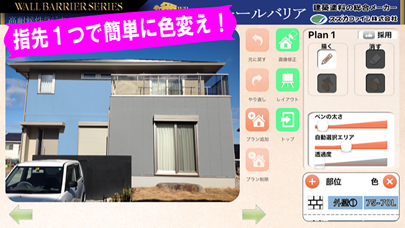
iPhoneもしくはiPadで撮影した写真から、指先一つで簡単に塗り替えイメージを作成!
建物の塗り替えカラーシミュレーションを簡単に行う事ができます。
現場での打合せや、お施主様へのプレゼンテーションなど、塗り替えプランのご提案にご利用ください。
[特徴]
・従来のカラーシミュレーションは、デジカメで撮影し、パソコンで編集、プリンターで印刷し、ご提案する、といった方法が一般的でしたが、本アプリを用いる事により、「撮影」「編集」「プレゼン」の全てをiPadのみで行う事が可能になります。
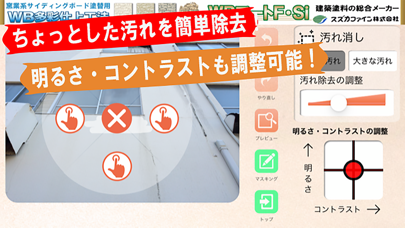
・色変更を直感的に行うことができますので、習得に時間もかからず比較的短時間で塗り替えイメージを作成する事ができます。
・AirPrintを設定すればプリントアウトも可能です。
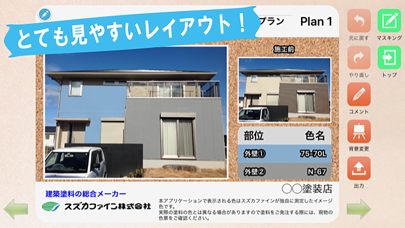
・プレゼン用レイアウトは、JPG・PDFでの出力・メール送信が可能です。
・位置情報サービスに対応していますので、物件所在地を地図上に表示する事が可能です。
・「facebook」や「twitter」との共有機能があります。
[注意事項]
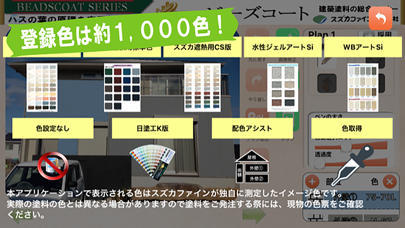
・本アプリで表示される登録色は、スズカファインが独自に測定したイメージ色です。実際の塗料の色とは異なる場合がありますので、塗料をご発注される際には、現物の色票をご確認ください。
・2012年発売のiPad Air2(iOS10)、2012年発売のiPhone6(iOS10)以降でのご利用を推奨いたします。
(それ以前のモデルでは、処理に時間がかかり、動作しない場合があります。)
最新機種であるiPad Airでのご利用がストレスなく操作可能です。
また、iPad miniでもご利用可能ですが、作業の効率上、より画面サイズの大きい、iPadでのご利用をお奨め致します。
・電話やメールでのサポート窓口は設定しておりませんので、ご利用方法につきましては、アプリに記載されております「説明書」をご覧いただきますよう、お願い申し上げます。
・本アプリのご利用により何らかの損害が発生しても当社は一切責任を負わないものとします。
・誤操作、システムの不具合、機器の故障等によるデータの消失、トラブル、損害等についても何ら責任を負わないものとします。