

ID Scan: Barcode Scanner Pro
ID Scan: Barcode Scanner Pro is made and published by iCubemedia Inc. AppBrain is an independent app data site and isn't affiliated with iCubemedia Inc. The app name, icon, screenshots and description belong to iCubemedia Inc. and are shown as published on the App Store.
AppBrain's verdict
Established- Rating on App Store
- 4.40
- 30 ratings
- Last updated
- October 8, 2026
It doesn't have enough ratings yet to judge what users think.
Rankings
App Store top chartsApp Store Rankings for ID Scan: Barcode Scanner Pro
Competitors
Similar apps and more from iCubemedia Inc.More from iCubemedia Inc.







Releases
Updates seen on the App Store- Version
- 3.02
- Launched
- September 2012
No changelog data
User feedback
Ratings and reviews on the App StoreComments on ID Scan: Barcode Scanner Pro for iOS
We don't have enough comments to show example comments. Please check back later.
Technology
Found in the app by AppBrain- Price
- $4.99
- App size
- 8.74 MB
- Content rating
- Everyone
Technologies used by ID Scan: Barcode Scanner Pro
About the app and developer
About ID Scan: Barcode Scanner Pro
ID Scan: Barcode Scanner Pro is a productivity app developed by iCubemedia Inc.
What is the rating of ID Scan: Barcode Scanner Pro?
ID Scan: Barcode Scanner Pro is rated 4.40 out of 5 stars, based on 30 ratings.
Is ID Scan: Barcode Scanner Pro free?
ID Scan: Barcode Scanner Pro costs $4.99. The app size is 8.74 MB. The latest version available is 3.02. The last update was on October 8, 2026.
What are the requirements for ID Scan: Barcode Scanner Pro?
The app has a content rating of Everyone. The app has been available on the App Store since September 2012.
Developer information for iCubemedia Inc.
Address:
Store listing
By iCubemedia Inc., from the App Store



Description by iCubemedia Inc. Written by the developer, not by AppBrain. Click to read.
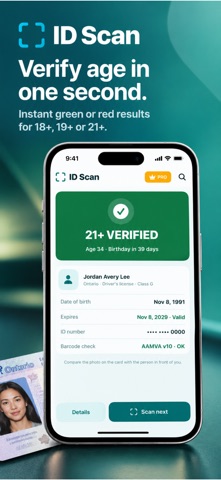
Point your camera at the barcode on the back of a driver's license or ID card. ID Scan shows the name, date of birth, age and expiry date right away, with a big green or red result for your 18+, 19+ or 21+ rule.
The check runs on your phone. No account, no cloud, no tracking.
NEW: EVENT PASSES AND DOOR CHECK-IN
Running a party, a launch or a private night? Your guest list and your door, in one app.
• Create an event and pick one of 6 pass designs, vertical or horizontal, with your color and logo
• Add guests by hand, from Contacts, or from a CSV or Excel file
• Send each guest their pass from your own Mail or Messages, or print them on Letter or A4
• See who confirmed, who declined and who hasn't replied
• At the door, scan the pass or the guest's ID. ID Scan finds them on the list, applies the event's age rule, counts +1s and tells you if they're already inside
• Each pass is signed for your event: an edited pass, an old one or one from another event is refused
BUILT FOR PLACES THAT CHECK IDs
• Bars, clubs and restaurants: fast 21+ checks with Door mode
• Cannabis, liquor and tobacco stores: age checks at the counter
• Hotels and rentals: guest check-in in seconds
• Events and venues: guest lists, passes and the door
• Security and HR: badges and access cards
WHAT IT READS
• US and Canadian driver's licenses and ID cards (AAMVA)
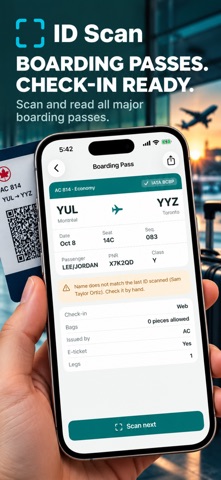
• Airline boarding passes (IATA)
• Any barcode or QR code: QR, PDF417, Data Matrix, Aztec, Code 128, Code 39, Code 93, EAN, UPC, ITF, Codabar, GS1 DataBar and more
• It knows what it scanned: products and books, SIM cards, IMEI numbers, UPS, FedEx, USPS and postal tracking, car VINs, and GS1 labels with lot and expiry date
• QR codes turn into actions: call, email, text, map, add to calendar, save a contact, copy a Wi-Fi password
PRIVATE BY DESIGN
• ID checks run 100% on your phone
• No sign-up, nothing sent to our servers
• Names are shortened in the log, and the log clears itself after 30 days (you choose)
• Lock the app with Face ID
FOR DEVELOPERS AND POWER USERS
• Generate PDF417, QR, Aztec and Code 128 codes with custom size and error correction
• Inspect, validate, compare and re-generate barcodes
• Batch generation, templates and saved profiles
• Export to PNG, JPG, PDF, SVG or JSON, and print
Available in 15 languages.
Terms of Use: https://www.apple.com/legal/internet-services/itunes/dev/stdeula/