

Office Reader - Pro Doc Editor
Office Reader - Pro Doc Editor is made and published by iCubemedia Inc. AppBrain is an independent app data site and isn't affiliated with iCubemedia Inc. The app name, icon, screenshots and description belong to iCubemedia Inc. and are shown as published on the App Store.
AppBrain's verdict
- Last updated
- May 5, 2026
- Size
- 21.9 MB
User feedback
Ratings and reviews on the App StoreComments on Office Reader - Pro Doc Editor for iOS
We don't have enough comments to show example comments. Please check back later.
Store listing
By iCubemedia Inc., from the App Store





Description by iCubemedia Inc. Written by the developer, not by AppBrain. Click to read.
Open, edit, and create real Word, Excel, and PowerPoint files on your iPhone and iPad, with smart AI built in to draft, rewrite, and transform your documents. Scan paperwork, record voice memos, and organize everything in one beautiful, private app.
— WRITE WITH AI —
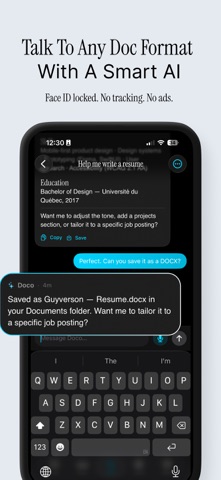
Office Reader has smart AI built in. Tap sparkle to generate an email, rewrite a paragraph, summarize a report, or draft a full document in the right format — the AI knows whether you're writing a resume, a screenplay, a contract, or a pitch deck, and writes in that voice. Chat directly, speak your thoughts with voice input, and save what you love as a real document.
— REAL OFFICE SUPPORT —
Not a reader. A creator. Office Reader writes genuine .docx, .xlsx, and .pptx files — open them later in Word, Excel, or PowerPoint and everything is intact: bold, lists, formulas, slide layouts, speaker notes, everything.
• Rich text editing with formatting, lists, headings, and more
• Spreadsheets with typed cells, formulas, and multi-sheet workbooks
• Presentations with five slide layouts, drag-reorder, and notes
• Export any document to PDF in one tap
— POWERFUL EXTRAS —
• Scan documents with one tap (Vision-powered OCR)
• Merge PDFs
• Audio recorder with AI transcription
• Sketch canvas with Apple Pencil
• Private Folder locked by Face ID
• Home Screen widgets for quick capture
• Templates for resumes, invoices, proposals, meeting notes, and more
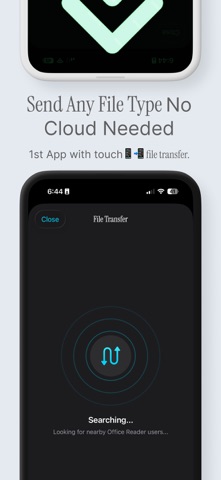
• Nearby-device file transfer (no cloud, no sign-in)
— YOUR FILES, ORGANIZED —
Industry-standard folders: Word Documents, Spreadsheets, Presentations, PDFs, Text, Images, Audio, Video, Archives. Filter with chip-based search. Everything syncs with iCloud Drive.
— PRIVATE BY DESIGN —
Your documents never train AI models. AI requests go through our secure proxy — your content is used only to generate your reply, nowhere else. Private Folder adds Face ID lock on top. No third-party trackers. No ads in the way of your work.
— MADE BY iCUBE LAB —
Office Reader is built by iCube Lab, the team behind Invoice, Expense Tracker, Legal Scan, and NoteCast AI. We ship polished, useful apps that respect your time and your privacy.
— SUBSCRIPTION TERMS —
Office Reader offers auto-renewing subscriptions:
• Pro Monthly — $6.99/month
• Pro Yearly — $39.99/year (7-day free trial)
• Max Monthly — $12.99/month
• Max Yearly — $99.99/year
One-time purchases also available: Pro Lifetime ($89.99), Max Lifetime ($149.99), and AI credit packs ($0.99–$9.99).
Payment is charged to your Apple ID at confirmation of purchase. Subscriptions automatically renew unless auto-renew is turned off at least 24 hours before the end of the current period. Your account will be charged for renewal within 24 hours prior to the end of the current period. You can manage and cancel subscriptions in your App Store account settings after purchase.
Privacy Policy: https://icube.so/privacy
Terms of Use: https://icube.so/terms
Questions? Email support@icube.so. Reviews and feedback make every update better — thank you for being here.
Safety and technology
Found in the app by AppBrain- Price
- Free
- App size
- 21.9 MB
- Content rating
- Everyone
Technologies used by Office Reader - Pro Doc Editor
Releases
Updates seen on the App Store- Version
- 3.1
- Launched
- November 2012
No changelog data
Alternatives
Similar apps and more from iCubemedia Inc.Alternatives to Office Reader - Pro Doc Editor


More from iCubemedia Inc.


Rankings
App Store top chartsApp Store Rankings for Office Reader - Pro Doc Editor
About the app and developer
About Office Reader - Pro Doc Editor
Office Reader - Pro Doc Editor is a productivity app developed by iCubemedia Inc.
User Ratings
The app has no ratings yet.
App Information
Office Reader - Pro Doc Editor is freely available from the App Store. The app size is 21.88 MB. The latest version available is 3.1. The last update was on May 5, 2026.
Technical Requirements
The app has a content rating of Everyone. The app has been available on the App Store since November 2012.
Developer information for iCubemedia Inc.
Address:
Frequently asked questions about Office Reader - Pro Doc Editor
Is Office Reader - Pro Doc Editor free?
Yes. Office Reader - Pro Doc Editor is free on the App Store.
Is Office Reader - Pro Doc Editor still available?
Yes. Office Reader - Pro Doc Editor is on the App Store, and the last update we saw was on May 5, 2026.
How large is Office Reader - Pro Doc Editor?
Office Reader - Pro Doc Editor is 21.88 MB.
Is Office Reader - Pro Doc Editor suitable for children?
App Store rates the content of Office Reader - Pro Doc Editor as suitable for everyone.
Who made Office Reader - Pro Doc Editor?
Office Reader - Pro Doc Editor was developed by iCubemedia Inc. It is listed in the productivity category on the App Store.
What are the best alternatives to Office Reader - Pro Doc Editor?
People looking at Office Reader - Pro Doc Editor also look at these productivity apps: PDF Pro - Doc & Mark, PDF Compressor: Merge Split, PDF Notes Pro, PDF Converter- Photos & Word, Zap Scan: Photo to PDF Scanner.