

ID2PDF - ID & Doc Scanner
ID2PDF - ID & Doc Scanner is made and published by SUMMER MINT LTD. AppBrain is an independent app data site and isn't affiliated with SUMMER MINT LTD. The app name, icon, screenshots and description belong to SUMMER MINT LTD and are shown as published on the App Store.
AppBrain's verdict
- Last updated
- September 16, 2026
Rankings
App Store top chartsApp Store Rankings for ID2PDF - ID & Doc Scanner
Competitors
Similar apps and more from SUMMER MINT LTDAlternatives to ID2PDF - ID & Doc Scanner


More from SUMMER MINT LTD


Releases
Updates seen on the App Store- Version
- 1.0
- Launched
- September 2026
No changelog data
User feedback
Ratings and reviews on the App StoreComments on ID2PDF - ID & Doc Scanner for iOS
We don't have enough comments to show example comments. Please check back later.
Technology
Found in the app by AppBrain- Price
- Free
- App size
- 38.4 MB
- Content rating
- Everyone
Technologies used by ID2PDF - ID & Doc Scanner
About the app and developer
About ID2PDF - ID & Doc Scanner
ID2PDF - ID & Doc Scanner is a productivity app developed by SUMMER MINT LTD.
User Ratings
The app has no ratings yet.
App Information
ID2PDF - ID & Doc Scanner is freely available from the App Store. The app size is 38.42 MB. The latest version available is 1.0. The last update was on September 16, 2026.
Technical Requirements
The app has a content rating of Everyone. The app has been available on the App Store since September 2026.
Developer information for SUMMER MINT LTD
Address:
Frequently asked questions about ID2PDF - ID & Doc Scanner
Is ID2PDF - ID & Doc Scanner free?
Yes. ID2PDF - ID & Doc Scanner is free on the App Store.
Is ID2PDF - ID & Doc Scanner still available?
Yes. ID2PDF - ID & Doc Scanner is on the App Store, and the last update we saw was on September 16, 2026.
How large is ID2PDF - ID & Doc Scanner?
ID2PDF - ID & Doc Scanner is 38.42 MB.
Is ID2PDF - ID & Doc Scanner suitable for children?
App Store rates the content of ID2PDF - ID & Doc Scanner as suitable for everyone.
Who made ID2PDF - ID & Doc Scanner?
ID2PDF - ID & Doc Scanner was developed by SUMMER MINT LTD. It is listed in the productivity category on the App Store.
What are the best alternatives to ID2PDF - ID & Doc Scanner?
People looking at ID2PDF - ID & Doc Scanner also look at these productivity apps: ID Copy Layout Helper 2026, ToDoMeong - Simple To-Do List, OnlyScans: PDF & Doc Scanner, Do PDF, PDF Scanner: Doc & OCR.
Store listing
By SUMMER MINT LTD, from the App Store



Description by SUMMER MINT LTD Written by the developer, not by AppBrain. Click to read.
Photograph an ID card, passport, visa, household register, driver's license, or residence permit. ID2PDF finds the edges, straightens the perspective, removes shadows, pairs the front and back onto the same page, lays everything out at true 1:1 physical size on A4, Letter, or A3, and exports a print-ready PDF in one tap — all on your device.
WHAT MAKES IT DIFFERENT
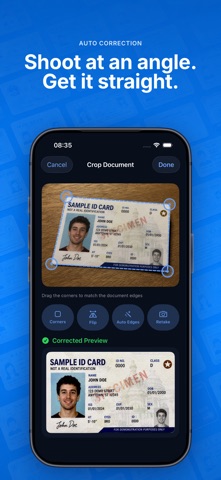
• Clean scans, automatically — automatic edge detection, perspective correction for photos shot at an angle, adjustable shadow removal, plus Enhanced and Grayscale modes. Tidy copies with no manual trimming.
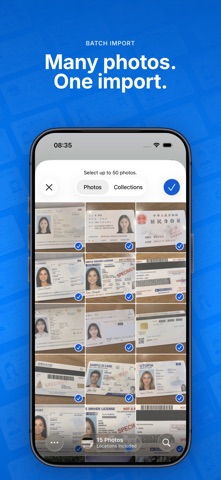
• Front and back on one page — shoot both sides in a row, or import them together from Photos. ID2PDF recognizes which side is which, pairs them into one document, and puts them on the same page by default.
• Several IDs from one photo — lay a few documents on the table, take a single shot, and ID2PDF splits them into separate documents (up to 6) in reading order.
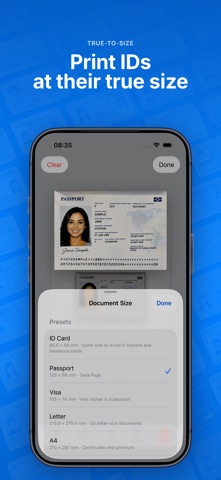
• True-to-size output — every document is laid out to the millimeter, so the print comes out exactly as large as the real thing. Presets cover the ID-1 card (85.6×54mm), the visa sticker (105×74mm), and the passport data page (125×88mm), and you can define any size from 20 to 300mm. Full-page sizes like A4, Letter, and A5 switch to edge-to-edge printing, just like a copier.
• 1 to 8 documents per page — 10 layouts, adjustable spacing, long-press to drag and reorder. Print a whole stack at once and save paper.
• Watermarks, free — presets such as "For this application only", with adjustable color, opacity, and density, tiled diagonally across the page so copies can't be reused elsewhere.
• Face ID protection — optionally require Face ID or Touch ID to open the app; the screen blurs when you switch away, so the app-switcher thumbnail never shows your documents.
• 100% on device — capture, recognition, layout, and PDF generation all run locally. Scanning and processing need no network, nothing is uploaded, and there's no account to create.
WHAT YOU SEE IS WHAT YOU PRINT
The page canvas on the home screen and the exported PDF share the same millimeter layout engine, so the positions, sizes, and watermark you see are exactly what comes out of the printer. Any crop the detector isn't sure about is flagged in orange, and you get one last confirmation before exporting.
MADE FOR
• Printing ID, passport, or visa copies for paperwork, reimbursements, school, a new job, or a lease
• Getting both sides of an ID onto one page without flipping it on a copier
• Fitting several documents on one page for batch copying and filing
• Keeping your go-to documents in a project, ready to re-export anytime
YOUR FILES STAY WITH YOU
Projects are saved locally, can be renamed or deleted anytime, and can auto-clear after 7 or 30 days if you prefer. No iCloud sync, no photo uploads.
ABOUT PRO
Capture, Photos import, auto-cropping, multi-card splitting, front/back pairing, all 10 layouts, watermarks, live page preview, project history, and Face ID protection are free — with no usage limits, no forced watermark, and no ads. Exporting and sharing the true-size, print-ready PDF is a Pro feature.
SUBSCRIPTION DETAILS
ID2PDF Pro offers:
• Monthly (auto-renewing)
• Lifetime — a one-time purchase, not a subscription
Prices are shown in the app and on the App Store for your region. Subscriptions renew automatically unless auto-renew is turned off at least 24 hours before the end of the current period. Payment is charged to your Apple ID account at confirmation of purchase. Your account is charged for renewal within 24 hours prior to the end of the current period. Manage or cancel anytime in Settings > Apple ID > Subscriptions.
Privacy Policy: https://id2pdf.com/privacy
Terms of Use: https://id2pdf.com/terms