

IFR Flight Trainer Simulator
IFR Flight Trainer Simulator is made and published by Flygo-Aviation Ltd. AppBrain is an independent app data site and isn't affiliated with Flygo-Aviation Ltd. The app name, icon, screenshots and description belong to Flygo-Aviation Ltd and are shown as published on the App Store.
AppBrain's verdict
Established- Rating on App Store
- 3.91
- 76 ratings
- Last updated
- June 28, 2026
It doesn't have enough ratings yet to judge what users think.
Rankings
App Store top chartsApp Store Rankings for IFR Flight Trainer Simulator
Competitors
Similar apps and more from Flygo-Aviation LtdAlternatives to IFR Flight Trainer Simulator





More from Flygo-Aviation Ltd


Releases
Updates seen on the App Store- Version
- 9.19
- Launched
- December 2014
No changelog data
User feedback
Ratings and reviews on the App StoreComments on IFR Flight Trainer Simulator for iOS
We don't have enough comments to show example comments. Please check back later.
Technology
Found in the app by AppBrain- Price
- Free
- App size
- 155.1 MB
- Content rating
- Everyone
Technologies used by IFR Flight Trainer Simulator
About the app and developer
About IFR Flight Trainer Simulator
IFR Flight Trainer Simulator is an education app developed by Flygo-Aviation Ltd.
What is the rating of IFR Flight Trainer Simulator?
IFR Flight Trainer Simulator is rated 3.91 out of 5 stars, based on 76 ratings.
Is IFR Flight Trainer Simulator free?
IFR Flight Trainer Simulator is free. The app size is 155.13 MB. The latest version available is 9.19. The last update was on June 28, 2026.
What are the requirements for IFR Flight Trainer Simulator?
The app has a content rating of Everyone. The app has been available on the App Store since December 2014.
Developer information for Flygo-Aviation Ltd
Address:
Frequently asked questions about IFR Flight Trainer Simulator
Is IFR Flight Trainer Simulator free?
Yes. IFR Flight Trainer Simulator is free on the App Store.
Is IFR Flight Trainer Simulator still available?
Yes. IFR Flight Trainer Simulator is on the App Store, and the last update we saw was on June 28, 2026.
How large is IFR Flight Trainer Simulator?
IFR Flight Trainer Simulator is 155.13 MB.
Is IFR Flight Trainer Simulator suitable for children?
App Store rates the content of IFR Flight Trainer Simulator as suitable for everyone.
How do people rate IFR Flight Trainer Simulator?
IFR Flight Trainer Simulator scores 3.91 out of 5 stars, from 76 ratings on the App Store.
Who made IFR Flight Trainer Simulator?
IFR Flight Trainer Simulator was developed by Flygo-Aviation Ltd. It is listed in the education category on the App Store.
What are the best alternatives to IFR Flight Trainer Simulator?
People looking at IFR Flight Trainer Simulator also look at these education apps: Garmin GTN Trainer, Boldmethod, Cessna Companion, PlaneEnglish: ARSim, FAR/AIM - FAA Pilot Reference.
Store listing
By Flygo-Aviation Ltd, from the App Store

Description by Flygo-Aviation Ltd Written by the developer, not by AppBrain. Click to read.
This is the perfect app for learning and practicing IFR procedures, and it is much cheaper than a single flight hour.
Try it out if you want to acquire an instrument rating or just want to brush up your IFR skills.
IFR Flight Trainer Simulator was designed with simplicity and intuitive operability in mind.
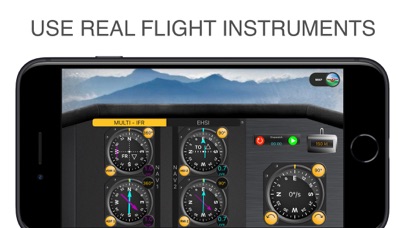
The instruments available are: VOR, RMI, HSI, EHSI, DME, Directional Gyro and airspeed indicator. Thanks to a NAV 1 and a NAV 2 modes, you will also be able to train for two NDB/VOR approaches.
Main features:
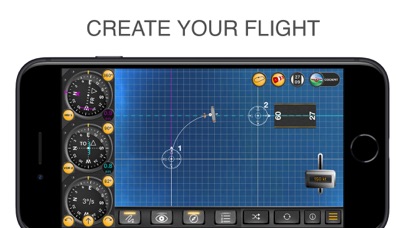
• COCKPIT/MAP - Use the cockpit mode to practice and use the map mode to set up a scenario and check you progress. Both the aircraft and ground stations can be easily relocated to a new position by dragging and dropping them.
• VOR, DME, HSI, EHSI, RMI - This aviation app is carefully designed to reflect the characteristics of different instruments. Choose between VOR or NDB navigation, select your instruments (HSI/EHSI or RMI) and a speed range up to 400 kts.
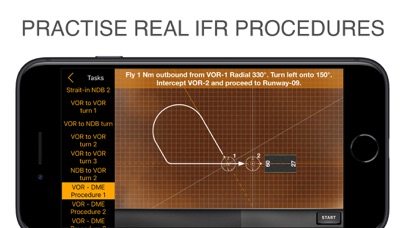
• APPROACH PROCEDURES - IFR Flight Trainer Simulator will help learn how to track a radial, how to intercept a radial outbound, inbound, how to fly a DME arc, and so on. It is the simplest way to learn the navigation procedures inside out!
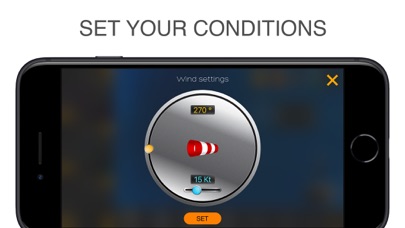
• WIND - Have you become familiar with all the procedures? Add some wind to spice things up. The wind settings are displayed on separate screen, where you can set its direction and speed to increase the challenge.
• HOLDING - Set and practice standard or non-standard holding patterns. Test you skills with VOR or NDB fix holdings.
You already know where your next flight will happen? Build a scenario for it in the app to practice what awaits you in real life. This way you can practice your flight in a safe environment before facing the real challenge in the cockpit.
If you want to learn the essentials, take a look at the built-in tasks as well.
All features:
• Use the classic or glass cockpit mode to simulate what you see in a real aircraft
• Use the map mode to learn and understand the procedures from a third-person point of view
• Choose between VOR and NDB navigation
• Use the following, carefully designed instruments: RMI, HSI, EHSI, Directional gyro, DME, Airspeed indicator
• Fly your own routes by creating challenging scenarios, using holding patterns and adjusting the wind
• Test your knowledge through various built-in tasks
• Drag & drop the aircraft or ground station symbols to move them around quickly
• Turn the aircraft with 1.5°/s, 3°/s (standard), 6°/s and 9°/s modes, or just simply rotate the compass dial
• View your flight path by enabling the aircraft track trail
• Simulate winds up to 50 kts
• Practice IFR flying procedures by generating random scenarios
Download the app to see for yourself whether we can help you learn the essentials of IFR navigation. Try it for free and prepare at home without wasting expensive flight or simulator time.