

Image and Video Compressor
Image and Video Compressor is made and published by Jonathan Ng. AppBrain is an independent app data site and isn't affiliated with Jonathan Ng. The app name, icon, screenshots and description belong to Jonathan Ng and are shown as published on the App Store.
AppBrain's verdict
- Rating on App Store
- 5.00
- 1 ratings
- Last updated
- October 15, 2026
- Size
- 6.67 MB
It doesn't have enough ratings yet to judge what users think.
User feedback
Ratings and reviews on the App StoreComments on Image and Video Compressor for iOS
We don't have enough comments to show example comments. Please check back later.
Store listing
By Jonathan Ng, from the App Store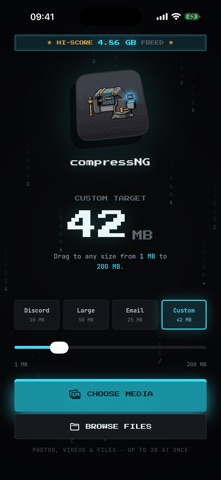


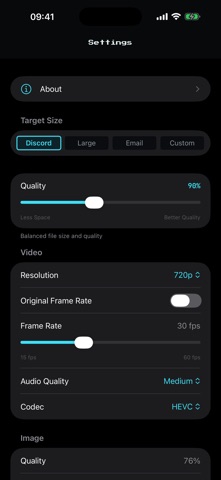

Description by Jonathan Ng Written by the developer, not by AppBrain. Click to read.
CompressNG uses the MB target you choose to calculate compression for photos and videos. Select 10 MB, 25 MB, 50 MB, or a custom target from 1–200 MB. Add media from Photos or Files—or send it from another app's Share menu. Compress a mixed batch, inspect the result, then save or share the output where you need it.
Built for email attachments, school or work forms, messaging, upload limits, and reclaiming storage.
PRIVATE BY DESIGN
• Photo and video processing happens on your device
• No developer server, media uploads, account, ads, analytics, or tracking
• Works offline with media already stored on your device
VIDEO CONTROLS
• H.264 for compatibility or HEVC for efficiency
• Resolution caps: Original, 1080p, 720p, and 480p
• Frame-rate controls from 15–60 fps
• Audio quality from 64–192 kbps
• A warning when a video already fits your target
• If a result lands above target, Recompress adjusts the encoding budget for another pass
PHOTO CONTROLS
• Adjustable image quality
• Resize by longest side or exact dimensions
• Crop, rotate, and resize before export
• Preserve transparency in PNG images
BATCH PHOTOS AND VIDEOS
Process up to 20 photos and videos in one queue. Follow progress in the app or, on supported iPhone and iPad devices, with a Live Activity.
COMPARE BEFORE YOU SHARE
Review photos with a before-and-after slider and videos with synchronized comparison playback. See output size, dimensions, codec, bitrate, and space saved before export.
PRIVACY CONTROLS
Strip EXIF metadata such as location and camera information. Anonymize exported filenames when you do not want the original name attached.
TRACK YOUR SAVINGS
See files compressed, average savings, recent sessions, monthly savings, and your biggest result. Aggregate lifetime stats can sync through your private iCloud account.
Private, target-based compression with precise controls and a retro terminal look.
Safety and technology
Found in the app by AppBrain- Price
- Free
- App size
- 6.67 MB
- Content rating
- Everyone
Technologies used by Image and Video Compressor
Releases
Updates seen on the App Store- Version
- 1.3
- Launched
- July 2026
No changelog data
Alternatives
Similar apps and more from Jonathan NgAlternatives to Image and Video Compressor


More from Jonathan Ng

Rankings
App Store top chartsApp Store Rankings for Image and Video Compressor
About the app and developer
About Image and Video Compressor
Image and Video Compressor is a photo & video app developed by Jonathan Ng.
User Ratings
Image and Video Compressor is rated 5.00 out of 5 stars. The rating is based on one rating ratings.
App Information
Image and Video Compressor is freely available from the App Store. The app size is 6.67 MB. The latest version available is 1.3. The last update was on October 15, 2026.
Technical Requirements
The app has a content rating of Everyone. The app has been available on the App Store since July 2026.
Developer information for Jonathan Ng
Address:
Frequently asked questions about Image and Video Compressor
Is Image and Video Compressor free?
Yes. Image and Video Compressor is free on the App Store.
Is Image and Video Compressor still available?
Yes. Image and Video Compressor is on the App Store, and the last update we saw was on October 15, 2026.
How large is Image and Video Compressor?
Image and Video Compressor is 6.67 MB.
Is Image and Video Compressor suitable for children?
App Store rates the content of Image and Video Compressor as suitable for everyone.
How do people rate Image and Video Compressor?
Image and Video Compressor has one rating of 5.00 stars on the App Store.
Who made Image and Video Compressor?
Image and Video Compressor was developed by Jonathan Ng. It is listed in the photo & video category on the App Store.
What are the best alternatives to Image and Video Compressor?
People looking at Image and Video Compressor also look at these photo & video apps: Slim: Photo & Video Compressor, Tiny Photo Compressor, Photo Compressor: MB to KB, Video Compressor: Target Size, Compress Video - Size Reducer.