

Image Converter - JPEG, PNG
Image Converter - JPEG, PNG is made and published by Husein Hakim. AppBrain is an independent app data site and isn't affiliated with Husein Hakim. The app name, icon, screenshots and description belong to Husein Hakim and are shown as published on the App Store.
AppBrain's verdict
- Last updated
- August 9, 2025
Rankings
App Store top chartsApp Store Rankings for Image Converter - JPEG, PNG
Competitors
Similar apps and more from Husein HakimAlternatives to Image Converter - JPEG, PNG


More from Husein Hakim


Releases
Updates seen on the App Store- Version
- 1.0
- Launched
- August 2025
No changelog data
User feedback
Ratings and reviews on the App StoreComments on Image Converter - JPEG, PNG for iOS
We don't have enough comments to show example comments. Please check back later.
Technology
Found in the app by AppBrain- Price
- Free
- App size
- 11.0 MB
- Content rating
- Everyone
Technologies used by Image Converter - JPEG, PNG
About the app and developer
About Image Converter - JPEG, PNG
Image Converter - JPEG, PNG is an utilities app developed by Husein Hakim.
What is the rating of Image Converter - JPEG, PNG?
Image Converter - JPEG, PNG has no ratings yet.
Is Image Converter - JPEG, PNG free?
Image Converter - JPEG, PNG is free. The app size is 11.05 MB. The latest version available is 1.0. The last update was on August 9, 2025.
What are the requirements for Image Converter - JPEG, PNG?
The app has a content rating of Everyone. The app has been available on the App Store since August 2025.
Developer information for Husein Hakim
Address:
Store listing
By Husein Hakim, from the App Store
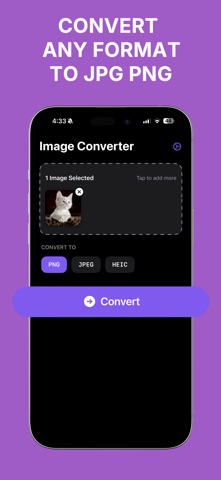

Description by Husein Hakim Written by the developer, not by AppBrain. Click to read.
With Image Converter - JPEG, PNG you’ll never have to worry about compatibility issues again. This image converter app is designed for fast, intuitive, and professional results, making it the perfect image conversion solution for everyone.
Why Choose Image Converter - JPEG, PNG?
Instant Image Conversion: Convert your images in seconds using the powerful Image Converter engine.
Convert Images in Bulk.
Supports JPEG, PNG, and HEIF: Choose from the most essential image formats.
Offline Access: Use Image Converter - JPEG, PNG without needing an internet connection.
Clean & Simple Interface: Optimized for a smooth and focused Image Converter experience.
Whether you need an image for web upload, design use, document sharing, or just resizing and reformatting, Image Converter - JPEG, PNG is the solution you’ve been looking for.
How to Use This Image Converter:
Converting images with Image Converter - JPEG, PNG is as easy as 1-2-3. Here's how:
Open Image Converter - JPEG, PNG.
Select your image from the photo gallery or files.
Choose your output format: JPEG, PNG, or HEIF.
Tap “Convert” and your image is ready!
Save or share the converted file with ease.
This quick and efficient process is what makes Image Converter the go-to app for anyone needing instant image format changes.
Supported Formats
Currently, Image Converter - JPEG, PNG supports the most widely used image formats:
JPEG
PNG
HEIF (High-Efficiency Image Format)
Our Image Converter is optimized for these three formats to ensure perfect compatibility and the highest output quality.
Perfect for Every Use Case
Image Converter - JPEG, PNG is ideal for:
Students submitting assignments in required formats
Social media content creators
Graphic designers needing high-quality images in specific formats
Anyone who just wants a reliable Image Converter in their pocket
Whether you're converting screenshots to JPEG, saving web images as PNG, or optimizing photos in HEIF, Image Converter - JPEG, PNG makes it fast and easy.
Why Thousands Trust Image Converter
Thousands of users rely on Image Converter - JPEG, PNG every day for clean, crisp, and correct image conversions. Our lightweight and fast Image Converter app is built from the ground up for convenience and simplicity. Unlike other apps overloaded with unnecessary features, Image Converter - JPEG, PNG does one thing—and does it best: converting images.
Privacy & Security First
Image Converter - JPEG, PNG never uploads your photos or conversions to any server. All conversions happen locally on your device. Your privacy is respected and your images stay on your device.
EULA terms: https://www.apple.com/legal/internet-services/itunes/dev/stdeula/