Image Filters Photo Editor +
Image Filters Photo Editor + is made and published by PaulJAdam.com. AppBrain is an independent app data site and isn't affiliated with PaulJAdam.com. The app name, icon, screenshots and description belong to PaulJAdam.com and are shown as published on the App Store.
AppBrain's verdict
Established- Rating on App Store
- 3.69
- 32 ratings
- Last updated
- October 24, 2025
- Size
- 2.05 MB
It doesn't have enough ratings yet to judge what users think.
User feedback
Ratings and reviews on the App StoreComments on Image Filters Photo Editor + for iOS
We don't have enough comments to show example comments. Please check back later.
Store listing
By PaulJAdam.com, from the App StoreDescription by PaulJAdam.com Written by the developer, not by AppBrain. Click to read.
BLUR
◆ Bokeh Blur – Applies a bokeh effect.
◆ Disc Blur – Blurs an image using disc shapes.
◆ Gaussian Blur – Blur and smooth out images.
◆ Morphology Gradient – Finds the edges of an image.
◆ Motion Blur – Blurs an image to simulate the effect of using a camera that moves a specified angle and distance while capturing the image.
◆ Zoom Blur – Simulates the effect of zooming the camera while capturing the image.
COLOR ADJUSTMENT
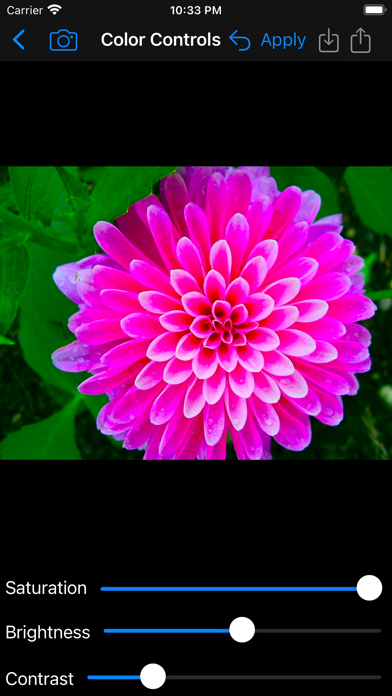
◆ Color Controls – Greatly enhance colors, or remove them for a black & white photo.
◆ Color Threshold – Converts image into high-contrast color.
◆ Exposure Adjust – Brighten up dark photos or darken bright photos.
◆ Gamma Adjust – Darkens or lightens photos.
◆ Hue Adjust – Adjust photo’s hue/color tint.
◆ Vibrance – Make the photo’s color pop without looking fake.
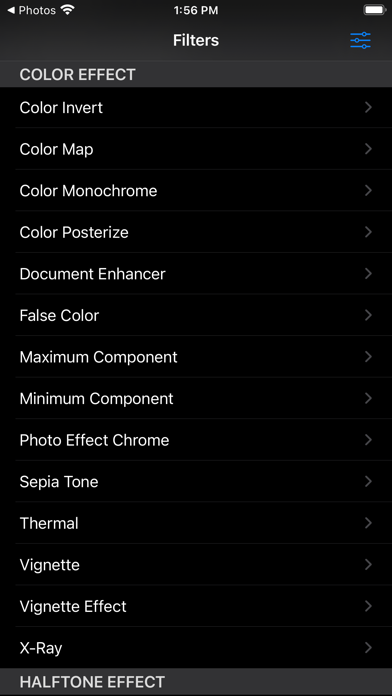
COLOR EFFECT
◆ Color Invert – Invert all colors as if image was converted to a negative.
◆ Color Map – Maps the colors from a psychedelic gradient to your image.
◆ Color Monochrome – Remaps colors so they fall within shades of a single color.
◆ Color Posterize – Turn images into posters, i.e. the “Andy Warhol” effect.
◆ Document Enhancer – Enhance a document image by removing unwanted shadows, whitening the background, and enhancing contrast.
◆ False Color – Maps luminance to a color ramp of two colors.
◆ Maximum Component – Returns a grayscale image from max(r,g,b).
◆ Minimum Component – Returns a grayscale image from min(r,g,b).
◆ Photo Effects:
- Chrome – Vintage photography film with exaggerated color.
- Fade – Vintage photography film with diminished color.
- Instant – Vintage photography film with distorted colors.
- Mono – Black-and-white photography film with low contrast.
- Noir – Black-and-white photography film with exaggerated contrast.
- Process – Vintage photography film with emphasized cool colors.
- Tonal – Black-and-white photography film without significantly altering contrast.
- Transfer – Vintage photography film with emphasized warm colors.
◆ Sepia Tone – Give an old-fashioned look to your photos.
◆ Thermal – Apply a Thermal image effect.
◆ Vignette – Soften photo’s edges and draw attention to its center.
◆ Vignette Effect – More advanced controls than basic Vignette.
◆ X-Ray – Apply a X-Ray style effect to an image.
HALFTONE EFFECT
◆CMYK Halftone – Creates a color, halftoned rendition of the source image, using cyan, magenta, yellow, and black inks over a white page.
◆ Dot Screen – Simulates the dot patterns of a halftone screen.
◆ Hatched Screen – Simulates the hatched pattern of a halftone screen.
◆ Line Screen – Simulates the line pattern of a halftone screen.
SHARPEN
◆ Sharpen Luminance – Increases image detail by sharpening.
◆ Unsharp Mask – Sharpen images to make them stand out.
STYLIZE
◆ Bloom – Softens edges and applies a pleasant glow to an image.
◆ Comic Effect – Turn images into comic book pages.
◆ Crystallize – Creates polygon-shaped color blocks from image.
◆ Edges – Finds edges in image and displays them in color.
◆ Gabor Gradients – Linear filter used for texture analysis.
◆ Gloom – Dulls the highlights of an image.
◆ Hexagonal Pixellate – Maps an image to colored hexagons.
◆ Highlight and Shadows – Increase or decrease shadows and highlight.
◆ Line Overlay – Creates a sketch that outlines the edges of an image in black.
◆ Pixelate – Makes an image blocky by mapping to colored squares defined by the replaced pixels.
◆ Pointillize – Renders photo in a pointillistic style.
Apply image filters in a quick, easy to use interface. Share filtered photos to text messages & save to your phone.
Save full size image to Photo Library, Send via Email, Copy into other apps.
No Ads!
Post to the #ImageFilterApp Hashtag to see other's image filter creations on Instagram, Twitter, & Facebook.
App will be updated over time with more filters.
Supports Light and Dark Modes.
Landscape and Portrait orientations supported.
Fully Accessible with the VoiceOver screen reader for blind and low vision users.
Safety and technology
Found in the app by AppBrain- Price
- Free
- App size
- 2.05 MB
- Content rating
- Everyone
Technologies used by Image Filters Photo Editor +
Releases
Updates seen on the App Store- Version
- 6.1
- Launched
- August 2013
No changelog data
Alternatives
Similar apps and more from PaulJAdam.comAlternatives to Image Filters Photo Editor +
More from PaulJAdam.com
Rankings
App Store top chartsApp Store Rankings for Image Filters Photo Editor +
About the app and developer
About Image Filters Photo Editor +
Image Filters Photo Editor + is a photo & video app developed by PaulJAdam.com.
What is the rating of Image Filters Photo Editor +?
Image Filters Photo Editor + is rated 3.69 out of 5 stars, based on 32 ratings.
Is Image Filters Photo Editor + free?
Image Filters Photo Editor + is free. The app size is 2.05 MB. The latest version available is 6.1. The last update was on October 24, 2025.
What are the requirements for Image Filters Photo Editor +?
The app has a content rating of Everyone. The app has been available on the App Store since August 2013.
Developer information for PaulJAdam.com
Address: