Download Android Apps and Games
AppBrain
  • Apps
  • Apps being viewed right now Trending apps today Most popular apps All-time most downloaded apps Top rated apps
  • Intelligence ▾
    Intelligence overview → Track any Android app or your whole market
    Track & analyze
    Keyword Tracker & OptimizerTrack & improve Play rankings App Performance ReportOne-off PDF for any app StatisticsFree Android & Play market stats
    Promote your app
    Featured Apps App Links
  • Intelligence
  • Pricing
  • Dashboard
  • Sign up
  • Log in
Last updated on: 2026-07-08
App Store Apps > Photo & Video > Image Filter Photo Editor Tool
Image Filter Photo Editor Tool icon

Image Filter Photo Editor Tool

3.3
PaulJAdam.com
4.64
11 reviews
Free

Image Filter Photo Editor Tool Screenshot 1 of 10
Image Filter Photo Editor Tool Screenshot 2 of 10
Image Filter Photo Editor Tool Screenshot 3 of 10
Image Filter Photo Editor Tool Screenshot 4 of 10
Image Filter Photo Editor Tool Screenshot 5 of 10
Image Filter Photo Editor Tool Screenshot 6 of 10
Image Filter Photo Editor Tool Screenshot 7 of 10
Image Filter Photo Editor Tool Screenshot 8 of 10
Image Filter Photo Editor Tool Screenshot 9 of 10
Image Filter Photo Editor Tool Screenshot 10 of 10
Download from the App Store

About Image Filter Photo Editor Tool

Image Filter Photo Editor Tool is an overall app developed by PaulJAdam.com.

Download Statistics

User Ratings

Image Filter Photo Editor Tool is rated 4.64 out of 5 stars. The rating is based on 11 ratings.

App Information

Image Filter Photo Editor Tool is FREE to download. The APK download size is 17.18 MB. The latest version available is 3.3. The last update was on November 2, 2025.

Technical Requirements

The app has a content rating of Everyone. The app has been available on Google Play January 2021.

Description
Amazing Photoshop like filter effects on your iPhone & iPad!
◆ Color Controls – Greatly enhance colors, or remove them for a black & white photo.
◆ Comic Effect – Turn images into comic book pages.
◆ Color Invert – Invert all colors as if image was converted to a negative.
◆ Color Map – Maps the colors from preset gradients or add your own gradient color stops.
◆ Color Monochrome – Remaps colors so they fall within shades of a single color.
◆ Color Posterize – Turn images into posters, i.e. the “Andy Warhol” effect.
◆ Crystallize – Creates polygon-shaped color blocks from image.
◆ Dot Screen – Simulates the dot patterns of a halftone screen.
◆ Edges – Finds edges in image and displays them in color.
◆ Exposure Adjust – Brighten up dark photos or darken bright photos.
◆ Gamma Adjust – Darkens or lightens photos.
◆ Gloom – Dulls the highlights of an image.
◆ Gaussian Blur – Classic blur filer we all love.
◆ Hatched Screen – Simulates the hatched pattern of a halftone screen.
◆ Highlight and Shadows – Increase or decrease shadows and highlight.
◆ Hue Adjust – Adjust photo’s hue/color tint.
◆ Line Screen – Simulates the line pattern of a halftone screen.
◆ Motion Blur – Blur by angle and distance.
◆ Photo Effects:
- Chrome – Vintage photography film with exaggerated color.
- Fade – Vintage photography film with diminished color.
- Instant – Vintage photography film with distorted colors.
- Mono – Black-and-white photography film with low contrast.
- Noir – Black-and-white photography film with exaggerated contrast.
- Process – Vintage photography film with emphasized cool colors.
- Tonal – Black-and-white photography film without significantly altering contrast.
- Transfer – Vintage photography film with emphasized warm colors.
◆ Pixellate – Makes an image blocky by mapping to colored squares defined by the replaced pixels.
◆ Pointillize – Renders photo in a pointillistic style.
◆ Sepia Tone – Give an old-fashioned look to your photos.
◆ Sharpen Luminance – The classic sharpen filter.
◆ Straighten – Rotate the image.
◆ Temperature and Tint – Change the colors of the image.
◆ Thermal – Apply a Thermal image effect.
◆ Unsharp Mask – Sharpen images to make them stand out.
◆ Vibrance – Make the photo’s color pop without looking fake.
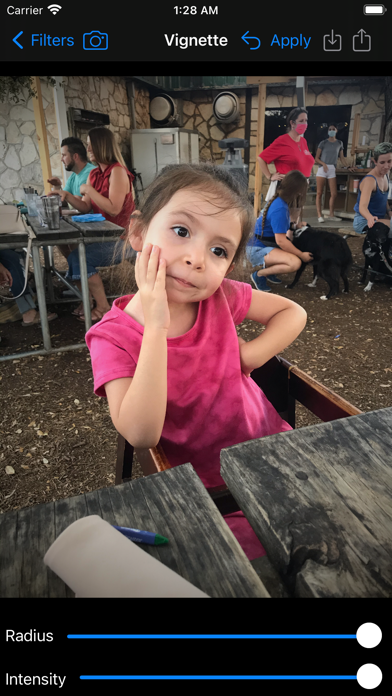
◆ Vignette – Soften photo’s edges and draw attention to its center.
◆ Vignette Effect – More advanced controls than basic Vignette.
◆ Watermark – Add text in a custom font on top of the image to protect your copyright.
◆ X-Ray – Apply a X-Ray style effect to an image.
◆ Zoom Blur – Simulates the effect of zooming the camera while capturing the image.
*More filters with free future updates!

Apply image filters in a quick, easy to use interface. Share filtered photos to text messages & save to your phone.

Save full size image to Photo Library, Send via Email, Copy into other apps.

Post to the #ImageFilterApp Hashtag to see other's image filter creations on Instagram, Twitter, & Facebook.

This app will be updated over time with many more filters added.

App supports Light and Dark Appearance Modes.

Landscape and Portrait orientations are supported.

Fully Accessible with the VoiceOver screen reader for blind and low vision users.
Show more Show less

More data about Image Filter Photo Editor Tool

Price Free to download
Rating 4.64 based on 11 ratings
Ranking Not ranked
Version 3.3
App download size 17.2 MB
Suitable for Everyone

Alternative downloads for the Image Filter Photo Editor Tool app

Simple Negative Image icon Simple Negative Image
Ryouhei Azuma
4.4
Free
106 ratings
Negative Photo Video Effect icon Negative Photo Video Effect
Manish Mehra
4.3
Free
38 ratings
Negative Image: Photo Enhancer icon Negative Image: Photo Enhancer
Ofir Yagil
4.3
Free
171 ratings
Negative Photo Effects icon Negative Photo Effects
Mithilesh Kumar
1.7
Free
9 ratings
More active
Negative Me icon Negative Me
福恩 毛
3.8
Free
43 ratings
Negative Photo Video Maker icon Negative Photo Video Maker
Manish Mehra
4.2
Free
28 ratings
Negative Photo: Photo Inverter icon Negative Photo: Photo Inverter
Thao Nguyen Thi
4.7
Free
2.9K ratings
Negative Photo Effect icon Negative Photo Effect
Ramesh Kumar
1.7
Free
6 ratings

More from PaulJAdam.com

Image Filters Photo Editor + icon Image Filters Photo Editor +
PaulJAdam.com
3.6
Free
31 ratings
Accessibility Techniques icon Accessibility Techniques
PaulJAdam.com
5.0
Free
15 ratings
a11yTools - Web Accessibility icon a11yTools - Web Accessibility
PaulJAdam.com
4.2
$9.99
5 ratings
Text Reader - Language Pronunciation TTS (Text-to-Speech) icon Text Reader - Language Pronunciation TTS (Text-to-Speech)
PaulJAdam.com
3.0
$0.99
2 ratings
My Task Board - To Do Tracker icon My Task Board - To Do Tracker
PaulJAdam.com
5.0
$0.99
1 ratings

Changelog of Image Filter Photo Editor Tool

No changelog data

Developer information for PaulJAdam.com

PaulJAdam.com

Address:

Share Image Filter Photo Editor Tool

Comments on Image Filter Photo Editor Tool for iOS

We don't have enough comments to show example comments. Please check back later.

App Store Rankings for Image Filter Photo Editor Tool

This app is not ranked

Technologies used by Image Filter Photo Editor Tool

Popular Overall Apps other people are watching Apps on sale Today's trending apps Top new apps
Simple Negative Image icon Simple Negative Image
Negative Photo Video Effect icon Negative Photo Video Effect
Negative Image: Photo Enhancer icon Negative Image: Photo Enhancer
Negative Photo Effects icon Negative Photo Effects
Negative Me icon Negative Me
Negative Photo Video Maker icon Negative Photo Video Maker
Negative Photo: Photo Inverter icon Negative Photo: Photo Inverter
Negative Photo Effect icon Negative Photo Effect

Back to top
AppBrain Intelligence premium content

Subscribe now to get full and unlimited access to AppBrain Intelligence. You'll have access to:

  • App Intelligence dashboard (performance timeline, competitor comparison, country rankings, insight cards)
  • Detailed ranking data per app
  • Full timeline per developer
  • Device market shares data per country
  • Unlimited keyword tracking
1 Month

$75/mo
(billed every month)

SAVE 0%
Subscribe
3 Months

$65/mo
($195 billed every 3 months)

SAVE 13%
Subscribe
1 Year

$57.50/mo
($690 billed every year)

SAVE 23%
Subscribe
Each subscription will automatically renew 3 days before the expiration date for the same time period. Subscriptions can be cancelled at any time before the renewal.

AppBrain is a directory focused on discovering great apps and games. We give statistics, rankings and search options that Google Play and the App Store don't have. All trademarks are owned by their respective owners. AppBrain doesn't offer APKs or binaries, and always lets users install the official version from Google Play or the App Store.

More apps

  • Top Android apps being viewed
  • Christ Apostolic Church Hymnal
  • View ABC The Alphabet Train
  • Tiimo: Daily To Do List

Android Statistics

  • Android statistics
  • Google Play Developer stats
  • Trending Android Apps
  • Top popular Apps
  • Buy the best Android phone

About AppBrain

  • Contact
  • Privacy
  • Documentation
  • DMCA takedowns
  • Articles
  • Blog
  • Android Interstitial Ads: Best practices to optimize your app's earnings
© 2010-2026 - AppBrain