

Image Resize & Compress
Image Resize & Compress is made and published by JEAN CHOE. AppBrain is an independent app data site and isn't affiliated with JEAN CHOE. The app name, icon, screenshots and description belong to JEAN CHOE and are shown as published on the App Store.
AppBrain's verdict
- Last updated
- October 1, 2026
Rankings
App Store top chartsApp Store Rankings for Image Resize & Compress
Competitors
Similar apps and more from JEAN CHOE


Releases
Updates seen on the App Store- Version
- 1.1.1
- Launched
- July 2026
No changelog data
User feedback
Ratings and reviews on the App StoreComments on Image Resize & Compress for iOS
We don't have enough comments to show example comments. Please check back later.
Technology
Found in the app by AppBrain- Price
- Free
- App size
- 36.2 MB
- Content rating
- Everyone
Technologies used by Image Resize & Compress
About the app and developer
About Image Resize & Compress
Image Resize & Compress is an utilities app developed by JEAN CHOE.
What is the rating of Image Resize & Compress?
Image Resize & Compress has no ratings yet.
Is Image Resize & Compress free?
Image Resize & Compress is free. The app size is 36.19 MB. The latest version available is 1.1.1. The last update was on October 1, 2026.
What are the requirements for Image Resize & Compress?
The app has a content rating of Everyone. The app has been available on the App Store since July 2026.
Developer information for JEAN CHOE
Address:
Store listing
By JEAN CHOE, from the App Store



Description by JEAN CHOE Written by the developer, not by AppBrain. Click to read.
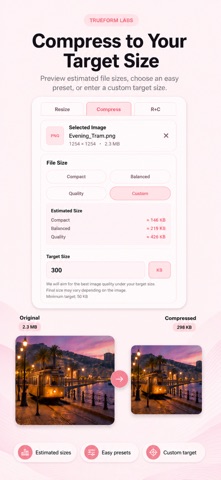
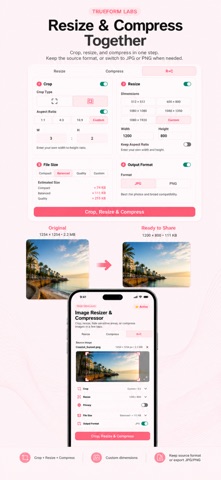
Choose an image from your library, crop it, resize with presets or custom dimensions, and hide sensitive areas with Cover or Mosaic. Compress images with quality presets or a custom target file size, and compare estimated sizes before processing.
Keep the original image format or export as JPG or PNG. Preview your result, then save it to your photo library or share it directly.
• Crop images with preset or custom aspect ratios
• Resize with presets or custom width and height
• Hide sensitive areas with Cover or Mosaic
• Compress with Compact, Balanced, or Quality presets
• Set a custom target file size
• Keep the original format or export as JPG/PNG
• Preview before saving
• Save and share results
• Works offline
Start with 3 free uses. Lifetime Unlock is available as a one-time purchase.