

Image to PDF: Convert to PDF
Image to PDF: Convert to PDF is made and published by Mohamed Abdelmagid. AppBrain is an independent app data site and isn't affiliated with Mohamed Abdelmagid. The app name, icon, screenshots and description belong to Mohamed Abdelmagid and are shown as published on the App Store.
AppBrain's verdict
- Rating on App Store
- 5.00
- 2 ratings
- Last updated
- July 22, 2025
It doesn't have enough ratings yet to judge what users think.
Rankings
App Store top chartsApp Store Rankings for Image to PDF: Convert to PDF
Competitors
Similar apps and more from Mohamed AbdelmagidAlternatives to Image to PDF: Convert to PDF


More from Mohamed Abdelmagid


Releases
Updates seen on the App Store- Version
- 1.0
- Launched
- July 2025
No changelog data
User feedback
Ratings and reviews on the App StoreComments on Image to PDF: Convert to PDF for iOS
We don't have enough comments to show example comments. Please check back later.
Technology
Found in the app by AppBrain- Price
- Free
- App size
- 1.15 MB
- Content rating
- Everyone
Technologies used by Image to PDF: Convert to PDF
About the app and developer
About Image to PDF: Convert to PDF
Image to PDF: Convert to PDF is an utilities app developed by Mohamed Abdelmagid.
User Ratings
Image to PDF: Convert to PDF is rated 5.00 out of 5 stars. The rating is based on 2 ratings.
App Information
Image to PDF: Convert to PDF is freely available from the App Store. The app size is 1.15 MB. The latest version available is 1.0. The last update was on July 22, 2025.
Technical Requirements
The app has a content rating of Everyone. The app has been available on the App Store since July 2025.
Developer information for Mohamed Abdelmagid
Address:
Store listing
By Mohamed Abdelmagid, from the App Store

Description by Mohamed Abdelmagid Written by the developer, not by AppBrain. Click to read.
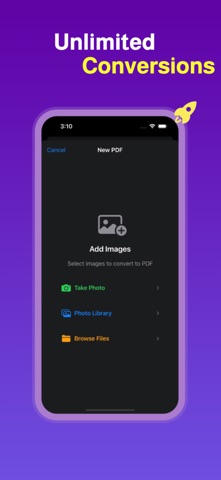
Perfect for students, professionals, and everyday users, this all-in-one photo to PDF app supports multiple image formats including JPG, PNG, HEIC, and more. Simply select your images from your gallery or take a new photo using your camera, customize the output, and convert to PDF instantly.
This powerful image to PDF converter makes it easy to create professional PDF documents from your photos, scans, and screenshots. Whether you’re creating a single-page PDF or combining multiple images into one file, everything is fast, seamless, and done right on your device—no internet required.
Key Features:
Convert JPG to PDF, PNG to PDF, and other image formats to PDF quickly and easily
Use your camera to take pictures and convert them to PDF instantly
Batch convert multiple photos to one single PDF file
Customize PDF settings including image quality, page size, orientation, and margins
Rearrange, rotate, or remove pages before saving your PDF
Create unlimited PDF pages from your images with no restrictions
Save, share, and export PDFs to other apps or cloud storage
Works offline without an internet connection
Lightweight, fast, and easy to use PDF converter app
This app is ideal for converting receipts, notes, ID cards, homework, forms, certificates, books, and more to PDF format. With full control over layout and quality, your converted PDFs are perfect for sharing, printing, and archiving.
Whether you're looking for a photo to PDF converter, a JPG to PDF app, a PNG to PDF tool, or a way to convert scanned documents into high-quality PDFs, this app covers all your needs. Easily turn photos into PDFs for school, work, or personal use.
Why choose this PDF converter app?
Intuitive and clean interface for easy image to PDF conversion
No limits on the number of images or pages in your PDF
Optimized for speed and performance on all devices
Reliable conversion for all image formats to PDF
Create PDF from camera or gallery instantly
Download now and enjoy the best image to PDF converter on the App Store. Whether it’s a JPG to PDF, picture to PDF, photo to PDF, or scanned document to PDF—you can do it all in just a few taps.
Terms of Use: https://mabdel8.github.io/imgtopdfweb/terms.html
Privacy Policy: https://mabdel8.github.io/imgtopdfweb/privacy.html