

ImagePress - Photo Resizer
ImagePress - Photo Resizer is made and published by CodeNeuron Studios. AppBrain is an independent app data site and isn't affiliated with CodeNeuron Studios. The app name, icon, screenshots and description belong to CodeNeuron Studios and are shown as published on the App Store.
AppBrain's verdict
- Last updated
- October 7, 2026
- Size
- 9.09 MB
User feedback
Ratings and reviews on the App StoreComments on ImagePress - Photo Resizer for iOS
We don't have enough comments to show example comments. Please check back later.
Store listing
By CodeNeuron Studios, from the App Store




Description by CodeNeuron Studios Written by the developer, not by AppBrain. Click to read.
Stop playing guess-and-check with a quality slider. Tell ImagePress the size cap, and it finds the highest quality that fits.
COMPRESS TO AN EXACT SIZE (KB)
- Set a target like 40 KB or 100 KB — ImagePress lands at or under it automatically
- Quick caps: 20 / 50 / 100 / 200 / 500 KB · 1 MB, or any custom limit
- Perfect for exam portals, government forms, and email attachment limits
- No more "File Too Large" rejections
EXACT SIZE & PRESETS — NO DISTORTION
- Resize to exact pixels (e.g. 200 × 230) with aspect-lock — no stretching
- Exam & ID presets: UPSC/SSC 140×160, Bank 200×230
- Social presets: Instagram square & portrait, Story, X, WhatsApp, LinkedIn
- Fill, Fit, or Stretch — your photo meets the spec exactly
WHY IMAGEPRESS
- 100% on-device — Your photos never leave your iPhone. No uploads, no cloud, no tracking.
- Zero internet needed — Works perfectly in airplane mode.
- Professional engine — Built on Apple native ImageIO and CoreGraphics.
- No accounts — Honest, one-time purchase. No subscriptions.
KEY FEATURES
- Compress to an exact file size (KB target)
- Exact width × height with aspect-lock and Fill/Fit/Stretch
- Exam, ID, and social media presets
- Quality presets (Low, Medium, High) + custom slider 10–100%
- Format conversion between JPEG, PNG, and HEIC (HEIC → JPG for forms)
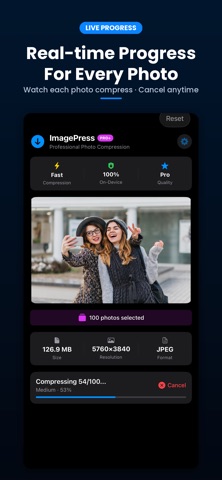
- Batch compress up to 500 photos at once
- Before and After comparison slider
- HDR Preserve — keep Display P3 colors and vivid brightness
- Save to Photos or share via AirDrop, Mail, and Messages
- Full Dark Mode support
HOW IT WORKS
1. Select photos from your library
2. Choose a target size, dimension preset, or quality
3. Tap Compress — done in seconds
4. Save to Photos or share anywhere
PERFECT FOR
- Exam and job-portal photo uploads (exact KB + dimensions)
- Government and online form submissions
- Sending photos via WhatsApp, Email, or Telegram
- Uploading to websites, blogs, and marketplaces
- Freeing up iPhone storage
- Anyone tired of "File Too Large" errors
YOUR PRIVACY MATTERS
ImagePress does not collect any data. We have no servers because we don't need them — every photo is processed locally on your device using Apple native frameworks. Use ImagePress completely offline.
FROM THE MAKERS OF VIDEOPRESS
ImagePress is built by the same independent team behind VideoPress — the trusted on-device video compressor. Same commitment to privacy, performance, and an honest one-time price.
Safety and technology
Found in the app by AppBrain- Price
- Free
- App size
- 9.09 MB
- Content rating
- Everyone
Technologies used by ImagePress - Photo Resizer
Releases
Updates seen on the App Store- Version
- 1.2
- Launched
- May 2026
No changelog data
Alternatives
Similar apps and more from CodeNeuron StudiosAlternatives to ImagePress - Photo Resizer


More from CodeNeuron Studios


Rankings
App Store top chartsApp Store Rankings for ImagePress - Photo Resizer
About the app and developer
About ImagePress - Photo Resizer
ImagePress - Photo Resizer is a photo & video app developed by CodeNeuron Studios.
What is the rating of ImagePress - Photo Resizer?
ImagePress - Photo Resizer has no ratings yet.
Is ImagePress - Photo Resizer free?
ImagePress - Photo Resizer is free. The app size is 9.09 MB. The latest version available is 1.2. The last update was on October 7, 2026.
What are the requirements for ImagePress - Photo Resizer?
The app has a content rating of Everyone. The app has been available on the App Store since May 2026.
Developer information for CodeNeuron Studios
Address:
Frequently asked questions about ImagePress - Photo Resizer
Is ImagePress - Photo Resizer free?
Yes. ImagePress - Photo Resizer is free on the App Store.
Is ImagePress - Photo Resizer still available?
Yes. ImagePress - Photo Resizer is on the App Store, and the last update we saw was on October 7, 2026.
How large is ImagePress - Photo Resizer?
ImagePress - Photo Resizer is 9.09 MB.
Is ImagePress - Photo Resizer suitable for children?
App Store rates the content of ImagePress - Photo Resizer as suitable for everyone.
Who made ImagePress - Photo Resizer?
ImagePress - Photo Resizer was developed by CodeNeuron Studios. It is listed in the photo & video category on the App Store.
What are the best alternatives to ImagePress - Photo Resizer?
People looking at ImagePress - Photo Resizer also look at these photo & video apps: Minimo Studio: Compress & Trim, Split Long Video To Shorts, PicSizer: Photo Compressor, Photo Compress - SmallPic, 2X: Video & Photo Compressor.