AppBrain's verdict on InScan - PDF Scanner
- Last updated
- December 28, 2025
- Size
- 40.3 MB
About InScan - PDF Scanner
InScan - PDF Scanner is an utilities app developed by 昱 曹.
User Ratings
The app has no ratings yet.
App Information
InScan - PDF Scanner is freely available from the App Store. The app size is 40.32 MB. The latest version available is 2.2.1. The last update was on December 28, 2025.
Technical Requirements
The app has a content rating of Everyone. The app has been available on the App Store since January 2025.
InScan - PDF Scanner is made and published by 昱 曹. AppBrain is an independent app data site and isn't affiliated with 昱 曹. The app name, icon, screenshots and description belong to 昱 曹 and are shown as published on the App Store.
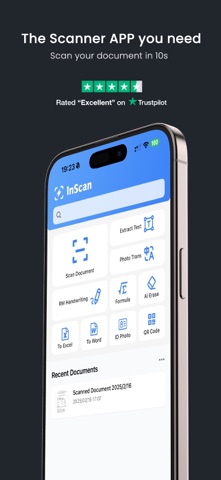
A CAMERA SCANNER THAT’S ACTUALLY EASY (CAM SCAN / CAMERA SCAN)
InScan is built for one-hand use and quick results:
• Smart auto-capture with edge detection and perspective correction
• Automatic background cleanup for a clear scanner / photocopy look
• Color, grayscale, and high-contrast modes for tricky lighting
• Batch scan multiple pages and save as one file (documents scanner)
• Import from Photos when you already have photo documents
PDF SCANNER + PDF MAKER (SCAN TO PDF)
Create professional files with one tap:
• Scan to PDF, scan pdf, or export JPG/PNG
• Merge, split, reorder, rotate, crop, and rename pages
• Compress to reduce size and free up space on iPhone storage
• Picture to PDF converter for pictures, screenshots, and paperwork
• Fast scanner performance that keeps up with busy days
SCAN NOTES, SCAN WORDS (OCR)
Need editable text? InScan includes OCR so you can copy text, search keywords inside your scanned files, and turn images into usable notes. It’s great for students and work: scan notes, scan docs, scan paper, and even small print.
SCAN & SHARE (SCAN AND EMAIL / SCAN TO EMAIL)
Send documents anywhere, anytime:
• Scan and email directly from the app
• Share to Files, iCloud Drive, Google Drive, Dropbox, OneDrive, WhatsApp, WeChat, Messenger, Slack, and more
• Print, AirDrop, or “scan me” and share in seconds
ORGANIZE YOUR SCANS
Keep everything tidy:
• Folders and tags for doc scanner workflows
• Smart search by file name (and by text after OCR)
• Favorites and recent lists so you always find what you scanned
• Optional app lock with Face ID / Touch ID on supported devices
USE CASES PEOPLE LOVE
• Work: scan contracts, invoices, forms, and business cards (card scanner)
• School: scan homework, textbooks, lecture slides, and handouts
• Travel: a pocket scanner for tickets, bookings, IDs, and receipts
• Home: paper scanner for letters, bills, warranties, and manuals
FREE SCANNER APP THAT FEELS PRO
If you’re looking for a scanner app free, free document scanner, free pdf scanner app, or a simple scanner that just works, InScan is designed to be fast, clean, and reliable—your everyday iPhone scanner app.
People search in many ways: cam scanner app, camera scanner app, phone scanner, photo scanner, scan app, pdf scanner, pdf scanner free, scan to pdf, scan and email, scan to email, document scanner app, scanned, scanned documents, photocopy, picture to pdf, and more. InScan is made for all of those moments.
Download InScan and start scanning today. Start scanning in seconds—InScan helps you scan, save, and share every document on the go. Scan. Save. Share. That’s InScan Today
Privacy Policy: https://interpreter.youshowedu.com/privacy
User Agreement and Terms of Service: https://interpreter.youshowedu.com/term
More data about InScan - PDF Scanner
| Price | Free |
| Rating | No ratings |
| Ranking | Not ranked |
| Version | 2.2.1 |
| App size | 40.3 MB |
| Suitable for | Everyone |
Share InScan - PDF Scanner
Comments on InScan - PDF Scanner for iOS
We don't have enough comments to show example comments. Please check back later.
- Price
- Free
- App size
- 40.3 MB
- Content rating
- Everyone
Technologies used by InScan - PDF Scanner
Changelog of InScan - PDF Scanner
Updates seen on the App Store- Version
- 2.2.1
- Launched
- January 2025
No changelog data
Alternatives to InScan - PDF Scanner
More from 昱 曹
App Store Rankings for InScan - PDF Scanner
Developer information for 昱 曹
Address:
Frequently asked questions about InScan - PDF Scanner
Is InScan - PDF Scanner free?
Yes. InScan - PDF Scanner is free on the App Store.
Is InScan - PDF Scanner still available?
Yes. InScan - PDF Scanner is on the App Store, and the last update we saw was on December 28, 2025.
How large is InScan - PDF Scanner?
InScan - PDF Scanner is 40.32 MB.
Is InScan - PDF Scanner suitable for children?
App Store rates the content of InScan - PDF Scanner as suitable for everyone.
Who made InScan - PDF Scanner?
InScan - PDF Scanner was developed by 昱 曹. It is listed in the utilities category on the App Store.
What are the best alternatives to InScan - PDF Scanner?
People looking at InScan - PDF Scanner also look at these utilities apps: 快拍扫描王, LinkMind, iCam Scanner with OCR - PDF CS, GuruDaily-每日校准, 快取-快递码管理助手.
Subscribe now to get full and unlimited access to AppBrain Intelligence. You'll have access to:
- App Intelligence dashboard (performance timeline, competitor comparison, country rankings, insight cards)
- Detailed ranking data per app
- Full timeline per developer
- Device market shares data per country
- Unlimited keyword tracking
- AI assistant access via MCP (Claude, Cursor or any MCP client)
AppBrain is an app data site, we track rankings, ratings, installs for all apps and games on Google Play and the App Store. AppBrain doesn't host app files or APKs, all install links go directly to the official store. All trademarks are owned by their respective owners.
More apps
App statistics
About AppBrain