

Interval Ear Training is made and published by 262Hz. AppBrain is an independent app data site and isn't affiliated with 262Hz. The app name, icon, screenshots and description belong to 262Hz and are shown as published on the App Store.
AppBrain's verdict
EstablishedLoved by users- Rating on App Store
- 4.70
- 364 ratings
- Last updated
- July 19, 2024
Users love it: 4.7 stars from 364 ratings.
Rankings
App Store top chartsApp Store Rankings for Interval Ear Training
Competitors
Similar apps and more from 262HzAlternatives to Interval Ear Training








More from 262Hz


Releases
Updates seen on the App Store- Version
- 4.2.2
- Launched
- March 2010
No changelog data
User feedback
Ratings and reviews on the App StoreComments on Interval Ear Training for iOS
We don't have enough comments to show example comments. Please check back later.
Technology
Found in the app by AppBrain- Price
- Free
- App size
- 294.6 MB
- Content rating
- Everyone
Technologies used by Interval Ear Training
About the app and developer
About Interval Ear Training
Interval Ear Training is a music app developed by 262Hz.
What is the rating of Interval Ear Training?
Interval Ear Training is rated 4.70 out of 5 stars, based on 360 ratings.
Is Interval Ear Training free?
Interval Ear Training is free. The app size is 294.56 MB. The latest version available is 4.2.2. The last update was on July 19, 2024.
What are the requirements for Interval Ear Training?
The app has a content rating of Everyone. The app has been available on the App Store since March 2010.
Developer information for 262Hz
Address:
Store listing
By 262Hz, from the App Store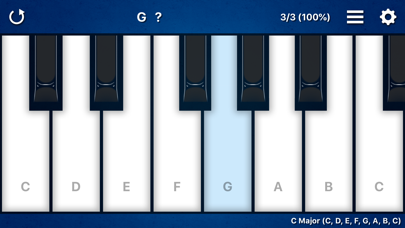
Description by 262Hz Written by the developer, not by AppBrain. Click to read.
A fun way to develop a better musical ear!
Great for experienced musicians and beginners.
Music students love this app.
----
Interval Ear Training can help improve:
• Interval recognition
• Sense of pitch
• Transcription skills
• Improvising skills
• Self esteem
---
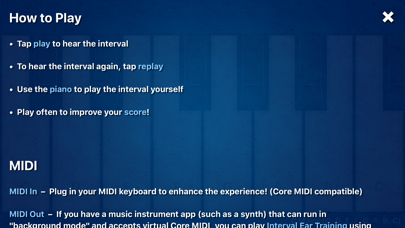
How to Play:
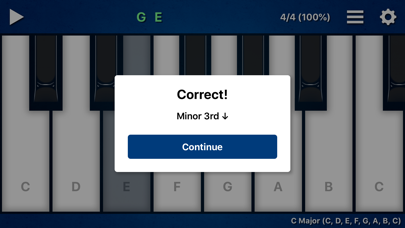
• Tap "play" to hear the interval
• To hear the interval again, tap "replay"
• Use the piano to play the interval yourself
• Play often to improve your score!
---
MIDI In – Plug in your MIDI keyboard to enhance the experience! (Core MIDI compatible)
MIDI Out – If you have a music instrument app (such as a synth) that can run in "background mode" and accepts virtual Core MIDI, you can play Interval Ear Training using the sounds of that app.
---
Tips for the Beginners:
Use the + and - keyboard range control to set the keyboard to a small range such as "C, D" or "C, D, E".
Keep practicing, and as you progress you'll want to make the range larger.
---
Tips for the Pros:
Set "Feedback" to "Never" and turn on "Autoplay" to play continuously without ever missing a beat. Crank up the tempo to see how fast you can go!
For more advanced ear training features, you'll want to Unlock Pro Settings.
---
Interval Settings:
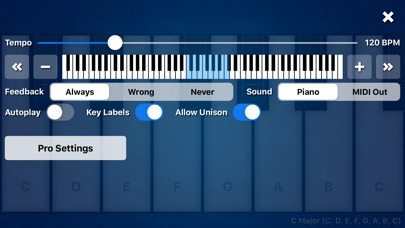
Tempo – 60 to 320 BPM
Keyboard Range – Starting at 2 notes in a major scale (ex. “C, D”) and up to 12 notes in a major scale (ex. “C, D, E, F, G, A, B, C, D, E, F, G”) with the ability to change octaves.
Feedback – Set to "Never" to stop all messages. Set to "Wrong" if you only want messages for incorrect intervals.
Sound – Set to "Piano" to hear the built-in piano sound. Set to "MIDI Out" to hear the sound of a music instrument app (such as a synth) that can run in "background mode" and accepts virtual Core MIDI.
Autoplay – Turn on to always play the next interval immediately. Turn off if you want to play the keyboard freely between intervals.
Key Labels – Turn off to remove note names on white keys.
Allow Unison – Turn off if you don't want the same note to be played twice in a row.
---
Pro Settings (requires in-app purchase):
Scale – 13 major scales
Difficulty - Diatonic, Random Tonic, Chromatic
Length – 2 to 6 notes
---
About the Difficulty Setting:
"Diatonic" uses notes from a major scale. This setting is recommended.
"Random Tonic" uses notes from a random major scale each time.
"Chromatic" mode is the "extreme mode" where any combination of notes is possible. As a result, strange intervals like the Augmented 2nd (ex. F to G#) are possible.
---
About the Score:
Interval Ear Training is all about self progression. Tap the score to reset at any time. The game goes on forever and the music never ends!
---
Can you guess the next note? Download the app to find out!