

Melody Ear Training is made and published by 262Hz. AppBrain is an independent app data site and isn't affiliated with 262Hz. The app name, icon, screenshots and description belong to 262Hz and are shown as published on the App Store.
AppBrain's verdict
Established- Rating on App Store
- 4.59
- 37 ratings
- Last updated
- July 19, 2024
- Size
- 294.9 MB
It doesn't have enough ratings yet to judge what users think.
User feedback
Ratings and reviews on the App StoreComments on Melody Ear Training for iOS
We don't have enough comments to show example comments. Please check back later.
Store listing
By 262Hz, from the App Store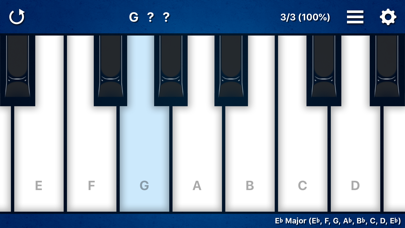
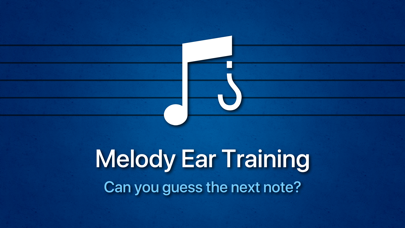
Description by 262Hz Written by the developer, not by AppBrain. Click to read.
A fun way to develop a better musical ear!
Great for experienced musicians and beginners.
Music students love this app.
----
Melody Ear Training can help improve:
• Interval recognition
• Sense of pitch
• Transcription skills
• Improvising skills
• Self esteem
---
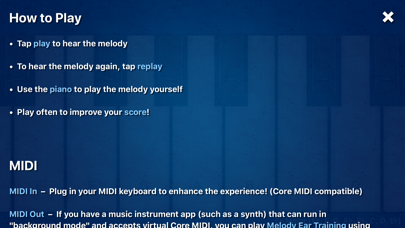
How to Play:
• Tap "play" to hear the melody
• To hear the melody again, tap "replay"
• Use the piano to play the melody yourself
• Play often to improve your score!
---
MIDI In – Plug in your MIDI keyboard to enhance the experience! (Core MIDI compatible)
MIDI Out – If you have a music instrument app (such as a synth) that can run in "background mode" and accepts virtual Core MIDI, you can play Melody Ear Training using the sounds of that app.
---
Tips for the Beginners:
Start with "2 Notes" for the melody length, set the difficulty to "Diatonic", and set the "Scale" to "C".
Use the + and - keyboard range control to set the keyboard to a small range such as "C, D" or "C, D, E".
Keep practicing, and as you progress you'll want to make the range larger.
---
Tips for the Pros:
Set "Feedback" to "Never" and turn on "Autoplay" to play continuously without ever missing a beat. Crank up the tempo to see how fast you can go!
---
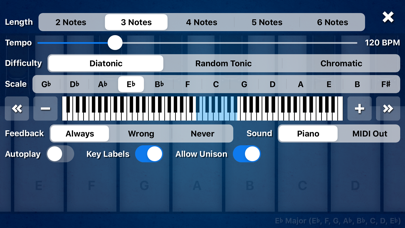
Melody Settings:
Scale – 13 major scales
Difficulty – Diatonic, Random Tonic, Chromatic
Length – 2 to 6 notes
Tempo – 60 to 320 BPM
Keyboard Range – Starting at 2 notes in a major scale (ex. “C, D”) and up to 12 notes in a major scale (ex. “C, D, E, F, G, A, B, C, D, E, F, G”) with the ability to change octaves.
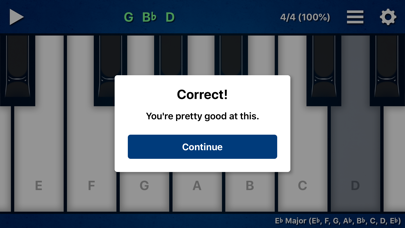
Feedback – Set to "Never" to stop all messages. Set to "Wrong" if you only want messages for incorrect melodies.
Sound – Set to "Piano" to hear the built-in piano sound. Set to "MIDI Out" to hear the sound of a music instrument app (such as a synth) that can run in "background mode" and accepts virtual Core MIDI.
Autoplay – Turn on to always play the next melody immediately. Turn off if you want to play the keyboard freely between melodies.
Key Labels – Turn off to remove note names on white keys.
Allow Unison – Turn off if you don't want the same note to be played twice in a row.
---
About the Difficulty Setting:
"Diatonic" uses notes from a major scale. This setting is recommended.
"Random Tonic" uses notes from a random major scale each time.
"Chromatic" mode is the "extreme mode" where any combination of notes is possible. As a result, strange intervals like the Augmented 2nd (ex. F to G#) are possible.
---
About the Score:
Melody Ear Training is all about self progression. Tap the score to reset at any time. The game goes on forever and the music never ends!
---
Can you guess the next note? Download the app to find out!
Safety and technology
Found in the app by AppBrain- Price
- $9.99
- App size
- 294.9 MB
- Content rating
- Everyone
Technologies used by Melody Ear Training
Releases
Updates seen on the App Store- Version
- 4.2.2
- Launched
- February 2010
No changelog data
Alternatives
Similar apps and more from 262HzAlternatives to Melody Ear Training







More from 262Hz


Rankings
App Store top chartsApp Store Rankings for Melody Ear Training
About the app and developer
About Melody Ear Training
Melody Ear Training is a music app developed by 262Hz.
User Ratings
Melody Ear Training is rated 4.59 out of 5 stars. The rating is based on 37 ratings.
App Information
Melody Ear Training costs $9.99. The app size is 294.88 MB. The latest version available is 4.2.2. The last update was on July 19, 2024.
Technical Requirements
The app has a content rating of Everyone. The app has been available on the App Store since February 2010.
Developer information for 262Hz
Address:
Frequently asked questions about Melody Ear Training
Is Melody Ear Training free?
No. Melody Ear Training costs $9.99 on the App Store.
Is Melody Ear Training still available?
Yes. Melody Ear Training is on the App Store, and the last update we saw was on July 19, 2024.
How large is Melody Ear Training?
Melody Ear Training is 294.88 MB.
Is Melody Ear Training suitable for children?
App Store rates the content of Melody Ear Training as suitable for everyone.
How do people rate Melody Ear Training?
Melody Ear Training scores 4.59 out of 5 stars, from 37 ratings on the App Store.
Who made Melody Ear Training?
Melody Ear Training was developed by 262Hz. It is listed in the music category on the App Store.
What are the best alternatives to Melody Ear Training?
People looking at Melody Ear Training also look at these music apps: ScalePlay, SWAM Viola, Pulse - Metronome, Pianist, SWAM Alto Sax.