

Interval Timer for Tasks
Interval Timer for Tasks is made and published by Foobar Creative. AppBrain is an independent app data site and isn't affiliated with Foobar Creative. The app name, icon, screenshots and description belong to Foobar Creative and are shown as published on the App Store.
AppBrain's verdict
Established- Rating on App Store
- 4.21
- 95 ratings
- Last updated
- October 10, 2026
It doesn't have enough ratings yet to judge what users think.
Rankings
App Store top chartsApp Store Rankings for Interval Timer for Tasks
Competitors
Similar apps and more from Foobar CreativeAlternatives to Interval Timer for Tasks






More from Foobar Creative





Releases
Updates seen on the App Store- Version
- 3.0.2
- Launched
- June 2019
No changelog data
User feedback
Ratings and reviews on the App StoreComments on Interval Timer for Tasks for iOS
We don't have enough comments to show example comments. Please check back later.
Technology
Found in the app by AppBrain- Price
- Free
- App size
- 86.7 MB
- Content rating
- Everyone
Technologies used by Interval Timer for Tasks
About the app and developer
About Interval Timer for Tasks
Interval Timer for Tasks is a productivity app developed by Foobar Creative.
What is the rating of Interval Timer for Tasks?
Interval Timer for Tasks is rated 4.21 out of 5 stars, based on 95 ratings.
Is Interval Timer for Tasks free?
Interval Timer for Tasks is free. The app size is 86.73 MB. The latest version available is 3.0.2. The last update was on October 10, 2026.
What are the requirements for Interval Timer for Tasks?
The app has a content rating of Everyone. The app has been available on the App Store since June 2019.
Developer information for Foobar Creative
Address:
Store listing
By Foobar Creative, from the App Store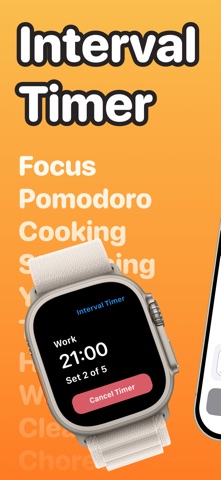


Description by Foobar Creative Written by the developer, not by AppBrain. Click to read.
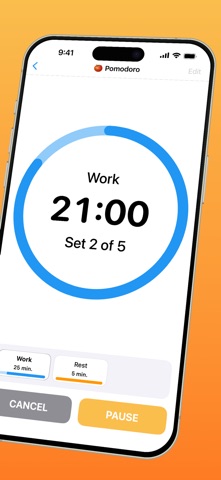
Interval Timer for Tasks lets you chain intervals into a single timer. Give each interval its own name, duration, sound and colour, and the app calls out every step as it passes. Watch the progress ring wind down, or close the app and let a notification tell you when the current interval has ended.
Save as many timers as you like, and run more than one at the same time. Add a start delay so you can get ready, and a finish delay so you can wrap up.
LOCK SCREEN ALARMS
Turn on Lock Screen Alarm for a timer and each interval rings like a system alarm, so it still reaches you when the screen is off. Requires iOS 26.1 or later.
GREAT FOR
- studying and focused work
- the pomodoro technique
- ADHD focus and timed work blocks
- taking regular breaks during the day
- stretching and mobility routines
- breathing exercises
- multi step routines and processes
- cooking and recipes
FEATURES
- chain multiple named intervals into one timer
- run several saved timers at the same time
- Lock Screen Alarms on iOS 26.1 and later
- a standalone Apple Watch app
- Siri and Shortcuts support
- local notifications while the app is in the background
- a large choice of alert sounds, one per interval
- a colour and a name for every interval
- start delay to get ready, finish delay to wrap up
- name and save your timers for next time
Interval Timer Premium Subscription
Upgrade to access all features
Payment will be charged to your Apple ID account at the confirmation of purchase. Subscription automatically renews unless it is canceled at least 24 hours before the end of the current period. Your account will be charged for renewal within 24 hours prior to the end of the current period. You can manage and cancel your subscriptions by going to your account settings on the App Store after purchase.
Terms of Use:
https://www.apple.com/legal/internet-services/itunes/dev/stdeula/