

Widget Timer
Widget Timer is made and published by Foobar Creative. AppBrain is an independent app data site and isn't affiliated with Foobar Creative. The app name, icon, screenshots and description belong to Foobar Creative and are shown as published on the App Store.
AppBrain's verdict
EstablishedWell rated- Rating on App Store
- 4.11
- 181 ratings
- Last updated
- October 8, 2026
- Size
- 89.5 MB
Users rate it well: 4.1 stars from 181 ratings.
User feedback
Ratings and reviews on the App StoreComments on Widget Timer for iOS
We don't have enough comments to show example comments. Please check back later.
Store listing
By Foobar Creative, from the App Store




Description by Foobar Creative Written by the developer, not by AppBrain. Click to read.
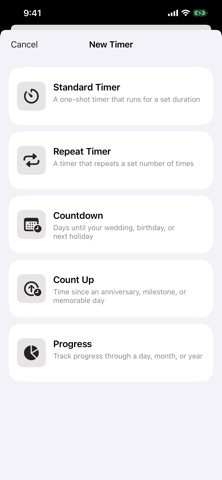
Every timer type, in one app:
- Countdown: count down the days to a birthday, holiday, wedding, or trip, and let it roll over automatically every year.
- Count Up: track the time since an anniversary, a milestone, or the day you started something new.
- Progress: see how far through the week, month, quarter, or year you are.
- Stopwatch: count elapsed time up from zero, starting and stopping as you go.
- Standard: a simple one-shot timer that counts down (or up) to a set duration.
- Repeat: a timer that repeats a set number of times, or infinitely, for periodic reminders like stretching or drinking water.
Widgets, done right:
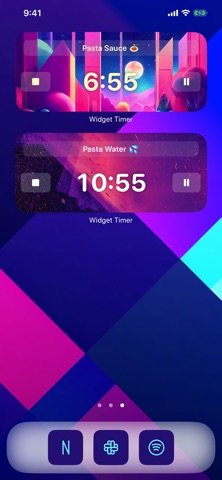
- add timer widgets to your Home Screen and Lock Screen
- interactive widgets, so you can start and stop your timers without opening the app
- customize the theme of each widget, or pick one from a gallery of over 50 themes
More to love:
- run as many timers as you like, all at once
- name every timer (emoji supported)
- lots of alert sounds to choose from
- multiple finished modes
- local notifications alert you when the app is in the background (no network required)
- long press to re-order the timers on the main screen
- works with Siri and Shortcuts
Some features require a purchase of either a Premium Subscription or a Premium Lifetime Unlock.
Widget Timer Premium Subscription
Payment will be charged to your Apple ID account at the confirmation of purchase. Subscription automatically renews unless it is canceled at least 24 hours before the end of the current period. Your account will be charged for renewal within 24 hours prior to the end of the current period. You can manage and cancel your subscriptions by going to your account settings on the App Store after purchase.
Terms of Use:
https://www.apple.com/legal/internet-services/itunes/dev/stdeula/
Safety and technology
Found in the app by AppBrain- Price
- Free
- App size
- 89.5 MB
- Content rating
- Everyone
Technologies used by Widget Timer
Releases
Updates seen on the App Store- Version
- 3.7
- Launched
- September 2020
No changelog data
Alternatives
Similar apps and more from Foobar CreativeAlternatives to Widget Timer





More from Foobar Creative





Rankings
App Store top chartsApp Store Rankings for Widget Timer
About the app and developer
About Widget Timer
Widget Timer is an utilities app developed by Foobar Creative.
User Ratings
Widget Timer is rated 4.11 out of 5 stars. The rating is based on 180 ratings.
App Information
Widget Timer is freely available from the App Store. The app size is 89.53 MB. The latest version available is 3.7. The last update was on October 8, 2026.
Technical Requirements
The app has a content rating of Everyone. The app has been available on the App Store since September 2020.
Developer information for Foobar Creative
Address: