

J-Notes: Notepad, Lock, Draw
J-Notes: Notepad, Lock, Draw is made and published by Robert Libsansky. AppBrain is an independent app data site and isn't affiliated with Robert Libsansky. The app name, icon, screenshots and description belong to Robert Libsansky and are shown as published on the App Store.
AppBrain's verdict
- Rating on App Store
- 5.00
- 1 ratings
- Last updated
- September 7, 2026
- Size
- 1.71 MB
It doesn't have enough ratings yet to judge what users think.
User feedback
Ratings and reviews on the App StoreComments on J-Notes: Notepad, Lock, Draw for iOS
We don't have enough comments to show example comments. Please check back later.
Store listing
By Robert Libsansky, from the App Store




Description by Robert Libsansky Written by the developer, not by AppBrain. Click to read.
WRITE IT, OR DRAW IT
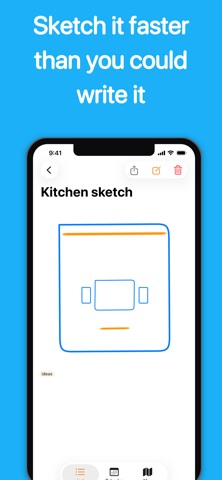
Type a note, or sketch one with pen, marker and pencil — Apple Pencil or your finger, with adjustable width and color. Start a drawing over a photo from your library or straight from the camera. Undo and redo sit under the keyboard while you write. Check items off inside the text: a checklist line is part of the note rather than a separate list, and the box responds wherever you tap it.
EVERYTHING WHERE YOU LEFT IT
• Pin the notes that matter to the top
• Color-code them, tag them, and filter by a tag in one tap
• Search titles, bodies and tags at once
• Compact, standard or detailed rows, remembered between launches
• Deleted notes wait 30 days in the trash, and can be opened before you decide
• On iPad the list and the note sit side by side, through rotation and Split View alike
REMINDERS THAT ARRIVE
Set a date and time on any note and it comes back as a notification — as a banner even when the app is already open, and tapping it opens that note rather than the list. If iOS will not schedule it, the app says so instead of losing it quietly. Notes with reminders also line up in a calendar view, by the day they are due.
NOTES THAT REMEMBER WHERE THEY WERE
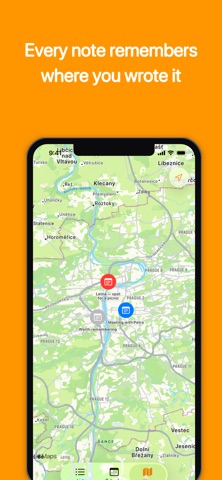
A note keeps the place it was written, and the map shows them all — notes made in the same spot share a pin. Useful for a trip, a viewing, a walk around a site, or anywhere the location is half of what you wrote down.
LOCKED IS LOCKED
• Lock any note behind Face ID or Touch ID
• The notes file is unreadable while the device is locked
• An unlocked note is covered before iOS takes its app-switcher snapshot
• A locked note's reminder reaches the Lock Screen without its title or its text
• Search does not look inside a locked note
ON YOUR HOME SCREEN AND LOCK SCREEN
Small, medium and large Home Screen widgets show your most recent notes, pinned first — and tapping one opens that note, not the list. All three Lock Screen shapes are there too: the newest note as a line, as a title with a line of text, or just how many notes there are. A locked note shows its padlock and nothing else, in every size. Ask Siri to create a note, or put it in a Shortcut.
BUILT FOR EVERYONE
Every icon-only control is labeled for VoiceOver, and a note's row is announced as one thing rather than as the seven pieces it is drawn from. A checklist line says whether it is checked. Text follows your Dynamic Type size, including the checkbox and the area you tap to check it. The unlock button shows the method your device actually offers.
YOURS, AND ONLY YOURS
• No ads
• No in-app purchases, no subscription
• No account, no sign-in, no cloud, no data collected
• Works completely offline
• Back up and restore everything as a single file
• English and Czech
• iPhone and iPad
Just your notes. Nothing else.
Safety and technology
Found in the app by AppBrain- Price
- Free
- App size
- 1.71 MB
- Content rating
- Everyone
Technologies used by J-Notes: Notepad, Lock, Draw
Releases
Updates seen on the App Store- Version
- 1.1.2
- Launched
- September 2022
No changelog data
Alternatives
Similar apps and more from Robert LibsanskyAlternatives to J-Notes: Notepad, Lock, Draw


More from Robert Libsansky


Rankings
App Store top chartsApp Store Rankings for J-Notes: Notepad, Lock, Draw
About the app and developer
About J-Notes: Notepad, Lock, Draw
J-Notes: Notepad, Lock, Draw is a productivity app developed by Robert Libsansky.
User Ratings
J-Notes: Notepad, Lock, Draw is rated 5.00 out of 5 stars. The rating is based on one rating ratings.
App Information
J-Notes: Notepad, Lock, Draw is freely available from the App Store. The app size is 1.71 MB. The latest version available is 1.1.2. The last update was on September 7, 2026.
Technical Requirements
The app has a content rating of Everyone. The app has been available on the App Store since September 2022.
Developer information for Robert Libsansky
Address: