

JetSign: Fill & Sign PDF Docs
JetSign: Fill & Sign PDF Docs is made and published by GrowthClick Inc. AppBrain is an independent app data site and isn't affiliated with GrowthClick Inc. The app name, icon, screenshots and description belong to GrowthClick Inc. and are shown as published on the App Store.
AppBrain's verdict
EstablishedLoved by users- Rating on App Store
- 4.90
- 1,460 ratings
- Last updated
- September 15, 2026
Users love it: 4.9 stars from 1,460 ratings.
Rankings
App Store top chartsApp Store Rankings for JetSign: Fill & Sign PDF Docs
Competitors
Similar apps and more from GrowthClick Inc.Alternatives to JetSign: Fill & Sign PDF Docs


Also available on Google Play

Releases
Updates seen on the App Store- Version
- 2.8.1
- Launched
- March 2019
No changelog data
User feedback
Ratings and reviews on the App StoreComments on JetSign: Fill & Sign PDF Docs for iOS
We don't have enough comments to show example comments. Please check back later.
Technology
Found in the app by AppBrain- Price
- Free
- App size
- 72.2 MB
- Content rating
- Everyone
Technologies used by JetSign: Fill & Sign PDF Docs
About the app and developer
About JetSign: Fill & Sign PDF Docs
JetSign: Fill & Sign PDF Docs is a productivity app developed by GrowthClick Inc.
What is the rating of JetSign: Fill & Sign PDF Docs?
JetSign: Fill & Sign PDF Docs is rated 4.90 out of 5 stars, based on 1.5 thousand ratings.
Is JetSign: Fill & Sign PDF Docs free?
JetSign: Fill & Sign PDF Docs is free. The app size is 72.16 MB. The latest version available is 2.8.1. The last update was on September 15, 2026.
What are the requirements for JetSign: Fill & Sign PDF Docs?
The app has a content rating of Everyone. The app has been available on the App Store since March 2019.
Developer information for GrowthClick Inc.
Address:
Frequently asked questions about JetSign: Fill & Sign PDF Docs
Is JetSign: Fill & Sign PDF Docs free?
Yes. JetSign: Fill & Sign PDF Docs is free on the App Store.
Is JetSign: Fill & Sign PDF Docs still available?
Yes. JetSign: Fill & Sign PDF Docs is on the App Store, and the last update we saw was on September 15, 2026.
How large is JetSign: Fill & Sign PDF Docs?
JetSign: Fill & Sign PDF Docs is 72.16 MB.
Is JetSign: Fill & Sign PDF Docs suitable for children?
App Store rates the content of JetSign: Fill & Sign PDF Docs as suitable for everyone.
How do people rate JetSign: Fill & Sign PDF Docs?
JetSign: Fill & Sign PDF Docs scores 4.90 out of 5 stars, from 1,460 ratings on the App Store.
Who made JetSign: Fill & Sign PDF Docs?
JetSign: Fill & Sign PDF Docs was developed by GrowthClick Inc. It is listed in the productivity category on the App Store.
What are the best alternatives to JetSign: Fill & Sign PDF Docs?
People looking at JetSign: Fill & Sign PDF Docs also look at these productivity apps: Signature Maker & Esign Now, Sign PDF documents, Signeasy: Sign PDF Documents, Fill and Sign Documents: eSign, Electronic Signature.
Store listing
By GrowthClick Inc., from the App Store


Description by GrowthClick Inc. Written by the developer, not by AppBrain. Click to read.
SUPER-SIMPLE SIGNING EXPERIENCE
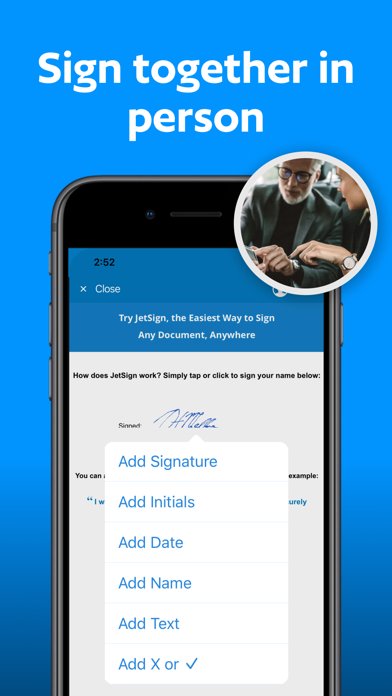
Tap or click anywhere to sign with your finger. Add your e-signature, dates, and text to your document and generate a signed PDF!
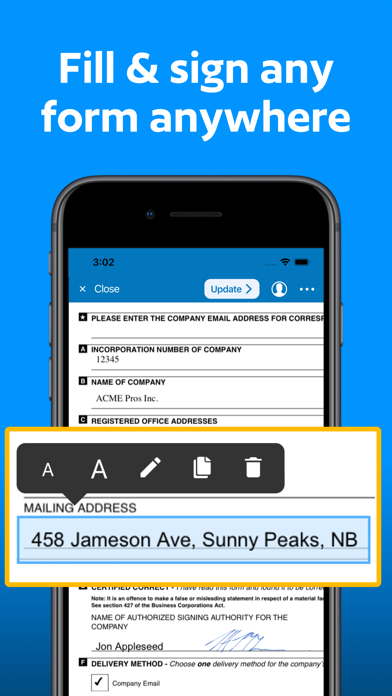
FILL & SIGN FORMS
Use our signature app to easily fill and sign forms by editing text directly on the document - no text entry pop-ups required! Resize text, add checkmarks and X's, and clone fields with our form-filler features and save as a PDF.
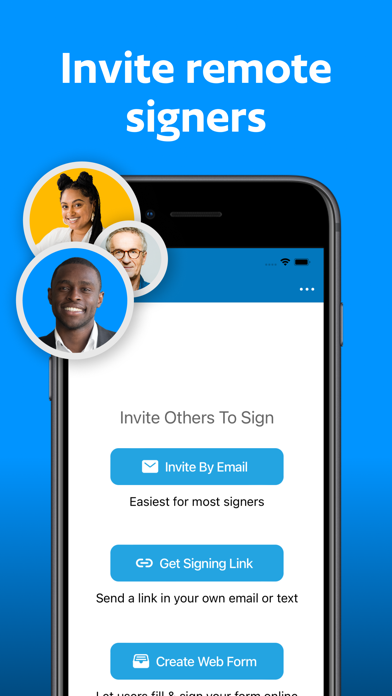
INVITE OTHERS TO SIGN REMOTELY
Send out documents for e-signature by email or with a simple signing link that you can share in your own email or text message. You and your remote signer(s) can view and sign your document with a full audit trail. When the other signer adds their e-signature, you will get notified of the signed PDF by email.
ADD SIGNING FIELDS FOR REMOTE SIGNERS
Make signing easier by highlighting exactly where others should sign, initial, and fill out your document! You can also add text, name, date signed, and checkbox fields to your agreements and forms.
CREATE TAMPER-PROOF AGREEMENTS WITH DIGITAL SIGNATURES
JetSign Premium uses digital signatures so you can verify the integrity of your signed document and detect any changes after signing with popular PDF viewers such as Adobe Acrobat Reader. To comply with Adobe standards, JetSign's digital signatures are powered by a Certificate Authority that is an approved member of the Adobe Approved Trust List (AATL) program.
SAVE TIME WITH TEMPLATES
Add a document once and re-use it daily for new customers and signers, including signer roles and fields, and template fields to be prefilled before inviting customers to sign.
CONVERT ANY FILE INTO A SIGNED PDF
Add one or several documents at a time including Word (doc/docx), Pages, PDF, HTML, RTF, WordPerfect, images, and 15 other file formats.
EASY IMPORTING
Add files from Dropbox, Google Docs & Drive, Microsoft OneDrive, Mail, and other apps to start signing.
STRONG SECURITY
We protect your documents in the cloud with leading encryption methods (AES-256), SSL hosting, and full audit trails for electronic signatures.
To share documents across your devices and with your remote signers, JetSign uses encrypted cloud storage in a secure US-based data center. View our Privacy Policy for full details at https://www.jetsign.com/privacy.
JetSign can be used for NDA's, sales proposals, contracts, job offers, lease agreements, and more. Discover how easy e-signatures can be - download JetSign and get started for free! (no account or registration required)
About Us
JetSign is made in Vancouver, Canada and is a secure e-signature service by GrowthClick Inc. We're focused on creating a super-simple signing experience that you'll love using from your smartphone, tablet, and web browser.
Get started for free (including up to 3 signed documents) or upgrade to unlock everything. Our plans start at $4.99 USD per month ($39.99/year) for additional signing and more features. (Note: Signing documents sent by other users is always free).
Payment will be charged to your Apple ID account at the confirmation of purchase. Subscription automatically renews unless it is canceled at least 24 hours before the end of the current period. Your account will be charged for renewal within 24 hours prior to the end of the current period. You can manage and cancel your subscriptions by going to your account settings on the App Store after purchase.
Privacy Policy: https://www.jetsign.com/privacy
Terms of Use: https://www.jetsign.com/terms