JoinVia: Reminders to Calendar is made and published by
Jeroen Visser.
AppBrain is an independent app data site and isn't affiliated with Jeroen Visser.
The app name, icon, screenshots and description belong to Jeroen Visser and are shown as
published on the App Store.
About JoinVia: Reminders to Calendar
JoinVia: Reminders to Calendar is a productivity app developed by Jeroen Visser.
What is the rating of JoinVia: Reminders to Calendar?
JoinVia: Reminders to Calendar has no ratings yet.
Is JoinVia: Reminders to Calendar free?
JoinVia: Reminders to Calendar is free. The app size is 6.29 MB. The latest version available is 2.1. The last update was on October 5, 2026.
What are the requirements for JoinVia: Reminders to Calendar?
The app has a content rating of Everyone. The app has been available on the App Store since September 2026.
Description by Jeroen Visser(from the App Store)
Keep Apple Reminders. See your tasks in Google Calendar or Outlook, and bring your day together with JoinVia's optional Agenda and Home Screen widget.
JoinVia mirrors dated reminders into a separate JoinVia calendar in Google Calendar, Microsoft Outlook or both. Edit in Reminders and your calendar follows, so you keep planning where you already do while seeing tasks beside meetings.
YOUR REMINDERS, EVERYWHERE YOUR CALENDAR GOES Once your reminders are in Google Calendar or Outlook, they show up wherever that calendar does: on your Windows or work computer, an Android phone, Android Auto, and Alexa or Google Nest speakers.
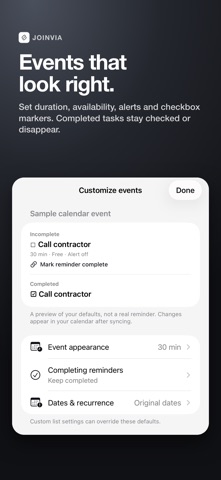
REMINDER SYNC, YOUR WAY - Choose Google Calendar or Outlook for free - Sync all dated reminders, timed reminders only or all-day reminders only - Select the reminder lists you want to include - Preview reminder eligibility before changing your calendars - Customize event duration, availability, alerts and title markers - Add [30m] or another whole-minute value to set a timed event's duration - Add [nosync] to exclude an individual reminder - Remove completed events or keep them with a completed marker - Optionally complete a reminder using its private calendar link - Sync manually, with Apple Shortcuts or through iOS background scheduling
YOUR DAY INSIDE JOINVIA - PRO Turn on the optional Agenda tab to see your calendar events and Apple Reminders together in a scrolling day view. Choose two or five days, complete reminders with a quick undo, and create for the selected day. Plan my day: tap a reminder's clock, pick 15 minutes to 1.5 hours, and JoinVia suggests free times between your meetings. Or move it to the next day. Keep Sync as your first tab or put Agenda first.
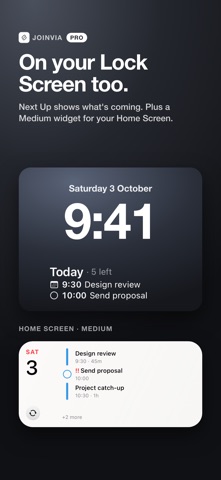
YOUR DAY ON YOUR HOME SCREEN - PRO See calendar events and Apple Reminders together. Choose Small, Medium, Large, or Extra Large on iOS 27, plus Next Up for your Lock Screen. - Browse up to five days in larger widgets, with pages for busy days - Keep original calendar and reminder-list colours - See event times and durations, with an optional countdown that fills up and shows the time left in the current event - Choose whether countdown seconds are shown - Spot high-priority reminders - Complete original Apple Reminders and undo a quick tap - Refresh the agenda, create a reminder or event, or open your chosen calendar - Choose Compact or Roomy spacing and whether finished events stay visible - Enjoy Pearl in light mode and Graphite in dark mode
Try the interactive sample widget inside JoinVia before choosing Pro. Explore days, spacing and checkboxes without calendar access.
Widget events come from calendars available on your iPhone. Signing into Google or Outlook for reminder sync does not automatically add those accounts to the iPhone's calendar store. Widget settings group available calendars by account and helps you find missing calendars and avoid reminder copies. iOS controls background updates and widget timing.
JOINVIA PRO Pro includes the in-app Agenda, agenda widgets, Google Calendar and Outlook together, up to three accounts per service (such as Work and Personal), per-list destination routing, additional accent colours, extended sync activity and Family Sharing. Choose Annual or a separate one-time Lifetime purchase. Eligible new annual subscribers receive an introductory trial. Apple confirms eligibility and localized prices before purchase.
PRIVACY FIRST Your reminders move directly from your iPhone to your selected calendar provider. No JoinVia account, sync server, advertising, analytics or tracking. OAuth tokens and sync mappings remain protected on your device.
Terms of Use (EULA): https://www.apple.com/legal/internet-services/itunes/dev/stdeula/
Each subscription will automatically renew 3 days before the expiration date for
the same time period. Subscriptions can be cancelled at any time before the renewal.