

Just Quick Search
Just Quick Search is made and published by Mill White. AppBrain is an independent app data site and isn't affiliated with Mill White. The app name, icon, screenshots and description belong to Mill White and are shown as published on the App Store.
AppBrain's verdict
Established- Rating on App Store
- 4.50
- 4 ratings
- Last updated
- October 15, 2025
- Size
- 9.01 MB
It doesn't have enough ratings yet to judge what users think.
User feedback
Ratings and reviews on the App StoreComments on Just Quick Search for iOS
We don't have enough comments to show example comments. Please check back later.
Store listing
By Mill White, from the App Store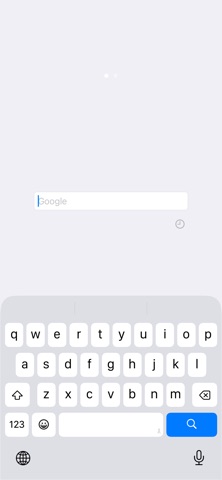
Description by Mill White Written by the developer, not by AppBrain. Click to read.
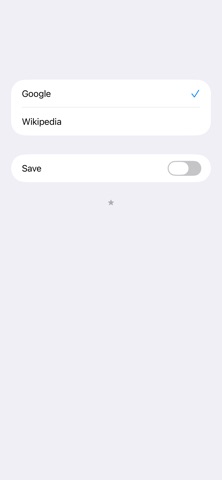
# Search Targets
- Wikipedia
- In addition to the above, you can add search targets.
# You can input quickly
- You don't need to scroll.
- You don't need to tap the text field.
- When application resumed, text field is empty and you can input immediately.
# Save Switch
- ON: When application launch or resume, the search target is you selected last.
- OFF: When application launch or resume, the search target is the top.
# History
- Keywords you enter are recorded.
- Max 300 items.
- Can delete all.
- Can delete selectively.
# Autocomplete
- Input candidates will be displayed in a two-stage.
- Top: from History.
- Bottom: from Web.
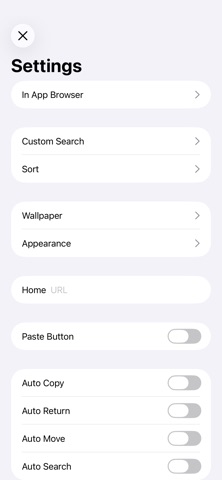
# Settings
- The view shows when you tap the "STAR" button at the bottom of the right screen.
## In App Browser
- You can make settings related to the in app browser.
- In app browser's URL Scheme is "jqs".
## Custom Search
- You can customize the search targets.
- The number of search targets you can add is unlimited.
- For more information, please visit the support page.
## Sort
- You can sort search targets.
## Wallpaper
- You can set the wallpaper.
- Optimal image size is the pixel size of the device.
- Ex) iPhone 16 Pro: 2,622 x 1,206 pixels.
## Appearance
- You can select the appearance, default or light or dark.
## Home
- You can specify the URL of Home page.
- In the search screen, when the text field is empty and you tap the "Search" button, the home page will be displayed.
## Paste Button
- Paste button to the search screen will be displayed.
- When you tap the Paste button on the search screen, the contents of the clipboard will be pasted into the text field.
## Auto Copy
- When execute search, the contents of the text field will be copied to the clipboard.
## Auto Return
- When select the search target, go back to the search screen automatically.
## Auto Move
- Automatically displays the search target selection screen when the application is launched or restarted.
## Auto Search
- When launching from the custom URL scheme or notification center, the search is execute automatically.
## Open URL
- When you execute a search with the URL is entered, open the URL directly.
- For more information, please visit the support page.
## Hide Page Control
- Hide page control in search screen.
## Support
- Jump to the support page of this app.
# Custom URL Scheme
- Custom URL Scheme is "justquicksearch".
## justquicksearch://
- Launch this app.
## justquicksearch://${keyword}
- With the ${keyword} has been entered, this app is launched.
# EULA
- https://www.apple.com/legal/internet-services/itunes/dev/stdeula/
Safety and technology
Found in the app by AppBrain- Price
- Free
- App size
- 9.01 MB
- Content rating
- High
Technologies used by Just Quick Search
Releases
Updates seen on the App Store- Version
- 4.2
- Launched
- February 2012
No changelog data
Alternatives
Similar apps and more from Mill WhiteAlternatives to Just Quick Search







More from Mill White

Rankings
App Store top chartsApp Store Rankings for Just Quick Search
About the app and developer
About Just Quick Search
Just Quick Search is an utilities app developed by Mill White.
User Ratings
Just Quick Search is rated 4.50 out of 5 stars. The rating is based on 4 ratings.
App Information
Just Quick Search is freely available from the App Store. The app size is 9.01 MB. The latest version available is 4.2. The last update was on October 15, 2025.
Technical Requirements
The app has a content rating of High Maturity. The app has been available on the App Store since February 2012.
Developer information for Mill White
Address: