

Kalimba Trainer is made and published by Ken Hamasaki. AppBrain is an independent app data site and isn't affiliated with Ken Hamasaki. The app name, icon, screenshots and description belong to Ken Hamasaki and are shown as published on the App Store.
AppBrain's verdict
- Rating on App Store
- 1.67
- 3 ratings
- Last updated
- October 22, 2026
It doesn't have enough ratings yet to judge what users think.
Rankings
App Store top chartsApp Store Rankings for Kalimba Trainer
Competitors
Similar apps and more from Ken HamasakiAlternatives to Kalimba Trainer



Also available on Google Play

Releases
Updates seen on the App Store- Version
- 1.0.13
- Launched
- March 2026
No changelog data
User feedback
Ratings and reviews on the App StoreComments on Kalimba Trainer for iOS
We don't have enough comments to show example comments. Please check back later.
Technology
Found in the app by AppBrain- Price
- Free
- App size
- 54.2 MB
- Content rating
- Everyone
Technologies used by Kalimba Trainer
About the app and developer
About Kalimba Trainer
Kalimba Trainer is a music app developed by Ken Hamasaki.
User Ratings
Kalimba Trainer is rated 1.67 out of 5 stars. The rating is based on 3 ratings.
App Information
Kalimba Trainer is freely available from the App Store. The app size is 54.23 MB. The latest version available is 1.0.13. The last update was on October 22, 2026.
Technical Requirements
The app has a content rating of Everyone. The app has been available on the App Store since March 2026.
Developer information for Ken Hamasaki
Address:
Store listing
By Ken Hamasaki, from the App Store


Description by Ken Hamasaki Written by the developer, not by AppBrain. Click to read.
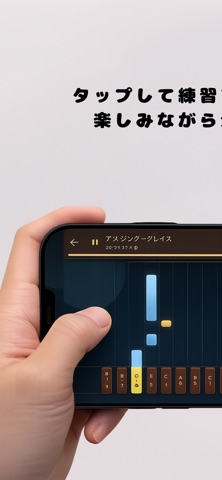
Play along with falling notes and practice efficiently using both your eyes and ears.
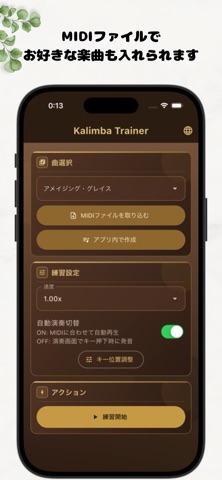
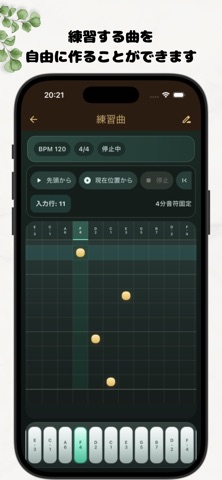
You can practice with built-in songs, import MIDI files, and create MIDI songs directly in the app.
Songs you create can be played back for review and downloaded as MIDI files.
You can adjust the key positions to match your real kalimba and change the playback speed, making it easier to practice at your own pace.
Using a phone stand to keep the screen in a comfortable position can make practice even smoother.
Main features
- Falling note display for 17-key kalimba layouts
- Practice with built-in songs
- Import and play MIDI files
- Create, duplicate, and edit MIDI songs in the app
- Download created songs as MIDI files
- Preview songs created in the composer
- Edit BPM and time signature
- Adjust playback speed
- Adjust key positions
- Switch between auto play and manual play
- Display language options: Japanese, English, Thai, Korean, Vietnamese, Khmer, German, and Chinese
Notes about MIDI import
- MIDI files that do not fit the kalimba layout may cause display or playback differences.
- Simple beginner-friendly MIDI files or single-melody songs are recommended.