Kerf Shift: 3D Print & Laser is made and published by
Floyd Richard.
AppBrain is an independent app data site and isn't affiliated with Floyd Richard.
The app name, icon, screenshots and description belong to Floyd Richard and are shown as
published on the App Store.
About Kerf Shift: 3D Print & Laser
Kerf Shift: 3D Print & Laser is an utilities app developed by Floyd Richard.
User Ratings
The app has no ratings yet.
App Information
Kerf Shift: 3D Print & Laser is freely available from the App Store. The app size is 6.48 MB. The latest version available is 1.0. The last update was on October 12, 2026.
Technical Requirements
The app has a content rating of Everyone. The app has been available on the App Store since October 2026.
Description by Floyd Richard(from the App Store)
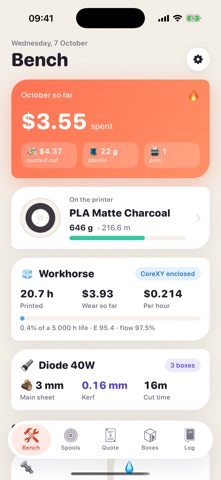
A friend asks what you'd charge for a lamp shade. You glance at the slicer, see 164 grams and six hours forty, and guess. Kerf Shift ends the guessing.
Monday. Type the grams and the print time. A receipt prints itself line by line: plastic priced from the exact spool on your printer, power from your own tariff, printer wear by the hour, your hands-on time, a small buffer for prints that don't stick. Markup on top, price at the bottom. Pull the receipt down, tear it off, and the job joins the queue.
Tuesday. The print starts and a little column of layers grows on screen as the hours pass. When time's up, tell it how the part came off the bed. A clean print takes its grams off the spool. A spaghetti mess takes only the share that actually went in the bin.
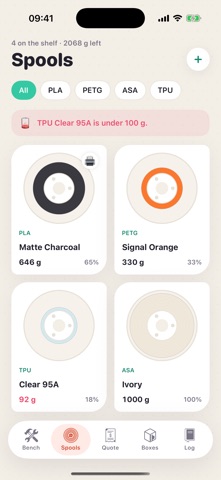
Wednesday. The orange PETG feels light. Put it on the kitchen scale, type the number, and see how far your books drifted from reality. Purged a few meters by hand? Turn the spool on screen with your finger and watch the filament come off.
Thursday. The extruder is underfeeding again. Mark, extrude, measure. A drawer of calibration formulas gives you new e-steps, flow and XY scale, writes them into your printer profile and keeps a trend line, so you can watch your machine settle down over the months.
Friday is laser day. Type a box size, pick plywood, MDF or acrylic, then drag the box on screen to stretch it. Every finger joint is shifted for the width of the laser beam, so press fit, snug and loose mean exactly that. Slide a tab into its notch under the magnifier before you ever touch a sheet. Not sure what your kerf is? Cut the test comb once and tap the opening that gripped.
Saturday. Send the ready-to-cut SVG or DXF to your laser software. Sanded and glued by lunch, no rattle.
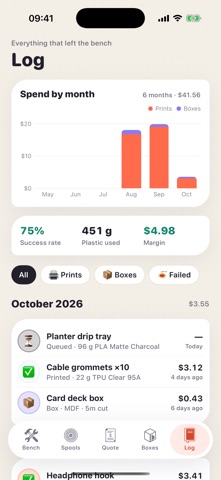
Sunday. Open the log. Every print and every box, what it cost you, what you quoted, how often prints succeed and how much plastic went where, month by month.
Made for the spare-room print farm, the small shop selling laser-cut organizers, the makerspace regular who keeps hearing "can you make me one?", and anyone who has ever glued together a box that wobbled.
Subscribe to see full ranking history in this country
AppBrain offers valuable information about your app and those of your competitors. Join AppBrain for free and claim this app to view more ranking data, view history etc.
Each subscription will automatically renew 3 days before the expiration date for
the same time period. Subscriptions can be cancelled at any time before the renewal.