
Keyboard Designer AR
Keyboard Designer AR is made and published by KENSHI DOI. AppBrain is an independent app data site and isn't affiliated with KENSHI DOI. The app name, icon, screenshots and description belong to KENSHI DOI and are shown as published on the App Store.
AppBrain's verdict
Established- Rating on App Store
- 3.20
- 5 ratings
- Last updated
- February 14, 2021
- Size
- 18.2 MB
It doesn't have enough ratings yet to judge what users think.
User feedback
Ratings and reviews on the App StoreComments on Keyboard Designer AR for iOS
We don't have enough comments to show example comments. Please check back later.
Store listing
By KENSHI DOI, from the App Store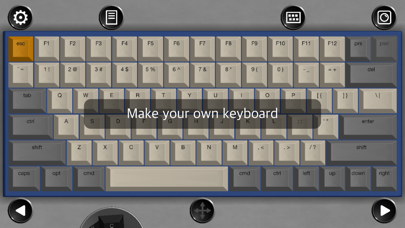
Description by KENSHI DOI Written by the developer, not by AppBrain. Click to read.
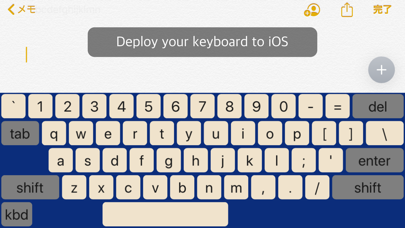
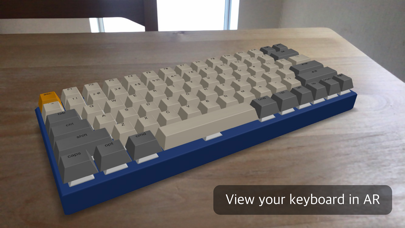
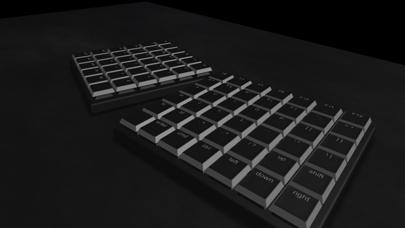
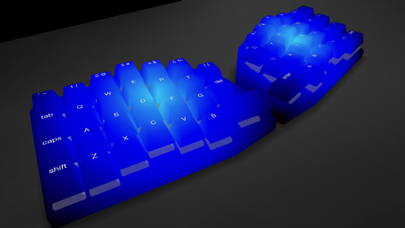
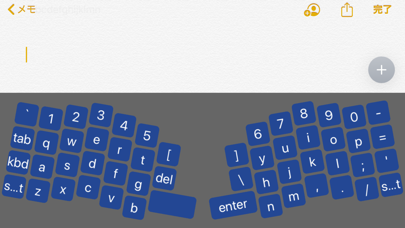
What if you can design your own keyboard on iPad and view it in 3D/AR? This app provides such an experience. You may also deploy it as a iOS keyboard.
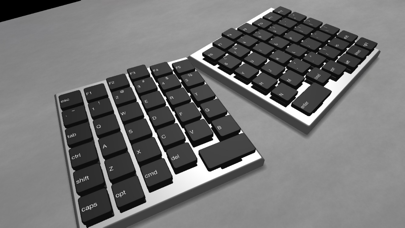
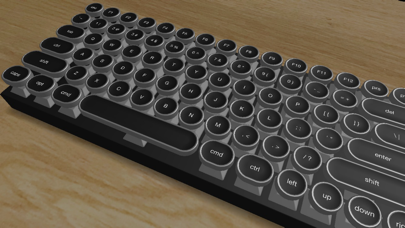
First, make a base keyboard via new keyboard menu. You may select keyboard type(monolithic, separated), layout(US, JIS), colors(cap, switch, keyboard), click sound(switch type), cap type(standard, chiclet, typewriter), etc.
Then you may move/add/delete keys via drag/drop or change each key settings via property menu.
Bulk config menu for keys allow you to change properties of keys which have the same settings with selected key.
Property menu allow you to change properties of selected key, keyboard, or desk.
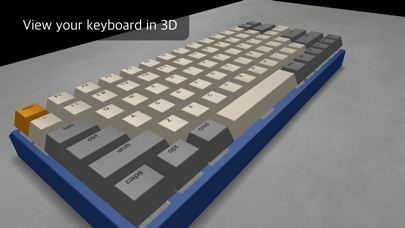
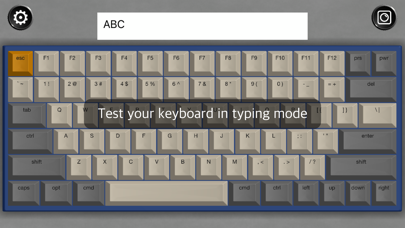
When you complete settings, you may view it in 3D/AR mode. Or you may test typing in typing mode.
Your keyboard can be deployed as an iOS keyboard extension to use in other iOS apps(You need to add KB Designer keyboard in General>Keyboard panel of Settings App.). Setting menu is in system setting menu. To deploy to iOS, switching keyboard key(assigned to Caps Lock key) is required. Interference of keys also checked.
iOS keyboard won't play click sound since it doesn't request iOS full access. So that you may use it without worrying about data leak.
Sizes are precise on iPad Pro 12.9 in. On other devices, objects will be displayed in smaller size.
Safety and technology
Found in the app by AppBrain- Price
- Free
- App size
- 18.2 MB
- Content rating
- Everyone
Technologies used by Keyboard Designer AR
Releases
Updates seen on the App Store- Version
- 1.5
- Launched
- November 2020
No changelog data
Alternatives
Similar apps and more from KENSHI DOIAlternatives to Keyboard Designer AR







More from KENSHI DOI








Rankings
App Store top chartsApp Store Rankings for Keyboard Designer AR
About the app and developer
About Keyboard Designer AR
Keyboard Designer AR is an utilities app developed by KENSHI DOI.
User Ratings
Keyboard Designer AR is rated 3.20 out of 5 stars. The rating is based on 5 ratings.
App Information
Keyboard Designer AR is freely available from the App Store. The app size is 18.23 MB. The latest version available is 1.5. The last update was on February 14, 2021.
Technical Requirements
The app has a content rating of Everyone. The app has been available on the App Store since November 2020.
Developer information for KENSHI DOI
Address:
Frequently asked questions about Keyboard Designer AR
Is Keyboard Designer AR free?
Yes. Keyboard Designer AR is free on the App Store.
Is Keyboard Designer AR still available?
Yes. Keyboard Designer AR is on the App Store, and the last update we saw was on February 14, 2021.
How large is Keyboard Designer AR?
Keyboard Designer AR is 18.23 MB.
Is Keyboard Designer AR suitable for children?
App Store rates the content of Keyboard Designer AR as suitable for everyone.
How do people rate Keyboard Designer AR?
Keyboard Designer AR scores 3.20 out of 5 stars, from 5 ratings on the App Store.
Who made Keyboard Designer AR?
Keyboard Designer AR was developed by KENSHI DOI. It is listed in the utilities category on the App Store.
What are the best alternatives to Keyboard Designer AR?
People looking at Keyboard Designer AR also look at these utilities apps: My Switch Collection, Motion Detector Camera, System Specs, RuneInput - Younger Futhark, Typiora Keyboard Pro.