

KeyBox-Vault is made and published by 亮军 涂. AppBrain is an independent app data site and isn't affiliated with 亮军 涂. The app name, icon, screenshots and description belong to 亮军 涂 and are shown as published on the App Store.
AppBrain's verdict
- Last updated
- September 21, 2026
Rankings
App Store top chartsApp Store Rankings for KeyBox-Vault
This app is not ranked
Competitors
Similar apps and more from 亮军 涂Alternatives to KeyBox-Vault


More from 亮军 涂


Releases
Updates seen on the App Store- Version
- 3.0
- Launched
- July 2026
No changelog data
User feedback
Ratings and reviews on the App StoreComments on KeyBox-Vault for iOS
We don't have enough comments to show example comments. Please check back later.
Technology
Found in the app by AppBrain- Price
- Free
- App size
- 5.61 MB
- Content rating
- Everyone
Technologies used by KeyBox-Vault
About the app and developer
About KeyBox-Vault
KeyBox-Vault is an utilities app developed by 亮军 涂.
User Ratings
The app has no ratings yet.
App Information
KeyBox-Vault is freely available from the App Store. The app size is 5.61 MB. The latest version available is 3.0. The last update was on September 21, 2026.
Technical Requirements
The app has a content rating of Everyone. The app has been available on the App Store since July 2026.
Developer information for 亮军 涂
Address:
Store listing
By 亮军 涂, from the App Store


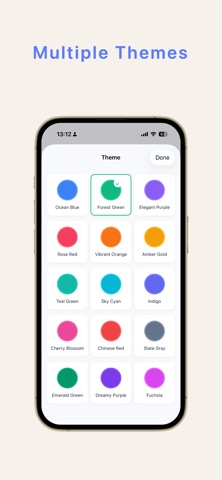
Screenshots by 亮军 涂, from the the App Store listing
Description by 亮军 涂 Written by the developer, not by AppBrain. Click to read.
【Middenshield】 is capable of storing various account passwords, supporting 2FA Google verifiers, Microsoft verifiers, etc. for over 1000 mainstream platforms. It allows for one-click scanning and saving, real-time iCloud cloud automatic saving. All accounts support backup export and import, and it supports importing verifiers for over 1000 streaming platforms.
Tired of forgetting passwords? Reusing the same weak password across multiple sites? KeyBox is an ultra-secure offline password manager built for iPhone and iPad, designed to keep all your account credentials safe in one place, accessible whenever you need them.
Ultra-Secure · Fully Offline · Encrypted Storage
AES-256 Encryption: Industry-standard AES-256 bit encryption ensures all your data is encrypted locally on your device. Even if your device is lost, your passwords remain unreadable.
100% Offline: Your password data is stored exclusively on your local device—never uploaded to any third‑party servers. No internet connection required, eliminating the risk of cloud data breaches.
Optional iCloud Sync: When you need multi‑device access, enable iCloud sync via your Apple ID. Data is end‑to‑end encrypted—the developer has no access to your information.
Key Features
Advanced Password Generator: Generate strong, random passwords with a single tap. Customize length and character sets to meet any site's requirements.
Password + Face ID Unlock: Secure your vault with a master password, or unlock instantly with Face ID / Touch ID—security and convenience in one.
Multiple Beautiful Themes: Choose from light, dark, and various color schemes. Personalize your password vault to match your style.
Smart Categorization: Organize passwords by website, social media, banking, email, and more. Quick search and tags make finding any credential effortless.
Why KeyBox?
No Subscription · One‑Time Purchase: Pay once, own forever. No monthly or yearly fees.
No Ads · No Tracking: We collect zero personal information and serve zero ads. Your privacy is truly respected.
Lightweight & Focused: Built to do one thing exceptionally well—manage your passwords. No bloat, no distractions.
Perfect for You If
You have multiple website / app accounts and struggle to manage passwords
You're concerned about cloud‑based password vaults being hacked or breached
You want to unlock your vault quickly with Face ID
You value privacy and prefer local storage over cloud services
You're tired of subscriptions and want a one‑time purchase tool
Your Passwords. Yours Alone.
KeyBox does not collect, store, or upload any of your password data. Your data exists only on your device (and optionally in your iCloud, if you enable sync)—completely under your control.
Download KeyBox today. Stop worrying about passwords and start enjoying a safer digital life.
Privacy Policy:https://daydayup-tlj.github.io/keybox/privacy_en.html
Terms of Service:https://daydayup-tlj.github.io/keybox/agreement_en.html
Tired of forgetting passwords? Reusing the same weak password across multiple sites? KeyBox is an ultra-secure offline password manager built for iPhone and iPad, designed to keep all your account credentials safe in one place, accessible whenever you need them.
Ultra-Secure · Fully Offline · Encrypted Storage
AES-256 Encryption: Industry-standard AES-256 bit encryption ensures all your data is encrypted locally on your device. Even if your device is lost, your passwords remain unreadable.
100% Offline: Your password data is stored exclusively on your local device—never uploaded to any third‑party servers. No internet connection required, eliminating the risk of cloud data breaches.
Optional iCloud Sync: When you need multi‑device access, enable iCloud sync via your Apple ID. Data is end‑to‑end encrypted—the developer has no access to your information.
Key Features
Advanced Password Generator: Generate strong, random passwords with a single tap. Customize length and character sets to meet any site's requirements.
Password + Face ID Unlock: Secure your vault with a master password, or unlock instantly with Face ID / Touch ID—security and convenience in one.
Multiple Beautiful Themes: Choose from light, dark, and various color schemes. Personalize your password vault to match your style.
Smart Categorization: Organize passwords by website, social media, banking, email, and more. Quick search and tags make finding any credential effortless.
Why KeyBox?
No Subscription · One‑Time Purchase: Pay once, own forever. No monthly or yearly fees.
No Ads · No Tracking: We collect zero personal information and serve zero ads. Your privacy is truly respected.
Lightweight & Focused: Built to do one thing exceptionally well—manage your passwords. No bloat, no distractions.
Perfect for You If
You have multiple website / app accounts and struggle to manage passwords
You're concerned about cloud‑based password vaults being hacked or breached
You want to unlock your vault quickly with Face ID
You value privacy and prefer local storage over cloud services
You're tired of subscriptions and want a one‑time purchase tool
Your Passwords. Yours Alone.
KeyBox does not collect, store, or upload any of your password data. Your data exists only on your device (and optionally in your iCloud, if you enable sync)—completely under your control.
Download KeyBox today. Stop worrying about passwords and start enjoying a safer digital life.
Privacy Policy:https://daydayup-tlj.github.io/keybox/privacy_en.html
Terms of Service:https://daydayup-tlj.github.io/keybox/agreement_en.html