

Kids Games: Learn to Code
Kids Games: Learn to Code is made and published by MEHMET CANKER (TR). AppBrain is an independent app data site and isn't affiliated with MEHMET CANKER (TR). The app name, icon, screenshots and description belong to MEHMET CANKER (TR) and are shown as published on the App Store.
AppBrain's verdict
- Last updated
- August 4, 2026
- Size
- 44.8 MB
User feedback
Ratings and reviews on the App StoreComments on Kids Games: Learn to Code for iOS
We don't have enough comments to show example comments. Please check back later.
Store listing
By MEHMET CANKER (TR), from the App Store

Description by MEHMET CANKER (TR) Written by the developer, not by AppBrain. Click to read.
This is not a coloring book with a "code" label. Underneath the friendly emoji-first world is a genuine block-execution runtime: sequences, loops, jumps, and collision — the same core concepts real programmers use. Kids as young as five can play solo because nothing needs to be read. It is fully offline, completely ad-free, and collects no personal data — the kind of screen time a parent can feel good about handing over.
WHAT YOU CAN DO
• Drag-and-drop coding — build a program by snapping blocks into a "when start" sequence, then press Run to watch it play out
• Learn loops early — the repeat block is in the free levels, so kids meet the one idea that separates real coding from simple tapping
• Debug and retry — if the hero misses the goal, tweak the blocks and Run again; fixing your own plan is the best part of learning to code
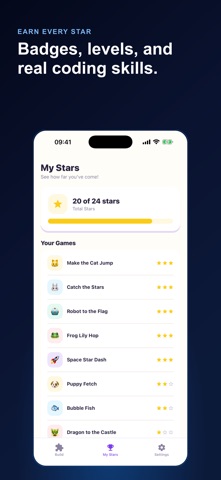
• Earn 1 to 3 stars per level — fewer blocks means more stars, so kids are rewarded for finding smarter, cleaner solutions
• Chase badges — milestone unlocks appear on the Progress tab and give your child a concrete next goal to aim for
• Watch stars grow — a total score that only ever goes up, so beating an old score feels great
• Play three goal types — reach the goal, collect the stars, or jump the gap, each teaching a different way to think
• Meet emoji heroes — a cat, frog, rocket, puppy, fish, and dragon star in the puzzles; fully playable offline anytime
WHY KIDS LEARN CODING
• Built on real computer-science ideas — sequence, loops, and debugging, taught through play instead of lectures
• Winnable in seconds, deep for hours — a five-year-old clears level one, while the star challenge keeps older kids optimizing
• Zero reading needed — the whole game is emoji and blocks, so pre-readers and early readers play completely on their own
• Rewards good thinking, not grinding — the star system celebrates elegant solutions, quietly teaching problem-solving and patience
• Grows with your child — start with a single hop and work up to bigger grids and trickier logic puzzles
SAFE FOR KIDS, MADE FOR PARENTS
• No ads — not a single banner, pop-up, or "watch a video to unlock" ever appears
• No data selling and no third-party tracking — your child's play stays on device
• No chat, no social, no leaderboards — nothing that exposes a child to strangers
• Parental gate — any purchase is protected behind an adult-only challenge, so a child can never buy anything by accident
• No push notifications nagging your kid to come back — the fun is the reason to return
WHO IT'S FOR
• Parents who want screen time that is genuinely educational, private, and calm
• Kids ages 5 to 10 who love games and are ready to start thinking like a maker
• Families looking for a safe, ad-free STEM game the whole household can trust
• Early learners who cannot read long instructions yet but are ready to solve real puzzles
Kids Learn Coding is free to start: three full starter levels cover every goal type and the complete block palette, including loops, so your child gets real wins and their first badges before anything is locked. When they finish and want more, an optional one-time family unlock opens five advanced levels and every future pack — decided by you, behind the parental gate, never sold to your kid.
Hand your child a game that teaches them to think. Download Kids Learn Coding and watch them build, run, and debug their first programs today.
Terms of Use
https://www.apple.com/legal/internet-services/itunes/dev/stdeula/
Privacy Policy
https://coddykit.com/terms/privacy-policy
Safety and technology
Found in the app by AppBrain- Price
- Free
- App size
- 44.8 MB
- Content rating
- Everyone
Technologies used by Kids Games: Learn to Code
Releases
Updates seen on the App Store- Version
- 1.0
- Launched
- August 2026
No changelog data
Alternatives
Similar apps and more from MEHMET CANKER (TR)Alternatives to Kids Games: Learn to Code


More from MEHMET CANKER (TR)


Rankings
App Store top chartsApp Store Rankings for Kids Games: Learn to Code
About the app and developer
About Kids Games: Learn to Code
Kids Games: Learn to Code is an education app developed by MEHMET CANKER (TR).
User Ratings
The app has no ratings yet.
App Information
Kids Games: Learn to Code is freely available from the App Store. The app size is 44.80 MB. The latest version available is 1.0. The last update was on August 4, 2026.
Technical Requirements
The app has a content rating of Everyone. The app has been available on the App Store since August 2026.
Developer information for MEHMET CANKER (TR)
Address: