

Kiji – Tasks, Notes & Habits
Kiji – Tasks, Notes & Habits is made and published by Hamdi Jomaa. AppBrain is an independent app data site and isn't affiliated with Hamdi Jomaa. The app name, icon, screenshots and description belong to Hamdi Jomaa and are shown as published on the App Store.
AppBrain's verdict
- Last updated
- October 3, 2026
- Size
- 22.5 MB
User feedback
Ratings and reviews on the App StoreComments on Kiji – Tasks, Notes & Habits for iOS
We don't have enough comments to show example comments. Please check back later.
Store listing
By Hamdi Jomaa, from the App Store




Description by Hamdi Jomaa Written by the developer, not by AppBrain. Click to read.
KIJI REQUIRES A SUBSCRIPTION
An auto-renewing subscription (or the one-time Lifetime purchase) is required to use Kiji. New subscribers get a 3-day free trial. Every feature described below is included in every plan; the plans differ only in how many photos and videos you can keep. There are no ads and nothing else to buy.
TASKS ON BOARDS (included in every plan)
• Every project is a board, and every board is a kanban: To Do, In Progress, Done.
• Drag a card between columns, switch to a checklist when you just want to tick things off, or to a calendar to see your month and your week.
• Type "tomorrow at 5pm" in a todo's title and the deadline and the reminder are set for you.
• Start dates, deadlines, notes and reminders on every todo, and a widget for what is due soon.
• Keep your dated todos in Apple Calendar as well, if you like. A change on either side reaches the other.
• A soft tick and a little confetti when you finish one. Turn the sounds off in Settings if you prefer quiet.
DOCUMENTS THAT HOLD MORE THAN TEXT (included in every plan)
• Headings, lists, quotes, code and checklists, with bold, italic, underline, strikethrough and highlight.
• Add photos and video straight into the page. They sync with it, within your plan's media allowance.
• Export to PDF, Word, HTML or Markdown.
• Keep documents in folders — nested, colored and sorted by category — and pin them to Home as a widget.
HABITS (included in every plan)
• Track what you do daily or on chosen weekdays, and see the last two weeks at a glance.
• Type what you did in your own words — "two glasses", "half an hour" — and Kiji works out the number.
A HOME YOU ARRANGE (included in every plan)
• Pin boards, single todos, documents, habits, a calendar, "due soon" and "recently added" as widgets.
• Drag them, resize them, color them. Four sizes, your order.
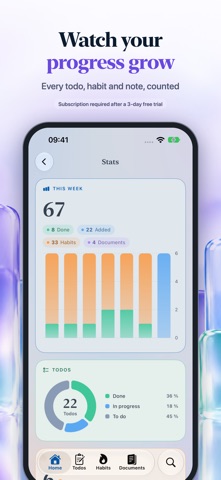
• Stats that show what you finished this week and what is still open, day by day.
ONE ACCOUNT, EVERY DEVICE (included in every plan)
• Start without an account. Create one with Apple, Google or email when you want everything on iPhone, iPad and Mac.
• Changes sync in the background. Work offline and it catches up.
• A Mac app with a real sidebar and three columns, not a stretched phone screen.
• Your recent todos on Apple Watch, and todo and calendar widgets for the Home Screen.
• Lock Kiji with Face ID, Touch ID or your passcode.
MADE TO BE QUICK (included in every plan)
• Pull down on any tab to capture a thought before it goes.
• Share text, links, photos and video to Kiji from other apps.
• Search across boards, todos, documents and habits.
• A short welcome that asks what matters to you and sets up your first boards and habits to match.
• Light and dark, Dynamic Type, and ten languages: English, French, Spanish, German, Italian, Portuguese (Brazil), Arabic, Simplified Chinese, Japanese and Korean.
PLANS AND PRICES
Choose one plan (new subscribers start with a 3-day free trial):
• Essential — $2.99 per month or $17.99 per year: 1 GB of photos and video, up to 200 media files.
• Plus — $4.99 per month or $34.99 per year: 5 GB, up to 1,000 media files.
• Pro — $8.99 per month or $59.99 per year: 25 GB, unlimited media files, priority support.
• Lifetime — $179.99 once: everything in Pro for as long as Kiji is offered, with no subscription.
Subscriptions are billed to your Apple Account and renew automatically at the same price unless canceled at least 24 hours before the end of the current period. A free trial converts to a paid subscription unless you cancel at least 24 hours before it ends. Manage or cancel any time in Settings › Apple Account › Subscriptions. Prices are in US dollars and may vary by region.
Terms of Use: https://hamdij0maa.github.io/kiji-legal/en/terms.html
Privacy Policy: https://hamdij0maa.github.io/kiji-legal/en/privacy.html
Safety and technology
Found in the app by AppBrain- Price
- Free
- App size
- 22.5 MB
- Content rating
- Everyone
Technologies used by Kiji – Tasks, Notes & Habits
Releases
Updates seen on the App Store- Version
- 1.0.4
- Launched
- September 2026
No changelog data
Alternatives
Similar apps and more from Hamdi JomaaAlternatives to Kiji – Tasks, Notes & Habits


Rankings
App Store top chartsApp Store Rankings for Kiji – Tasks, Notes & Habits
About the app and developer
About Kiji – Tasks, Notes & Habits
Kiji – Tasks, Notes & Habits is a productivity app developed by Hamdi Jomaa.
User Ratings
The app has no ratings yet.
App Information
Kiji – Tasks, Notes & Habits is freely available from the App Store. The app size is 22.47 MB. The latest version available is 1.0.4. The last update was on October 3, 2026.
Technical Requirements
The app has a content rating of Everyone. The app has been available on the App Store since September 2026.
Developer information for Hamdi Jomaa
Address:
Frequently asked questions about Kiji – Tasks, Notes & Habits
Is Kiji – Tasks, Notes & Habits free?
Yes. Kiji – Tasks, Notes & Habits is free on the App Store.
Is Kiji – Tasks, Notes & Habits still available?
Yes. Kiji – Tasks, Notes & Habits is on the App Store, and the last update we saw was on October 3, 2026.
How large is Kiji – Tasks, Notes & Habits?
Kiji – Tasks, Notes & Habits is 22.47 MB.
Is Kiji – Tasks, Notes & Habits suitable for children?
App Store rates the content of Kiji – Tasks, Notes & Habits as suitable for everyone.
Who made Kiji – Tasks, Notes & Habits?
Kiji – Tasks, Notes & Habits was developed by Hamdi Jomaa. It is listed in the productivity category on the App Store.
What are the best alternatives to Kiji – Tasks, Notes & Habits?
People looking at Kiji – Tasks, Notes & Habits also look at these productivity apps: eejabi, OceanPulse, Cozy Library: Study & Focus, KanToDo, OneStack: Organize Your Life.