Kiwi PDF: Editor & Scanner is a productivity app developed by TIMON SOFTWARE CO., LTD.
What is the rating of Kiwi PDF: Editor & Scanner?
Kiwi PDF: Editor & Scanner has no ratings yet.
Is Kiwi PDF: Editor & Scanner free?
Kiwi PDF: Editor & Scanner is free. The app size is 22.66 MB. The latest version available is 6. The last update was on November 14, 2026.
What are the requirements for Kiwi PDF: Editor & Scanner?
The app has a content rating of Everyone. The app has been available on the App Store since July 2026.
Kiwi PDF: Editor & Scanner is made and published by
TIMON SOFTWARE CO., LTD.
AppBrain is an independent app data site and isn't affiliated with TIMON SOFTWARE CO., LTD.
The app name, icon, screenshots and description belong to TIMON SOFTWARE CO., LTD and are shown as published on the App Store.
Description by TIMON SOFTWARE CO., LTD(from the App Store)
Sign a contract on the go, mark up a drawing or scan a receipt into a PDF — Kiwi PDF puts a complete PDF toolkit on your iPhone and iPad.
Most features are free. Advanced tools are part of Kiwi PDF Premium, an optional subscription — see the PREMIUM section below.
ANNOTATE & MARK UP • Pen, calligraphy brush, marker, highlight, underline and strikethrough • 15+ shapes: rectangles, circles, arrows, polygons, callouts, cloud borders • Text boxes, sticky notes, stamps and stickers • Select multiple annotations at once and undo every step • Annotations are saved as standard PDF markup that other PDF apps can read
SIGN • Draw or type your signature once, then reuse it on any document
SCAN & CONVERT • Scan paper with your camera — edges are detected and perspective corrected automatically • Convert images and text to PDF; export PDF to images, text or Word (text only) • Compress, crop, grayscale, flatten, repair and remove blank pages • Zip and unzip files with optional AES-256 encryption
READ & ORGANIZE • Fast reader with table of contents and text search • Reorder, rotate, insert, extract or delete pages • Merge and split files, add page numbers, headers, footers and watermarks • Built-in file manager with folders, search and previews
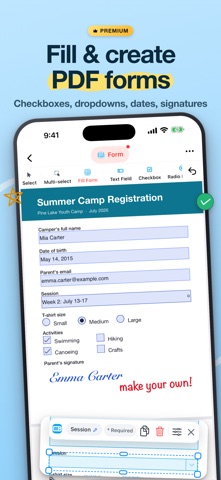
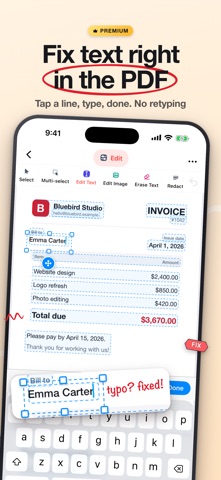
KIWI PDF PREMIUM (auto-renewable subscription) The following features require an active Premium subscription: • Edit Text & Images — rewrite the original text inside a PDF; replace, move or delete embedded images • OCR — recognize text in scanned pages to make them searchable and editable • Measure — distance, perimeter, area and angle, with a custom or calibrated scale • Redact — permanently black out sensitive text and images • Password — set or remove PDF passwords • Remove Metadata — strip hidden document information • Forms — fill interactive PDF forms (text fields, checkboxes, radio buttons, dropdowns, dates) and create your own fillable fields • Charts — insert bar, line and pie charts into a page • Insert Images — place photos and pictures on a page • Voice Notes — record audio comments on a page • File Attachments — attach any file to a PDF • Signature from Image — create a signature from a photo or your library
SUBSCRIPTION INFORMATION • Kiwi PDF Premium is offered as a monthly or a yearly auto-renewable subscription. Prices are shown in the app and may vary by country. • Payment is charged to your Apple Account when you confirm the purchase. • The subscription renews automatically unless auto-renew is turned off at least 24 hours before the end of the current period. Your account is charged for renewal within 24 hours before the end of the current period. • You can manage or cancel your subscription in your Apple Account settings at any time after purchase. • If a free trial is offered, any unused portion of the trial is forfeited when you purchase a subscription. • An account is optional: you can buy and restore Premium without signing in. Sign in with a Kiwi PDF account only if you want to use your Premium on your other devices. You can delete your account in the app at any time.
Terms of Use (EULA): https://kiwipdf.org/term Privacy Policy: https://kiwipdf.org/privacy Support: contact@kiwipdf.org — https://kiwipdf.org/help/en/
Each subscription will automatically renew 3 days before the expiration date for
the same time period. Subscriptions can be cancelled at any time before the renewal.