

KneeDrive
KneeDrive is made and published by Alec Storrie-Lombardi. AppBrain is an independent app data site and isn't affiliated with Alec Storrie-Lombardi. The app name, icon, screenshots and description belong to Alec Storrie-Lombardi and are shown as published on the App Store.
AppBrain's verdict
- Last updated
- May 26, 2026
Rankings
App Store top chartsApp Store Rankings for KneeDrive
Competitors
Similar apps and more from Alec Storrie-LombardiMore from Alec Storrie-Lombardi


Releases
Updates seen on the App Store- Version
- 1.0
- Launched
- May 2026
No changelog data
User feedback
Ratings and reviews on the App StoreComments on KneeDrive for iOS
We don't have enough comments to show example comments. Please check back later.
Technology
Found in the app by AppBrain- Price
- Free
- App size
- 308.7 MB
- Content rating
- Everyone
Technologies used by KneeDrive
About the app and developer
About KneeDrive
KneeDrive is a health & fitness app developed by Alec Storrie-Lombardi.
What is the rating of KneeDrive?
KneeDrive has no ratings yet.
Is KneeDrive free?
KneeDrive is free. The app size is 308.72 MB. The latest version available is 1.0. The last update was on May 26, 2026.
What are the requirements for KneeDrive?
The app has a content rating of Everyone. The app has been available on the App Store since May 2026.
Developer information for Alec Storrie-Lombardi
Address:
Frequently asked questions about KneeDrive
Is KneeDrive free?
Yes. KneeDrive is free on the App Store.
Is KneeDrive still available?
Yes. KneeDrive is on the App Store, and the last update we saw was on May 26, 2026.
How large is KneeDrive?
KneeDrive is 308.72 MB.
Is KneeDrive suitable for children?
App Store rates the content of KneeDrive as suitable for everyone.
Who made KneeDrive?
KneeDrive was developed by Alec Storrie-Lombardi. It is listed in the health & fitness category on the App Store.
Store listing
By Alec Storrie-Lombardi, from the App Store



Description by Alec Storrie-Lombardi Written by the developer, not by AppBrain. Click to read.
Use KneeDrive in two ways:
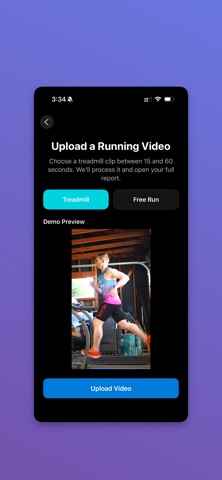
• Recorded: upload a short running clip and get a full report
• Live: capture a quick session and review results immediately
KneeDrive is designed to make form feedback simple and practical. Instead of guessing what your stride looks like, you can review clear metrics and coaching cues after each session.
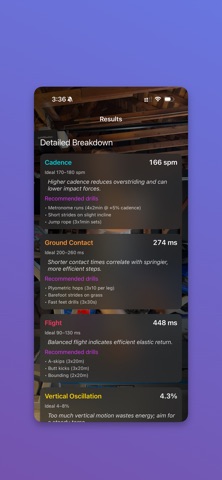
Current analysis includes:
• Cadence
• Ground contact timing
• Flight time
• Vertical oscillation
• Trunk position
• Elbow mechanics
• Form-focused coaching cues
Recorded Mode
Upload a short clip and KneeDrive processes the run into a detailed report. This is ideal when you want to review mechanics carefully and save the session.
Free Run Mode
Analyze side-view running footage with the camera held still while the runner moves across frame. Best for track, road, or outdoor stride reviews.
Treadmill Mode
Analyze side-view treadmill footage for stable, repeatable form checks over time.
Live Mode
Capture a short segment and review fast feedback right away. Great for demos, quick testing, and immediate coaching.
Reports and History
• Review key metrics in one place
• Save sessions you want to keep
• Discard test sessions when you do not need them
• Revisit prior runs in history
Best results
• Use a clear side view
• Keep the full runner in frame
• For Free Run, hold the camera steady in landscape at 1x zoom
• For Treadmill, keep the runner centered with a stable side angle
KneeDrive is built for runners, coaches, and testers who want fast, practical feedback without extra hardware.