

KnitNote: Row Counter & PDF
KnitNote: Row Counter & PDF is made and published by Chen Chung Lung. AppBrain is an independent app data site and isn't affiliated with Chen Chung Lung. The app name, icon, screenshots and description belong to Chen Chung Lung and are shown as published on the App Store.
AppBrain's verdict
- Last updated
- October 6, 2026
Rankings
App Store top chartsApp Store Rankings for KnitNote: Row Counter & PDF
Competitors
Similar apps and more from Chen Chung LungAlternatives to KnitNote: Row Counter & PDF


More from Chen Chung Lung


Releases
Updates seen on the App Store- Version
- 1.8.0
- Launched
- July 2026
No changelog data
User feedback
Ratings and reviews on the App StoreComments on KnitNote: Row Counter & PDF for iOS
We don't have enough comments to show example comments. Please check back later.
Technology
Found in the app by AppBrain- Price
- Free
- App size
- 46.6 MB
- Content rating
- Everyone
Technologies used by KnitNote: Row Counter & PDF
About the app and developer
About KnitNote: Row Counter & PDF
KnitNote: Row Counter & PDF is a lifestyle app developed by Chen Chung Lung.
What is the rating of KnitNote: Row Counter & PDF?
KnitNote: Row Counter & PDF has no ratings yet.
Is KnitNote: Row Counter & PDF free?
KnitNote: Row Counter & PDF is free. The app size is 46.65 MB. The latest version available is 1.8.0. The last update was on October 6, 2026.
What are the requirements for KnitNote: Row Counter & PDF?
The app has a content rating of Everyone. The app has been available on the App Store since July 2026.
Developer information for Chen Chung Lung
Address:
Store listing
By Chen Chung Lung, from the App Store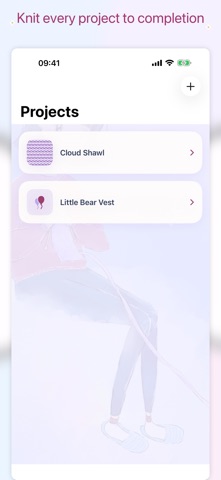

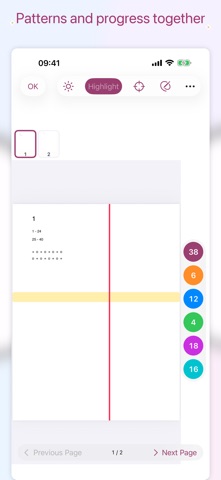

Description by Chen Chung Lung Written by the developer, not by AppBrain. Click to read.
Try every feature free for 7 days
• Browsing does not start the trial
• The trial begins with your first data change, including edits to existing or restored work
• After the trial, your projects, patterns, and backups remain available to read
• One lifetime purchase unlocks editing on iPhone, iPad, Mac, and the paired Apple Watch
Stay focused and count simply
• Give every project six counters with names you can customize
• Tap a counter to add one; touch and hold to subtract, reset, or rename it
• Completing a project locks its counters and journal until you resume it
Let the pattern take center stage
• Import PDF or image patterns for clear reading on iPhone, iPad, and Mac
• Highlight the current row, or combine horizontal and vertical highlights
• Keep page-specific notes, handwritten marks, and independent reading positions
• Use all six synchronized counters beside the pattern
Keep every step of the journey
• Add a shared note for each row
• Build a knitting journal with photos and text
• Manage project photos, tool details, and completion status
Organize yarn and make practical calculations
• Track yarn brand, color, quantity, and photos
• Calculate gauge, evenly spaced increases or decreases, and adjustments across rows
Count from your wrist
• Check projects and all six counters on Apple Watch
• Offline changes sync back to iPhone when the connection returns
Use KnitNote in your language
• Choose English, Traditional Chinese, Simplified Chinese, German, French, Japanese, Norwegian Bokmål, Swedish, Finnish, Danish, Korean, Greek, or Dutch in Settings
• The app and Apple Watch use your choice
• sharing screens follow the language selected in KnitNote Settings
• Your project names, notes, journal entries, and imported patterns stay exactly as you entered them
Export a complete backup and restore from the backup package you select.
No account required. KnitNote 1.8.0 and later is ad-free for everyone. One lifetime purchase unlocks editing. Existing lifetime purchases and eligible legacy paid access remain permanent; purchases can be restored in Settings. Project data stays on your device; external backups are created only when you export them.