

KotatsuTimer is made and published by Yu Akiyama. AppBrain is an independent app data site and isn't affiliated with Yu Akiyama. The app name, icon, screenshots and description belong to Yu Akiyama and are shown as published on the App Store.
AppBrain's verdict
- Last updated
- January 7, 2023
Rankings
App Store top chartsApp Store Rankings for KotatsuTimer
Competitors
Similar apps and more from Yu AkiyamaAlternatives to KotatsuTimer


More from Yu Akiyama


Releases
Updates seen on the App Store- Version
- 1.0
- Launched
- January 2023
No changelog data
User feedback
Ratings and reviews on the App StoreComments on KotatsuTimer for iOS
We don't have enough comments to show example comments. Please check back later.
Technology
Found in the app by AppBrain- Price
- Free
- App size
- 2.82 MB
- Content rating
- High
Technologies used by KotatsuTimer
About the app and developer
About KotatsuTimer
KotatsuTimer is a lifestyle app developed by Yu Akiyama.
What is the rating of KotatsuTimer?
KotatsuTimer has no ratings yet.
Is KotatsuTimer free?
KotatsuTimer is free. The app size is 2.82 MB. The latest version available is 1.0. The last update was on January 7, 2023.
What are the requirements for KotatsuTimer?
The app has a content rating of High Maturity. The app has been available on the App Store since January 2023.
Developer information for Yu Akiyama
Address:
Frequently asked questions about KotatsuTimer
Is KotatsuTimer free?
Yes. KotatsuTimer is free on the App Store.
Is KotatsuTimer still available?
Yes. KotatsuTimer is on the App Store, and the last update we saw was on January 7, 2023.
How large is KotatsuTimer?
KotatsuTimer is 2.82 MB.
Is KotatsuTimer suitable for children?
App Store gives KotatsuTimer a high maturity rating. It is meant for adults.
Who made KotatsuTimer?
KotatsuTimer was developed by Yu Akiyama. It is listed in the lifestyle category on the App Store.
What are the best alternatives to KotatsuTimer?
People looking at KotatsuTimer also look at these lifestyle apps: ビカクホリック, 入間市ごみ分別アプリ, Myアルバム - 可愛い写真整理アルバム.
Store listing
By Yu Akiyama, from the App Store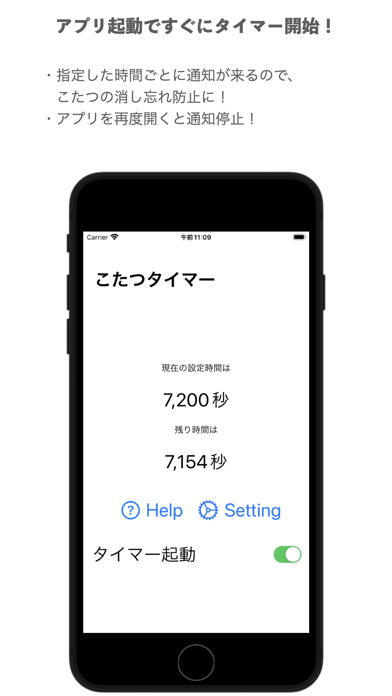


Description by Yu Akiyama Written by the developer, not by AppBrain. Click to read.
タイマーの設定方法
1.Settingをタップし、通知が欲しい時間を選択
(初回起動時又は設定時間変更時)
タイマーの開始
1.アプリを閉じ、バックグラウンドへ移行
※アプリを終了(タスクキル)しないこと
2.「タイマー起動」スイッチをオンにする
又はSetteing画面から戻ることでも開始可能
タイマーの終了
1.アプリを開き、フォアグラウンドへ移行
2.「タイマー起動」スイッチをオフにする
又はアプリの終了(タスクキル)
注意点
1.タイマー終了まで、一定時間ごとに
通知が続きます。
2.メモリ過負荷時はアプリが
終了する場合があります。タイマーの設定方法