

KReader Tool is made and published by 红霞 范. AppBrain is an independent app data site and isn't affiliated with 红霞 范. The app name, icon, screenshots and description belong to 红霞 范 and are shown as published on the App Store.
AppBrain's verdict
- Last updated
- September 2, 2026
Rankings
App Store top chartsApp Store Rankings for KReader Tool
Competitors
Similar apps and more from 红霞 范Alternatives to KReader Tool


Releases
Updates seen on the App Store- Version
- 1.2.1
- Launched
- December 2024
No changelog data
User feedback
Ratings and reviews on the App StoreComments on KReader Tool for iOS
We don't have enough comments to show example comments. Please check back later.
Technology
Found in the app by AppBrain- Price
- Free
- App size
- 16.6 MB
- Content rating
- Low
Technologies used by KReader Tool
About the app and developer
About KReader Tool
KReader Tool is an utilities app developed by 红霞 范.
User Ratings
The app has no ratings yet.
App Information
KReader Tool is freely available from the App Store. The app size is 16.60 MB. The latest version available is 1.2.1. The last update was on September 2, 2026.
Technical Requirements
The app has a content rating of Low Maturity. The app has been available on the App Store since December 2024.
Developer information for 红霞 范
Address:
Frequently asked questions about KReader Tool
Is KReader Tool free?
Yes. KReader Tool is free on the App Store.
Is KReader Tool still available?
Yes. KReader Tool is on the App Store, and the last update we saw was on September 2, 2026.
How large is KReader Tool?
KReader Tool is 16.60 MB.
Is KReader Tool suitable for children?
App Store gives KReader Tool a low maturity rating, so it is meant for older children and up.
Who made KReader Tool?
KReader Tool was developed by 红霞 范. It is listed in the utilities category on the App Store.
What are the best alternatives to KReader Tool?
People looking at KReader Tool also look at these utilities apps: ghostmemo, readme - library manager, v-do Play, BookConvert, 读万卷.
Store listing
By 红霞 范, from the App Store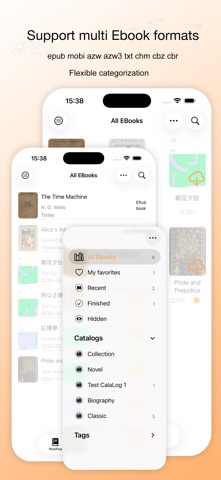


Description by 红霞 范 Written by the developer, not by AppBrain. Click to read.
KReader supports common EBook formats, including: epub, mobi, azw, azw3, txt, chm, cbz, cbr
[Features]
1. Flexible and diverse library classification management. You can customize favorites and color labels, and clearly display the classification information of books in the library icon and list display mode.
2. Clean and simple reading interface. Provide you with an immersive reading experience, so that you can focus on reading without being disturbed by other information and enjoy the reading.
3. Powerful auxiliary functions. A clean and concise reading experience does not mean the lack of functions.
-- You can choose the theme that suits you from a variety of reading topics, and you can also mediate the display brightness to protect your eyes when you read for a long time.
-- You can choose the font that suits your book. Books in different languages will have different font options.
-- You can add bookmarks and notes to books. Notes have many color themes, and you can even share your notes with your friends.
-- You can find keywords in the whole book.
4. Share your reading experience. You can share the daily reading, weekly reading and annual reading books with your friends through social Apps.
5. Perfectly match Apple's ecology. Through iCloud, you can synchronize books, reading progress, reading settings, bookmark notes, reading records and other information on all devices under your account to achieve seamless continuous reading between devices. It provides you with perfect cloud library management functions. (This needs professional version)
6. The reading experience on the big screen is better. Reading on iPad can bring you a more perfect reading experience.
You will find that while providing such rich functions, KReader still maintains the characteristics of small and fast.
KReader does not provide EBooks, but we are committed to providing you with a complete EBook reading tool.